

Detail Guide Helps you code a feature sync WooCommerce Single Information on Google Sheet Using woocommerce's REST API and completely free of charge we'll work together to build a basic version using WooCommerce's REST API to help automate your business part.
General Steps:
- Prepare WooCommerce side:
- Activate REST API.
- Create API Keys Consuer Key Consulmer Secret.
- Make sure your website uses HTTPS.
- Write Google Apps script:
- Create custom menus in Google Sheet.
- Settings for website configuration Info, API Keys.
- Write the function to API WooCommerce.
- Write JSON data processing function returned.
- Writes data to Google Sheet.
- Treat basic errors.
- Deal with page partitions if there are many orders.
Step 1: Ready download automatic row from WooCommerce
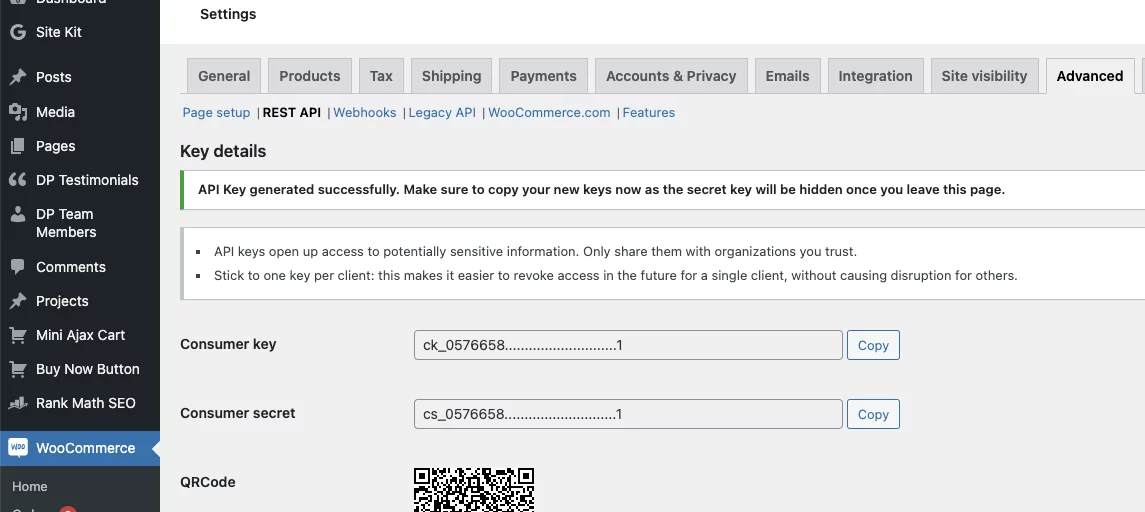
- Activate REST API:
- In WordPressor, Go To WooCommerce gt; Setts gt; refadred gt; REST API.
- Press Add Key.
- Create API Keys:
- Description: Name the key for example: Google Sheet Sync.
- User: Select the administrator or user to access the order.
- Permissions: Select Read Read if you just want to take data. If you want to update the package from Sheet, you need to read/Write. To be safe, let's start with Reading.
- Press Generate API Key.
- Important: Copy it immediately. Consumer Key và consumer setretYeah. They won't show again. Archive them in a safe place.
- HTTPS: Make sure your WordPress website is using HTTPS. WooCommerce REST API requires HTTPS to operate safely.
Step 2: Write Google Apps Script
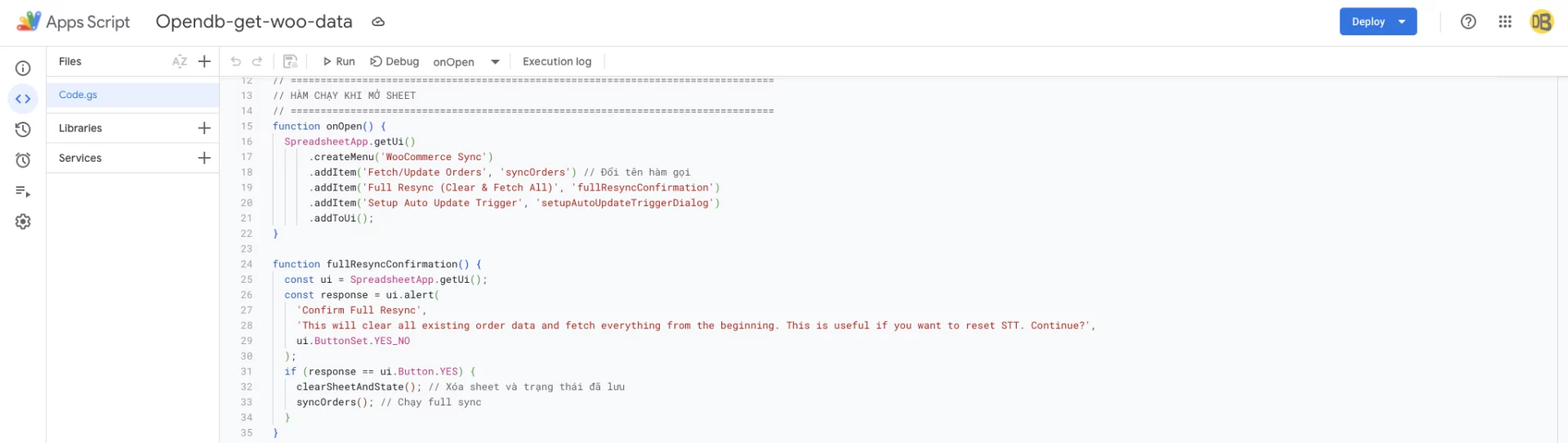
Open your Google Sheet or create a new sheet, then enter Extensions gt; Apps scriptYeah. Delete all default codes and paste the following code in:
Code:
// =================================================================================
// CẤU HÌNH BAN ĐẦU (BẠN CẦN THAY ĐỔI CÁC GIÁ TRỊ NÀY)
// =================================================================================
const WOO_SITE_URL = 'YOUR_WOOCOMMERCE_SITE_URL'; // Ví dụ: 'https://mywoo.com' (KHÔNG có dấu / ở cuối)
const WOO_CONSUMER_KEY = 'YOUR_CONSUMER_KEY';     // Dán Consumer Key của bạn vào đây
const WOO_CONSUMER_SECRET = 'YOUR_CONSUMER_SECRET'; // Dán Consumer Secret của bạn vào đây

const SHEET_NAME = 'WooCommerce Orders';
const ORDERS_PER_PAGE = 20; // Giữ ở mức vừa phải để tránh timeout khi fetch nhiều trang
const LAST_FETCHED_ORDER_DATE_KEY = 'lastFetchedOrderDateGmt'; // Key để lưu trữ trong PropertiesService

// =================================================================================
// HÀM CHẠY KHI MỞ SHEET
// =================================================================================
function onOpen() {
  SpreadsheetApp.getUi()
      .createMenu('WooCommerce Sync')
      .addItem('Fetch/Update Orders', 'syncOrders') // Đổi tên hàm gọi
      .addItem('Full Resync (Clear & Fetch All)', 'fullResyncConfirmation')
      .addItem('Setup Auto Update Trigger', 'setupAutoUpdateTriggerDialog')
      .addToUi();
}

function fullResyncConfirmation() {
  const ui = SpreadsheetApp.getUi();
  const response = ui.alert(
    'Confirm Full Resync',
    'This will clear all existing order data and fetch everything from the beginning. This is useful if you want to reset STT. Continue?',
    ui.ButtonSet.YES_NO
  );
  if (response == ui.Button.YES) {
    clearSheetAndState(); // Xóa sheet và trạng thái đã lưu
    syncOrders(); // Chạy full sync
  }
}

// =================================================================================
// HÀM XÓA DỮ LIỆU VÀ TRẠNG THÁI ĐÃ LƯU
// =================================================================================
function clearSheetAndState() {
  const ui = SpreadsheetApp.getUi();
  const sheet = SpreadsheetApp.getActiveSpreadsheet().getSheetByName(SHEET_NAME);
  if (sheet) {
    sheet.clear(); // Xóa toàn bộ nội dung sheet
    Logger.log(`Sheet "${SHEET_NAME}" cleared.`);
  }
  // Xóa ngày fetch cuối cùng đã lưu để kích hoạt full sync
  PropertiesService.getScriptProperties().deleteProperty(LAST_FETCHED_ORDER_DATE_KEY);
  Logger.log(`Property "${LAST_FETCHED_ORDER_DATE_KEY}" deleted.`);
  ui.alert('Sheet Cleared', 'Order data and last fetch state have been cleared. Next fetch will be a full resync.', ui.ButtonSet.OK);
}


// =================================================================================
// HÀM CHÍNH ĐỂ ĐỒNG BỘ ĐƠN HÀNG (FULL SYNC HOẶC INCREMENTAL)
// =================================================================================
function syncOrders() {
  const ui = SpreadsheetApp.getUi();

  if (!WOO_SITE_URL || WOO_SITE_URL === 'YOUR_WOOCOMMERCE_SITE_URL' || !WOO_CONSUMER_KEY || WOO_CONSUMER_KEY === 'YOUR_CONSUMER_KEY' || !WOO_CONSUMER_SECRET || WOO_CONSUMER_SECRET === 'YOUR_CONSUMER_SECRET') {
    ui.alert('Configuration Error', 'Please ensure WOO_SITE_URL, WOO_CONSUMER_KEY, and WOO_CONSUMER_SECRET are correctly set at the top of the script.', ui.ButtonSet.OK);
    return;
  }

  let sheet = SpreadsheetApp.getActiveSpreadsheet().getSheetByName(SHEET_NAME);
  if (!sheet) {
    sheet = SpreadsheetApp.getActiveSpreadsheet().insertSheet(SHEET_NAME);
    Logger.log(`Sheet "${SHEET_NAME}" created.`);
  }

  const scriptProperties = PropertiesService.getScriptProperties();
  const lastFetchedDateGmt = scriptProperties.getProperty(LAST_FETCHED_ORDER_DATE_KEY);
  let isIncrementalSync = false;
  let apiEndpoint = `/wp-json/wc/v3/orders?per_page=${ORDERS_PER_PAGE}&orderby=date&order=asc`; // Luôn lấy ASC để STT đúng

  if (lastFetchedDateGmt && sheet.getLastRow() > 1) { // Nếu có ngày đã lưu và sheet có dữ liệu (hơn 1 dòng tiêu đề)
    isIncrementalSync = true;
    apiEndpoint += `&after=${lastFetchedDateGmt}`; // Chỉ lấy đơn hàng mới hơn ngày đã lưu
    SpreadsheetApp.getActiveSpreadsheet().toast('Fetching new orders...', 'WooCommerce Sync', -1);
    Logger.log(`Incremental sync. Fetching orders after: ${lastFetchedDateGmt}`);
  } else {
    SpreadsheetApp.getActiveSpreadsheet().toast('Performing full sync of orders...', 'WooCommerce Sync', -1);
    Logger.log('Full sync. Fetching all orders (or sheet was empty/cleared).');
    if (sheet.getLastRow() > 0) { // Nếu là full sync mà sheet có dữ liệu thì xóa đi
        sheet.clear();
    }
  }

  try {
    let allNewOrdersData = [];
    let page = 1;
    let moreOrdersExist = true;
    let latestOrderDateInBatch = null;

    while (moreOrdersExist) {
      const currentApiEndpoint = `${apiEndpoint}&page=${page}`;
      const response = callWooCommerceApi(currentApiEndpoint, 'GET');

      if (response.getResponseCode() === 200) {
        const orders = JSON.parse(response.getContentText());
        if (orders.length > 0) {
          allNewOrdersData.push(...orders);
          // Tìm ngày tạo mới nhất trong batch này (quan trọng cho incremental sync)
          orders.forEach(order => {
            const orderDate = new Date(order.date_created_gmt + 'Z');
            if (!latestOrderDateInBatch || orderDate > latestOrderDateInBatch) {
              latestOrderDateInBatch = orderDate;
            }
          });
          SpreadsheetApp.getActiveSpreadsheet().toast(`Fetched page ${page} (${orders.length} orders)... Total new: ${allNewOrdersData.length}`, 'WooCommerce Sync', 10);
          page++;
          if (orders.length < ORDERS_PER_PAGE) {
            moreOrdersExist = false;
          }
        } else {
          moreOrdersExist = false;
        }
      } else {
        Logger.log(`Error fetching orders (Page ${page}): ${response.getResponseCode()} - ${response.getContentText()}`);
        ui.alert('API Error', `Failed to fetch orders (Page ${page}). Status: ${response.getResponseCode()}. Response: ${response.getContentText().substring(0, 300)}... Check logs for details.`, ui.ButtonSet.OK);
        SpreadsheetApp.getActiveSpreadsheet().toast('Error fetching orders.', 'WooCommerce Sync');
        return;
      }
      Utilities.sleep(500);
    }

    if (allNewOrdersData.length > 0) {
      writeOrdersToSheet(allNewOrdersData, isIncrementalSync, sheet);
      // Cập nhật ngày fetch cuối cùng, sử dụng ISO string để đảm bảo định dạng chuẩn và múi giờ UTC
      // Thêm 1 giây để đảm bảo không lấy trùng đơn hàng ở lần fetch sau nếu có nhiều đơn trong cùng 1 giây.
      if (latestOrderDateInBatch) {
        const nextFetchDate = new Date(latestOrderDateInBatch.getTime() + 1000); // Thêm 1 giây
        scriptProperties.setProperty(LAST_FETCHED_ORDER_DATE_KEY, nextFetchDate.toISOString().slice(0, -5)); // YYYY-MM-DDTHH:MM:SS (bỏ .SSSZ)
        Logger.log(`Updated last fetched date to: ${scriptProperties.getProperty(LAST_FETCHED_ORDER_DATE_KEY)}`);
      }
      SpreadsheetApp.getActiveSpreadsheet().toast(`Successfully processed ${allNewOrdersData.length} orders!`, 'WooCommerce Sync', 10);
    } else {
      SpreadsheetApp.getActiveSpreadsheet().toast(isIncrementalSync ? 'No new orders found.' : 'No orders found for full sync.', 'WooCommerce Sync', 10);
    }

  } catch (e) {
    Logger.log(`Error in syncOrders: ${e.toString()}\n${e.stack}`);
    ui.alert('Script Error', `An error occurred: ${e.message}. Check logs.`, ui.ButtonSet.OK);
    SpreadsheetApp.getActiveSpreadsheet().toast('Script error.', 'WooCommerce Sync');
  }
}

// =================================================================================
// HÀM GỌI WOOCOMMERCE API (Không thay đổi)
// =================================================================================
function callWooCommerceApi(endpoint, method, payload = null) {
  const url = WOO_SITE_URL + endpoint;
  const options = {
    method: method.toLowerCase(),
    headers: {
      'Authorization': 'Basic ' + Utilities.base64Encode(WOO_CONSUMER_KEY + ':' + WOO_CONSUMER_SECRET)
    },
    contentType: 'application/json',
    muteHttpExceptions: true
  };

  if (payload && (method.toUpperCase() === 'POST' || method.toUpperCase() === 'PUT')) {
    options.payload = JSON.stringify(payload);
  }

  Logger.log(`Calling API: ${method} ${url}`);
  const response = UrlFetchApp.fetch(url, options);
  Logger.log(`API Response Code: ${response.getResponseCode()}`);
  return response;
}

// =================================================================================
// HÀM GHI DỮ LIỆU ĐƠN HÀNG LÊN SHEET (Thay đổi nhiều)
// =================================================================================
function writeOrdersToSheet(ordersData, isIncrementalSync, sheet) {
  if (!sheet) {
    Logger.log(`Sheet "${SHEET_NAME}" not found for writing.`);
    SpreadsheetApp.getUi().alert('Error', `Sheet "${SHEET_NAME}" not found. Cannot write data.`);
    return;
  }

  // Định nghĩa các cột (KHÔNG bao gồm STT ở đây, STT sẽ được thêm tự động)
  const columnMappings = {
    'Order ID': order => order.id,
    'Order Number': order => order.number,
    'Status': order => order.status,
    'Date Created': order => order.date_created_gmt ? new Date(order.date_created_gmt + 'Z').toLocaleString() : (order.date_created ? new Date(order.date_created + 'Z').toLocaleString() : ''),
    'Customer ID': order => order.customer_id || 'Guest',
    'Billing Name': order => `${order.billing.first_name || ''} ${order.billing.last_name || ''}`.trim(),
    'Billing Email': order => order.billing.email,
    'Billing Phone': order => order.billing.phone,
    'Shipping Name': order => `${order.shipping.first_name || ''} ${order.shipping.last_name || ''}`.trim(),
    'Payment Method': order => order.payment_method_title,
    'Total Amount': order => parseFloat(order.total) || 0,
    'Currency': order => order.currency,
    'Product Names': order => order.line_items.map(item => `${item.name} (Qty: ${item.quantity})`).join('\n'),
    'Total Items': order => order.line_items.reduce((sum, item) => sum + item.quantity, 0)
  };
  const dataHeaders = Object.keys(columnMappings); // Tiêu đề dữ liệu
  const fullHeaders = ["STT", ...dataHeaders];     // Tiêu đề đầy đủ cho sheet (bao gồm STT)

  const dataToWrite = [];
  let startRow;
  let currentStt = 0;

  if (isIncrementalSync) {
    const lastSheetRow = sheet.getLastRow();
    if (lastSheetRow < 1) { // Sheet trống hoàn toàn, không thể là incremental
        isIncrementalSync = false; // Chuyển sang full sync
        Logger.log("Sheet was empty, forcing full sync mode for writing.");
    } else {
        const lastSttValue = sheet.getRange(lastSheetRow, 1).getValue(); // Giả sử STT ở cột 1
        currentStt = (typeof lastSttValue === 'number' && lastSttValue > 0) ? lastSttValue : 0;
        startRow = lastSheetRow + 1;
        Logger.log(`Incremental write. Starting STT from ${currentStt + 1}. Start row: ${startRow}`);
    }
  }

  if (!isIncrementalSync) { // Full sync hoặc sheet trống/mới
    if (sheet.getLastRow() > 0) sheet.clearContents(); // Xóa nội dung cũ nếu có, không xóa sheet object
    sheet.getRange(1, 1, 1, fullHeaders.length).setValues([fullHeaders]); // Ghi tiêu đề đầy đủ
    sheet.getRange("A1").setFontWeight("bold"); // In đậm STT
    sheet.getRange(1, 1, 1, fullHeaders.length).setFontWeight("bold"); // In đậm cả dòng tiêu đề
    currentStt = 0;
    startRow = 2; // Dữ liệu bắt đầu từ dòng 2
    Logger.log("Full write. Headers written. Starting STT from 1. Start row: 2");
  }


  ordersData.forEach(order => {
    currentStt++;
    const rowDataValues = dataHeaders.map(header => {
      try {
        return columnMappings[header](order);
      } catch (e) {
        Logger.log(`Error processing field "${header}" for order ID ${order.id}: ${e.message}`);
        return `Error processing field`;
      }
    });
    dataToWrite.push([currentStt, ...rowDataValues]); // Thêm STT vào đầu mỗi hàng dữ liệu
  });

  if (dataToWrite.length > 0) {
    sheet.getRange(startRow, 1, dataToWrite.length, fullHeaders.length).setValues(dataToWrite);
    // Áp dụng định dạng và tự động điều chỉnh độ rộng cột
    try {
      fullHeaders.forEach((header, index) => {
        sheet.autoResizeColumn(index + 1);
      });
      const currencyColumnIndex = fullHeaders.indexOf('Total Amount') + 1;
      if (currencyColumnIndex > 0) {
        sheet.getRange(startRow, currencyColumnIndex, dataToWrite.length, 1).setNumberFormat('#,##0.00');
      }
      const dateColumnIndex = fullHeaders.indexOf('Date Created') + 1;
      if (dateColumnIndex > 0) {
        sheet.getRange(startRow, dateColumnIndex, dataToWrite.length, 1).setNumberFormat('yyyy-mm-dd hh:mm:ss');
      }
    } catch (e) {
      Logger.log("Error during formatting/resizing columns: " + e);
    }
  } else {
    Logger.log("No new data rows to write.");
  }
}

// =================================================================================
// HÀM ĐỂ THIẾT LẬP TRIGGER TỰ ĐỘNG CẬP NHẬT
// =================================================================================
function triggerAutoSync() {
  Logger.log("Auto-sync trigger fired.");
  syncOrders();
}

function setupAutoUpdateTriggerDialog() {
  const ui = SpreadsheetApp.getUi();
  const result = ui.prompt(
      'Setup Auto Update',
      'Enter update frequency in minutes (e.g., 15, 30, 60). Minimum 15 minutes recommended for frequent updates, or higher for less frequent.',
      ui.ButtonSet.OK_CANCEL);

  if (result.getSelectedButton() == ui.Button.OK) {
    const minutes = parseInt(result.getResponseText());
    if (isNaN(minutes) || minutes < 1) {
      ui.alert('Invalid Input', 'Please enter a valid number of minutes (e.g., 15 or more).', ui.ButtonSet.OK);
      return;
    }

    // Xóa các trigger cũ có tên hàm là 'triggerAutoSync' để tránh trùng lặp
    const existingTriggers = ScriptApp.getProjectTriggers();
    for (let i = 0; i < existingTriggers.length; i++) {
      if (existingTriggers[i].getHandlerFunction() === 'triggerAutoSync') {
        ScriptApp.deleteTrigger(existingTriggers[i]);
        Logger.log(`Deleted existing trigger ID: ${existingTriggers[i].getUniqueId()}`);
      }
    }

    // Tạo trigger mới
    ScriptApp.newTrigger('triggerAutoSync')
        .timeBased()
        .everyMinutes(minutes)
        .create();
    ui.alert('Trigger Created', `Automatic order sync scheduled to run every ${minutes} minutes. You can manage triggers via "Edit > Current project's triggers".`, ui.ButtonSet.OK);
    Logger.log(`New trigger created to run "triggerAutoSync" every ${minutes} minutes.`);
  }
}
Step 3: Use of Script
- Script Configuration:
- Re-open Apps Script Extensions gt; Apps Script.
- At the top of the code file, change the following values:
YOUR_WOOCOMMERCE_SITE_URL: By your WordPress website example:https://shopcuaban.com). NO marked/At the end.YOUR_CONSUMER_KEY: With Consumer Key You created at Step 1.YOUR_CONSUMER_SECRET: Consumer Secrets You Made at Step 1.
- You Can Change
SHEET_NAMEIf you want to name another sheet. - You Can Adjust
ORDERS_PER_PAGEThe number of singles obtained each time the API, the maximum is 100, but the smaller value as 2050 can be more stable for weak servers.
- Save Script: Click on the Soft Disk Icon.
- First level run:
- Go back to your Google Sheet.
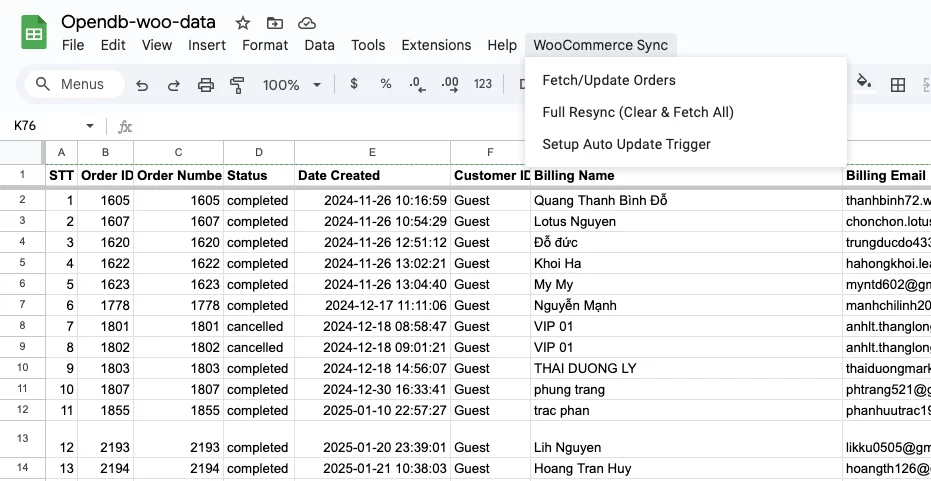
- You may need Reload Google Sheet page for WooCommerce Sync appearances.
- Click on WooCommerce Syncgt; FAR Orders.
- For the first time, Google will ask you to license the script.
- Press Continue.
- Select your Google account.
- Bạn có thể thấy cảnh báo Google hasn’t verified this app. Nhấn vào Advanced Nâng cao rồi chọn Go to [Tên dự án của bạn] unsafe Đi tới [Tên dự án của bạn] không an toàn.
- Xem lại các quyền và nhấn Allow Cho phép. Script cần quyền để kết nối với dịch vụ bên ngoài website của bạn và chỉnh sửa Google Sheet.
- Lần Chạy Đầu Tiên hoặc sau khi muốn reset:
- Cập nhật Đơn Hàng Mới Thủ công:
- Select WooCommerce Sync gt; Fetch/Update Orders. Script sẽ chỉ lấy các đơn hàng mới kể từ lần fetch thành công cuối cùng và nối vào cuối bảng với STT tiếp tục.
Bước 4. Thiết lập tự động cập nhật
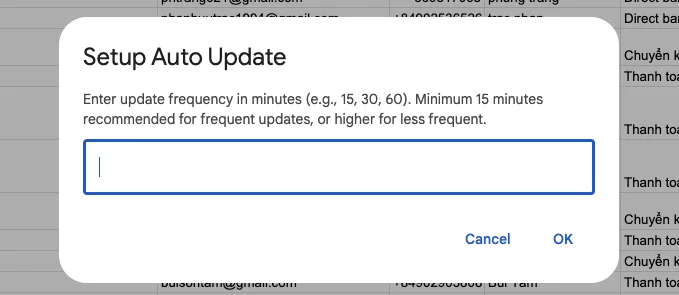
- Select WooCommerce Sync gt; Setup Auto Update Trigger.
- Nhập số phút bạn muốn script tự động chạy ví dụ:
15,30,60). - Nhấn OK. Một trigger sẽ được tạo.
- Bạn có thể quản lý các trigger này bằng cách vào trình soạn thảo Apps Script, chọn biểu tượng đồng hồ Triggers ở thanh bên trái.
Sau khi triển khai các bước trên, bạn đã tự code được tính năng lấy đơn hàng tự động từ website wordpress sử dụng woocommerce về google sheet. Các đơn hàng sẽ tự động tải mới về danh sách sau 1 giờ 6 giờ hay 1 ngày tuỳ theo thiết lập của bạn ở bước 4.
Cảm ơn bạn đã đọc bài viết từ Opendb.vn Đăng ký để nhận tin bài viết mới giúp tự động hoá công việc hiệu quả nhé!

