
In the Era DataPression The marketing is based on data, the control of the Facebook Ads index over real time is a key factor that determines the performance of the campaign. In fact, many Marketer are still wasting resources on the process. Facebook Ads data download manual, cross-reference and clean up information every day. This takes not only the time of the operation but also the risk of error, reducing accuracy in analysis and optimum.
This article will systemise 3 Facebook Ads data download method, from hand-to-hand operation on Ads Manager to Automation Solution with DB Connector, help you build the report system Exactly..
1. Manual data from Ads Manager
This is the most traditional and popular method, which is appropriate when you need to fast-view data or make a hot report for the boss/subscription immediately.
Performance Steps:
Step 1: Truy cập vào Ads Manager Advertising Manager.
Step 2: Select the duration of the report. Example: Today, the past seven days, this month... in the upper right corner.
Step 3 Important: Customise index column.
- Click on the button Column Columns Select Customise Customize Columns column.
- Select the indicators you care about CPM, CPC, CTR, ROAS, Buyers...
Step 4: Select Download Objects.
- Selecting on the Campaagns Operations, the Advertising Group or the specific commercial.
- Leave it empty if you want to load the whole data.
Step 5: Click on the button Reports the arrow down or the databoard to the right of the toolbar.
Step 6: Select Export table data.
Step 7: Select File Format:
- .xlsx Excelsior: If you need a nice format to send a report right away.
- .csv: If you need a lightweight file to enter the material into another software.
Step 8: Press Export to download the machine.
Advantage
- Free, available in Ads Manager
- Fit for fast report, single data
- Do not install plugin tools
Disabilities
- Each day must be downloaded from the beginning
- Cannot connect to multiple account to load iTunes
- Distinguished data, easily misdirected when transplanting files
- Not suitable for Dashboard or business report
👉 Truy cập vào Ads Manager Advertising Manager To begin.
2. Download data using the Facebook Ads Reporting Tool Advertising
If you need a deeper analysis of examples: effective comparisons of age, gender, domains that do not want to use Excel, tools Ads Reporting Well, Facebook is a good choice.
Step 1: At the Advertising Manager interface, click on icons All Tools Three dashes on the left bar.
Step 2: Drag down the Analysis and Report, Select Ads Reporting Ads report.
Step 3: Blue button + Create Create Report.
Step 4: Select the ad account you want to retrieve data, then press Tạo Create.
Step 5: Tại giao diện chỉnh sửa báo cáo bên phải màn hình là thanh điều khiển:
- Phân tích Breakdowns: Kéo thả các yếu tố như Tên chiến dịch, Ngày, Tuổi, Giới tính, Vùng miền vào báo cáo.
- Số liệu Metrics: Kéo thả các chỉ số như Số tiền đã chi tiêu, Kết quả, CPC, CTR vào báo cáo.
Step 6: Chọn khoảng thời gian ở góc trên bên phải.
Step 7: Sau khi bảng dữ liệu hiện ra như ý muốn, nhấn vào nút Export biểu tượng tải xuống ở thanh trên cùng bên phải.
Step 8: Đặt tên cho file và chọn định dạng .xlsx, .csv hoặc hình ảnh để tải về.
Advantage
- Phân tích sâu, trực quan hơn Ads Manager
- Tùy chỉnh nhiều bảng dữ liệu phức tạp
- Phù hợp cho marketer muốn so sánh các phân khúc khách hàng
Disabilities
- Vẫn là tải thủ công → không tự động cập nhật
- Báo cáo không chạy realtime
- Không gom dữ liệu từ nhiều tài khoản
- Không đồng bộ vào dashboard Looker Studio / Sheets
3. Tải dữ liệu Facebook Ads tự động bằng DB Connector Giải pháp tối ưu
DB Connector là một nền tảng ETL giúp tự động lấy dữ liệu từ Facebook Ads và đồng bộ vào các nơi lưu trữ như Google Sheets, BigQuery, Excel, Looker Studio hoặc database của doanh nghiệp. Không cần code, không cần developer và không lo token hết hạn.
Quy trình gồm 3 bước đơn giản
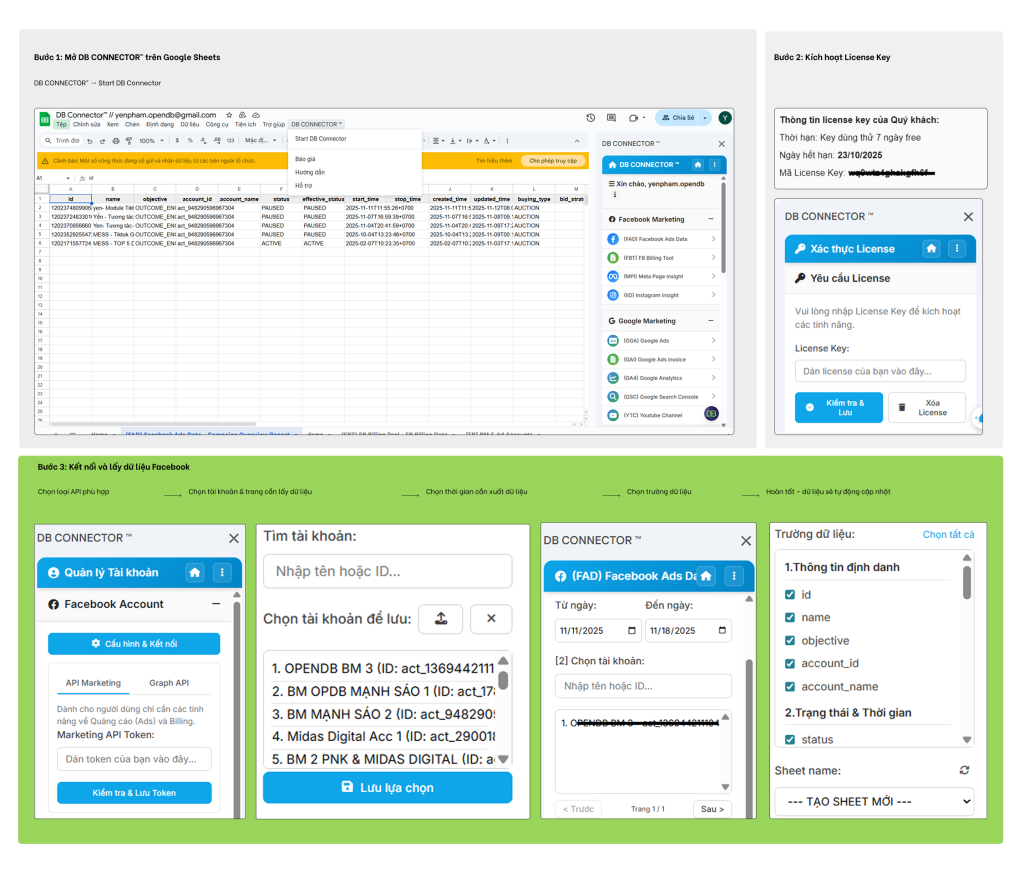
3 bước tải dữ liệu từ DB CONNECTOR™ bản dễ hiểu
Bước 1: Mở DB CONNECTOR™ trên Google Sheets
- Mở Google Sheets
- Select DB CONNECTOR™ → Start DB Connector
- Công cụ sẽ xuất hiện ở thanh sidebar bên phải màn hình
Bước 2: Kích hoạt License Key
- Paste License Key mà bạn đã được cấp vào ô tương ứng
- Press Kiểm tra Lưu
- Nếu License hợp lệ → hệ thống tự động chuyển bạn sang giao diện chính
Bước 3: Kết nối và lấy dữ liệu Facebook
3.1 Chọn loại API phù hợp
- API Marketing Dễ nhanh: Phù hợp cho nhu cầu lấy Ads + Billing
→ Bạn chỉ cần dán Marketing API Token, lưu lại là xong - Advanced API: Dành cho người cần đầy đủ dữ liệu: Ads, Billing, Pages, Instagram,…
→ Nhập App ID, App Secret và Token ngắn hạn
3.2 Chọn tài khoản trang cần lấy dữ liệu
- Sau khi kết nối thành công, bạn sẽ thấy các mục: Ad Accounts, Pages, Instagram Accounts
- Press Cập nhật danh sách
- Chọn tài khoản/trang bạn muốn dùng
- Bấm Lưu lựa chọn
3.3 Hoàn tất dữ liệu sẽ tự động cập nhật
- Tất cả dữ liệu được cập nhật tự động vào Google Sheets
- Bạn có thể đặt ** lịch giờ lấy dữ liệu**
- Không cần tải thủ công, không mất thời gian, không sợ thiếu dữ liệu
Advantage
- Hoàn toàn tự động không tốn thời gian tải thủ công
- Đồng bộ nhiều tài khoản quảng cáo cùng lúc
- Không cần code
- Phục vụ trực tiếp cho các phần mềm trực quan hóa dữ liệu như Looker Studio,…
- Chính xác gần như tuyệt đối không ghép file thủ công
Disabilities
- Mất phí nhưng rẻ hơn nhiều so với nhân sự xử lý dữ liệu thủ công
- Cần vài phút để làm quen với giao diện ban đầu
👉 Truy cập ngay để đăng ký trải nghiệm DB Connector miễn phí
TỔNG KẾT:
Việc lựa chọn phương thức Facebook Ads data download không chỉ dừng lại ở thao tác kỹ thuật, mà là bài toán về tối ưu hóa vận hành. Trong khi Ads Manager và Ads Reporting Solve the need for immediate report Adhoc, then DB Connector It's the essential infrastructure solution for business to move towards comprehensive automation.
Transfers from process Facebook Ads data download The craft to sync the data in real time is the key to helping Marketer remove the wrong number, free the resources and focus absolutely on strategic thinking to break sales.

