

I. INDUDUCITON
About DB Connector

Double click for video
What is DB Connector?
DB Connector is a tool in supporting users to connect data from Punjabis platforms, advertising, social networks, CRM and electronic trade to Google Sheets. Users working on Google Sheets files were supplied by the unit and used sidebar DB Connector to log in the source account, select the report, select the data field and download the results into the calculation.
Development Goals
· Giảm thao tác xuất và nhập dữ liệu thủ công từ nhiều nền tảng.
· Chuẩn hóa quy trình lấy dữ liệu về Google Sheets.
· Hỗ trợ người dùng tạo báo cáo định kỳ từ các template có sẵn.
· Giúp dữ liệu sẵn sàng cho tổng hợp, phân tích và xây dựng dashboard.
Objects
· Nhân sự Digital Marketing và Performance Marketing.
· Agency quản lý nhiều tài khoản quảng cáo.
· Nhân sự E-commerce, CRM và vận hành bán hàng.
· Data Analyst, Marketing Analyst và người lập báo cáo trên Google Sheets.
Values Bring
· Tiết kiệm thời gian lấy dữ liệu.
· Hạn chế sai sót do sao chép thủ công.
· Hỗ trợ lựa chọn trường dữ liệu theo mục tiêu báo cáo.
· Cho phép đặt lịch tải lại dữ liệu đối với các báo cáo được hỗ trợ.
System Architecture
In the user view, DB Connector operates in simple models: the user's foundation account is connected to DB Connector; the configuration user requires data download; DB Connector takes data from the corresponding source and records the results to Google Sheets.
Processing
Step 1. Opening Google Sheets file has been shared.
Step 2. Launch DB Connector from Google Sheets.
Step 3. Log on DB Connector and check License.
Step 4. Select connector to use.
Step 5. Connect or select a connected foundation account.
Step 6. Select the time, data accounts, tether and data fields.
Step 7. Select Sheet Gets Data.
Step 8. Press data and check results.
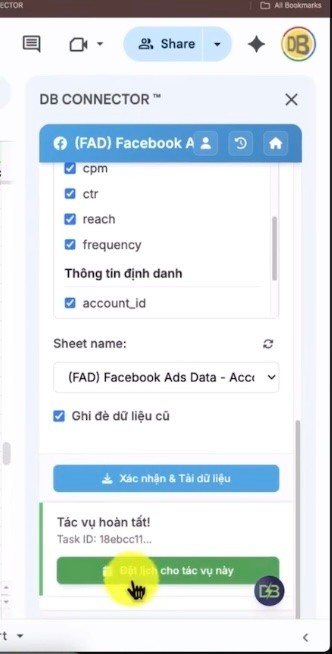
Step 9. Set an automatic schedule if necessary and if connector supports.
Supported Foundations
Group | Connector |
|---|---|
FacebookPDF | FAD Facebook Ads Data; FBT FB Billing Tool; MPI Meta Page Insight; IID Instagram Insight |
GooglePDF | GGA Google Ads; GA4 Google Analytics; GSC Google Search Cartel; YTC YouTube Channel |
TikTokPoint | BCABC Accunt; TTA TikTok Ads; GMV TikTok GMV Ads; TTO TikTok Organic; TTS TikTok Shop Stell |
CRM Ecommerce | GFL Getfly; POSROK; PAN Pancake Chat; PAC Pancake CRM; ETSY Eyyy Reporter; AMZ Amazon Steller Data; SPE Shopee Order Data |
The core concepts
1. Accunt Account
In DB Connector, it is necessary to distinguish the account used to use the system with the base account connected to retrieve data.
Organisation | Description |
|---|---|
DB Connector Accubot | The account used to access and use DB Connector on Google Sheets is shared. |
Background Account | Facebook, Google, TikTok or other service accounts are accessed and authorized by users. |
Account/ Data Objects | The specific object was selected to download the report, for example Facebook Ads Accunt, Fanpage, GA4 Property, YouTube Channel or Shop. |
2. Data Source Connector
Data Source is the basis for data supply. Connector is the component in the DB Connector designed to connect and download a specific data group from that Data Sourer. A platform may have multiple contortions serving different types of data.
3. API Connection OAuth/Token
For users, the API connection is implemented through the login and access operation on the source platform. After a successful proxy, DB Connector can display accounts or data objects which users are allowed to access. When access is expired or revoked, the user needs to reconnect the account.
Lưu ý: Users do not need to manually enter the Access Token or Reverred Token in the regular usage stream, unless the interface of a specific contort requires it. |
|---|
Four. Tryton
Tetts are the pre-configured report template by a data level or an analysis target. Tetts decides the data field group and report structure is downloaded to Google Sheets.
· Tên và mục đích báo cáo.
· Cấp dữ liệu, ví dụ Account, Campaign, Ad Set hoặc Ad.
· Nhóm trường định danh, trạng thái, thời gian, hiệu suất và chuyển đổi.
· Các breakdown đặc thù như tuổi, giới tính, nền tảng, khu vực hoặc giờ.
Five. License Key Package Service
License Key determines the rights to use DB Connector and the user's feature range. Package status can be displayed on sidebar, for example Free Trial or License state active.
· Kiểm tra đúng tài khoản DB Connector.
· Kiểm tra trạng thái Free Trial hoặc License.
· Kích hoạt hoặc gia hạn theo hướng dẫn của đơn vị cung cấp.
· Một số connector, template hoặc tính năng có thể phụ thuộc vào gói dịch vụ.
Six. Data Download Process
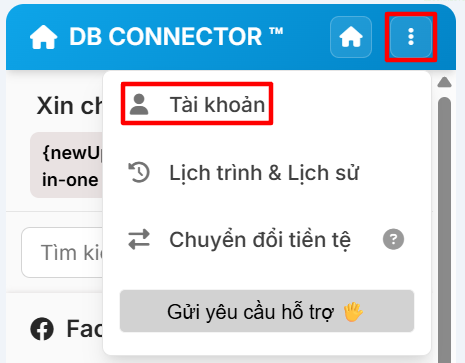
Step 1. Connect background account.
Step 2. Select the amount of time to download.
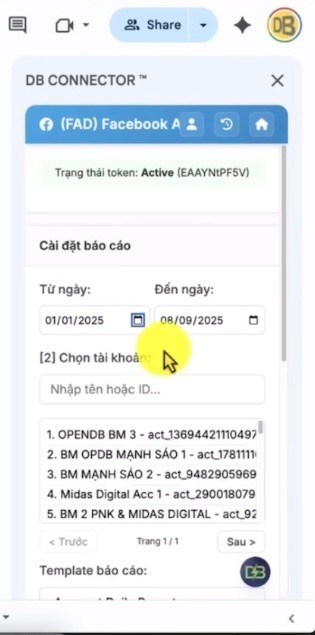
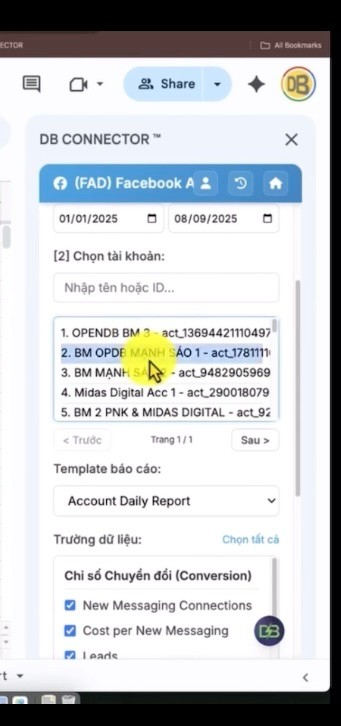
Step 3. Select an account or data object to load.
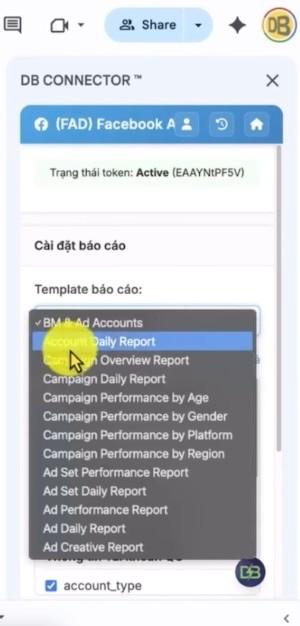
Step 4. Select the report.
Step 5. Select data fields to put into report.
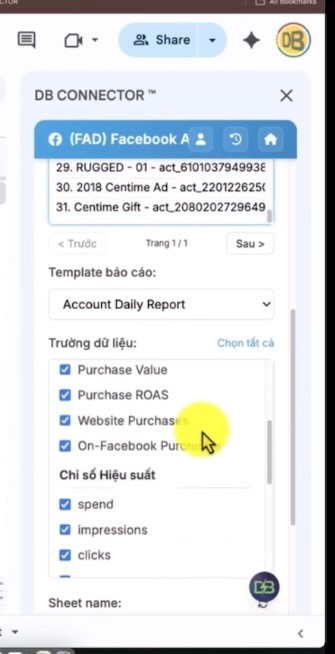
Step 6. Select Sheet to receive data or create new Sheet.
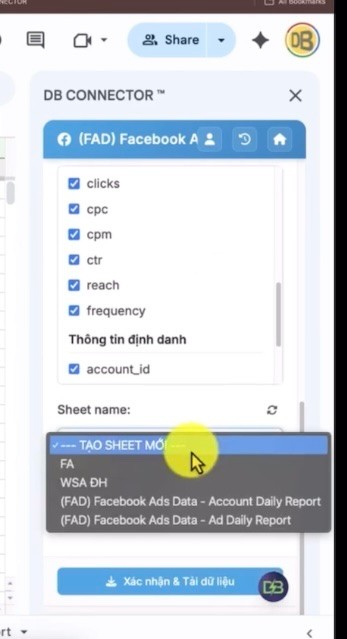
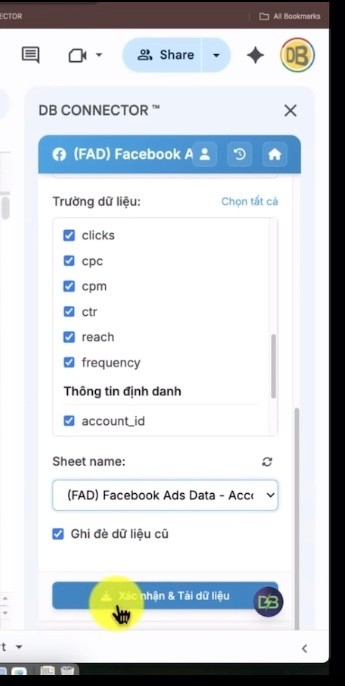
Step 7. Press the data button.
Step 8. Set the data download schedule after the report is created, if necessary.
II. MODIALE CONNECTOR
FacebookPDF
1. FAD Facebook Ads Data
1.1 Introduction
Facebook Ads Data allows users to download ad data from Facebook Ads accounts which the connected Facebook account has access to. Connector supports many terrier levels in Campaign, Ad Set, Ad and breakdown reports or day reporting.
Contents | Description |
|---|---|
Main Function | Download Facebook Ads data to Google Sheets according to tether and the selected data field. |
Range | General report, performance, by day, breakdown demographics, platforms, areas, hours and creatives. |
Qualifications | Access to Facebook Ads Accunitt; DB Connector and License in the available state; Google Sheets file has the right to edit. |
Organisation | The schedule can be set after the configuration and download of the report, according to the system schedule. |
1.2 Login & Responsibility
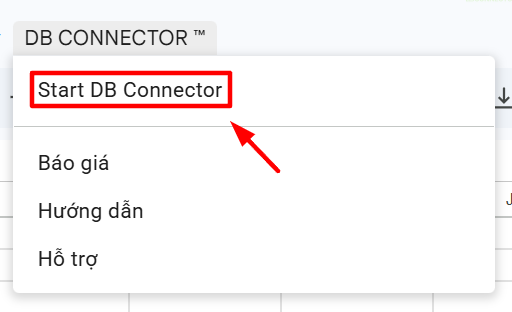
Step 1. Opening Google Sheets has been shared and launch BB Connector.
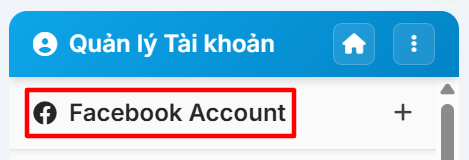
Step 2. At the DB Connector homepage, open account management and select Facebook Ads Data.
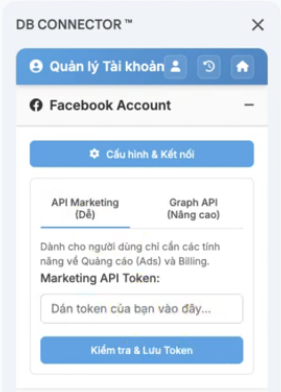
Step 3. Facebook login on proxy window is shown.
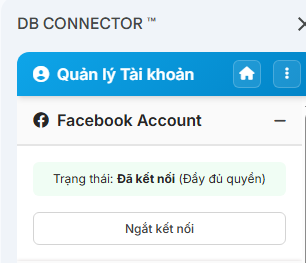
Step 4. Go back to sidebar and check out the appearing Facebook account.
Step 5. Select Facebook account to download Facebook List Ads Accunt allowed access.
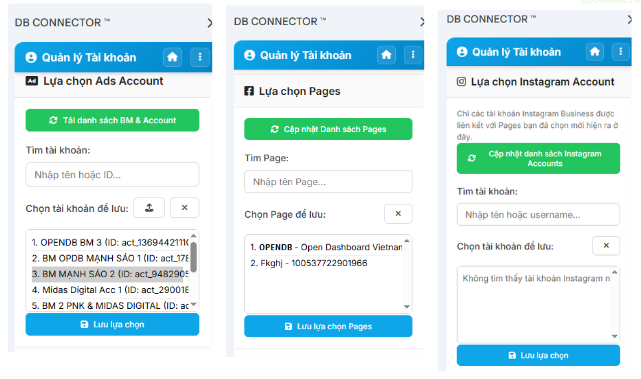
1.3 Guide data download steps similar to the data load part
Step 1.Yeah. Select the duration of the start and end date for the data to load. The time zone of the ad account should be checked when comparing the data by date.
Step 2Yeah. Select the Facebook Chooses Ads Accunt to retrieve data. Check both the name and ID to avoid the wrong account with the same name.
Step 3Yeah. Select the Tetms list to open the report and choose the template that matches the data level or the analysis target.
Step 4Yeah. Select the data field which marks the fields to put in the report. You can use Select All to get the entire school supported in tether; however the report will be wide and the processing time can be increased.
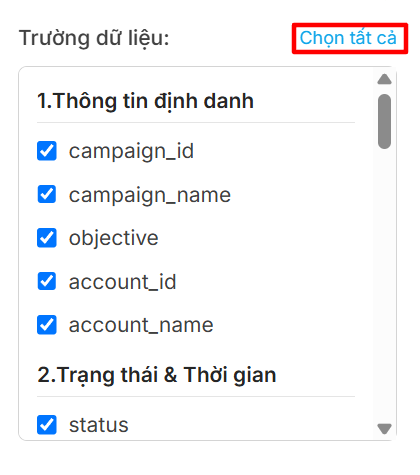
Step 5Yeah. Select the current Sheet or create new Sheet as the location to receive data. Make sure the data area does not contain content to hold.
Step 6Yeah. Confirm and download data Check the time, account, twitter and data field; then press the data download button.
Step 7Yeah. Check the column title results, date range, account, line number and main index results after the data is recorded to Google Sheets
Suggests: During the first run, select an account and short interval to check the report structure before loading large data ranges. |
|---|
1.4 Tryton List
Name | Field Group | Description/ Purpose |
|---|---|---|
Campaign Overview Report | 1. Name Info 2.TMarch 3.1 MHz Prices 4. Performance Index 5.0.0.0 data download time 6. Convert performance index | Monitor the operation's main performance and information |
Campaign Performance byAGE GENDER | 1. Operation Information 2.850 type Breakdown 3. Converting Performance Index 4.0.5 Data Download Time | Compatible demographics |
Campaign Performance by Age | 1. Operation Information 2.850 type Breakdown 3. Converting Performance Index 4.0.5 Data Download Time | Effective Analysis by age |
Campaign Performance by Gender | 1. Operation Information 2.850 type Breakdown 3. Converting Performance Index 4.0.5 Data Download Time | Gender Effective Analysis |
Campaign Performance by Platform | 1. Organisation 2.850 type Breakdown 3, Time 4. Performance Index 5. conversion Switch Index | Effective Comparison of Foundations |
Campaign Performance by Region | 1. Operation Information 2.850 type Breakdown 3. Performance Index 4. Conversion Switch Index 5, About Time to Retrieve Data | Geological Effective Analysis |
Campaign Performance by Hour Audience Time | 1. Organisation 2.850 type Breakdown 3. Performance Index 4. Convert Index | Analysis of active time frames |
Ad Set Performance Report | 1. Name Info 2.TMarch status 3. Configure 4. Performance Index 5. Engagement Interactive Index 6. Conversion Switch Index Seven, three, three, three, six, six, six, six, six, six, six, six, four, six, six, six, six, six, six, six, six, six, six, six, six, six, six, six, six, six, six, six, six, six, six, six, six, six, six, six, six, six, six, six, six, six, six, six, six, six, six, six, six, six, six, six, six, six, six, six, six, six, six, six, six, six, six, six, six, six, six, six, six, six, six, six, six, six, six, six, six, six, six, six, six, six, six, six, six, six, six, six, six, six, six, six, six, six, six, six, six, six, six, six, six, six, six, six, six, six, six, six, six, six, six, six, six, six, six, six, six, six, six, six, six, took, took, six, | Effective Tracking Each Advertising Group |
Ad Performance Report | 1. Other Organiser 2. Diagnostic Status Three. Performance Index Four. Conversion Switch Index Five. Data Time | Effective Monitor of Advertising |
Accunt Daily Report | 1. Name Info 2. Performance Index 3. Conversion Switch Index | Monitor for account-wide trends |
Campaign Daily Report | 1. Name Info 2. Performance Index 3. Conversion Switch Index | Monitor campaign trends |
Ad Set Daily Report | 1. Name Info 2.TMarch 3. Configure 4. Performance Index 5. Engagement Interactive Index 6. Conversion Switch Index 7.Video Views Detail | Monitor for Advertising Group trends |
Ad Set Daily + Targeting Report | 1. Information Group QC 2.Targeting demographics 3, Targeting Geography 4.Tagging Object Interests Five. Placements 6. Advantage+ Automation 7. Performance Index 8.140 Engagement Works Nine. Video 10, 336 for Conversion Eleven. | Collate performance with targing configuration |
Ad Set Performance by Platform | 1. Organisation 2.850 type Breakdown 3, Time 4. Performance Index 5. Interactive Index 6. Convert Index | Compare performance on the platform |
Ad Daily Report | 1. Name Info 2.TMarch 3. Performance Index 4. Convert Index 5.Video Views Detail | Monitor the trends of each ad |
Adreve Report | 1. Name Info Two.Termic 3. Creation Information 4. Performance Index 5. conversion Switch Index Six, three, three, three, three, six, six, six, six, six, six, six, six, six, six, six, six, six, six, six, six, six, six, six, six, six, six, six, six, six, six, six, six, six, six, six, six, six, six, six, six, six, six, six, three, six, six, six, six, six, six, six, six, six, six, six, six, six, six, six, six, six, six, six, six, six, six, six, six, six, six, six, six, six, six, six, six, six, six, six, six, six, six, six, six, six, six, six, six, six, six, six, six, six, six, six, six, six, six, six, six, six, six, six, six, six, six, six, six, six, six, six, six, six, six, six, six, six, six, six, six, six, six, six, six, took, six, six, | Analyse information creative |
Adreve Daily Report | 1. Name Info Two.Termic 3. Creation Information 4. Performance Index 5. Interactive Index 6. Convert Index 7.Video Views Detail | Monitor performance as time passes |
AGE GENDER DET ED REGUE | 1. Account Time 2. Advertising Information Three. Creation Information Four. Performance Cost Five. Messaging Interactive Six. Landing Page Video | Deeply specialized demographics |
LOCATION DET ED REGUE | 1. Account Time 2. Organisation Three. Creation Information Four. Performance Cost Five. Messaging Interactive Six. Landing Page Video | Data Analysis by Location |
BM Ad Accounts | 1, Business Manager Information 2. Information on QC Accounts | Look up allowed account structures |
1.5 List of Fields Data Fields
Field Group | Field Name | Data Type | Meaning |
|---|---|---|---|
Other Organiser | campaign_id | String/ID | Operation Names Code |
Other Organiser | campaign_name | Text | Operation Name |
Other Organiser | objective | Text | Target of Operations |
Other Organiser | Other Organiser | String/ID | Advertising account code |
Other Organiser | account_name | Text | Organisation |
Trạng thái Thời gian | status | Text | Operation Status |
Trạng thái Thời gian | effective status | Text | Status of effective. |
Trạng thái Thời gian | Start time | Organisation | Other Organiser |
Trạng thái Thời gian | Stop time | Organisation | Date or time of note stop. |
Trạng thái Thời gian | Ceated time | Organisation | Date or time of data recording. |
Trạng thái Thời gian | Update time | Organisation | Date or time for data updates. |
Set the table | buying_type | Text | Advertising form |
Set the table | bid_strategy | Text | Price strategy |
Performance Index | spend | Money | Total spending of advertising in time range |
Performance Index | impressions | integer | The number of turnshow ads |
Performance Index | reach | integer | The only number of people approached. |
Performance Index | clicks | integer | The total number of clicks recorded |
Performance Index | cpc | Money | Average cost per click |
Performance Index | cpm | Money | Average cost of over 1,000 turn displays |
Performance Index | ctr | Rate | Click ratio on display number |
Data Download Time | date start | Date | Date of the data range |
Data Download Time | date stop | Date | The End of Data Range |
Convert performance index | New Messaging Connections | integer | Number of newly recorded text messages |
Convert performance index | Cost per New Messaging | Money | Cost per new message connection |
Convert performance index | New Messaging Connections N | integer | New messaging Index in the way to name N on the system |
Convert performance index | Cost per New Messaging N | Money | The cost on each new message connection in the name of N |
Convert performance index | Leads | integer | The number of potential customers is noted |
Convert performance index | Cost Leads | Money | Cost per Lead |
Convert performance index | Purchases | integer | The number of purchases recorded |
Convert performance index | Cost Purchases | Money | Cost per purchase turn |
Convert performance index | Purchase Value | Money | The value of purchase is noted |
Convert performance index | Purchase ROAS | Number of decimals | The sales rate on advertising spending |
Convert performance index | Website Purchases | integer | The number of purchases on the website |
Convert performance index | On Facebook Purchases | integer | The number of purchases took place on Facebook |
Convert performance index | Synchronising folder | integer | Number of registered events |
Convert performance index | Cost / Complete Register | Money | Cost on each registered event |
Convert performance index | ThruPlay | integer | Video viewers score ThruPlay criteria |
Convert performance index | Cost / ThruPlay | Money | Cost per ThruPlay turn |
Operation Information | campaign_id | String/ID | Operation Names Code |
Operation Information | campaign_name | Text | Operation Name |
Operation Information | Other Organiser | String/ID | Advertising account code |
Operation Information | account_name | Text | Organisation |
Breakdown Category | age | Text | age information by definition of source platform. |
Breakdown Category | geneder | Text | Gender information in the definition of source background. |
Convert performance index | spend | Money | Total spending of advertising in time range |
Breakdown Category | publither priatform | Text | publisher information is based in the definition of the source platform. |
Breakdown Category | platform Position | Text | position platform information in the definition of source platforms. |
Time | date start | Date | Date of the data range |
Time | date stop | Date | The End of Data Range |
Conversion Switch Index | New Messaging Connections | integer | Number of newly recorded text messages |
Conversion Switch Index | Cost per New Messaging | Money | Cost per new message connection |
Conversion Switch Index | New Messaging Connections N | integer | New messaging Index in the way to name N on the system |
Conversion Switch Index | Cost per New Messaging N | Money | The cost on each new message connection in the name of N |
Conversion Switch Index | Leads | integer | The number of potential customers is noted |
Conversion Switch Index | Cost Leads | Money | Cost per Lead |
Conversion Switch Index | Purchases | integer | The number of purchases recorded |
Conversion Switch Index | Cost Purchases | Money | Cost per purchase turn |
Conversion Switch Index | Purchase Value | Money | The value of purchase is noted |
Conversion Switch Index | Purchase ROAS | Number of decimals | The sales rate on advertising spending |
Conversion Switch Index | Website Purchases | integer | The number of purchases on the website |
Conversion Switch Index | On Facebook Purchases | integer | The number of purchases took place on Facebook |
Conversion Switch Index | Synchronising folder | integer | Number of registered events |
Conversion Switch Index | Cost / Complete Register | Money | Cost on each registered event |
Conversion Switch Index | ThruPlay | integer | Video viewers score ThruPlay criteria |
Conversion Switch Index | Cost / ThruPlay | Money | Cost per ThruPlay turn |
Conversion Switch Index | Video Views 3s | Number | The number value of the 3s view video. |
Breakdown Category | region | Text | region information by definition of source background. |
Data Time | date start | Date | Date of the data range |
Data Time | date stop | Date | The End of Data Range |
Breakdown Category | hour of day | Text | hour of day information in the definition of the source foundation. |
Breakdown Category | date start | Date | Date of the data range |
Breakdown Category | date stop | Date | The End of Data Range |
Switch Index | New Messaging Connections | integer | Number of newly recorded text messages |
Switch Index | Cost per New Messaging | Money | Cost per new message connection |
Switch Index | New Messaging Connections N | integer | New messaging Index in the way to name N on the system |
Switch Index | Cost per New Messaging N | Money | The cost on each new message connection in the name of N |
Switch Index | Leads | integer | The number of potential customers is noted |
Switch Index | Cost Leads | Money | Cost per Lead |
Switch Index | Purchases | integer | The number of purchases recorded |
Switch Index | Cost Purchases | Money | Cost per purchase turn |
Switch Index | Purchase Value | Money | The value of purchase is noted |
Switch Index | Purchase ROAS | Number of decimals | The sales rate on advertising spending |
Switch Index | Synchronising folder | integer | Number of registered events |
Switch Index | Cost / Complete Register | Money | Cost on each registered event |
Switch Index | ThruPlay | integer | Video viewers score ThruPlay criteria |
Switch Index | Cost / ThruPlay | Money | Cost per ThruPlay turn |
Other Organiser | id | String/ID | The identification code of the specified information. |
Other Organiser | name | Text | Name of the specified information. |
Trạng thái Thời gian | end time | Organisation | Date or end of time status. |
Configure Policy | daily budget | Money | The monetary value of daily budget. |
Configure Policy | Livetime budget | Organisation | Date or time note lifetime budget. |
Configure Policy | budget remaining | Money | The monetary value of the budget refinning. |
Configure Policy | optimization goal | Text | The optimization information goes through the definition of the source platform. |
Configure Policy | marbles | Text | The billing event information in the definition of the source platform. |
Configure Policy | bid_strategy | Text | Price strategy |
Configure Policy | promoted ophoto | Text | Promoted information opaque in the definition of the source platform. |
Configure Policy | targing | Text | Targing information in the definition of source background. |
Performance Index | frequency | Number/ Dependency | The average ratio or value of frequency. |
Engagement Interactive Index | Postorders | Number | The number value of the post comments. |
Engagement Interactive Index | Link clicks | URL | Path to click. |
Engagement Interactive Index | Cost per unique link click | URL | Path to the cost per unique click. |
Engagement Interactive Index | Landing pageviews | Number | The number value of the view landing page. |
Engagement Interactive Index | Cost per landing pageview | Money | The currency value of per landing page views. |
Engagement Interactive Index | Adds to Cart | Text | Information adds to cart by definition of source platform. |
Engagement Interactive Index | Cost per add to cart | Money | The monetary value of the cost per add to cart. |
Engagement Interactive Index | Checkouts Delgadex | Text | Checkouts information initiated by the definition of the source platform. |
Engagement Interactive Index | Cost per checkout initiated | Money | The monetary value of the per checkout initiated cost. |
Conversion Switch Index | Leads Conversion Value | Number | The number value of leads convert value. |
Other Organiser | adset id | String/ID | The ID of the ad group. |
Other Organiser | Adset name | Text | The name of the ad group. |
Other Organiser | Ceated time | Organisation | Date or time of data recording. |
Other Organiser | Update time | Organisation | Date or time for data updates. |
Diagnostic Status | status | Text | Operation Status |
Diagnostic Status | effective status | Text | Status of effective. |
Performance Index | Postorders | Number | The number value of the post comments. |
Performance Index | Link clicks | URL | Path to click. |
Performance Index | Cost per unique link click | URL | Path to the cost per unique click. |
Conversion Switch Index | Landing pageviews | Number | The number value of the view landing page. |
Conversion Switch Index | Cost per landing pageview | Money | The currency value of per landing page views. |
Conversion Switch Index | Adds to Cart | Text | Information adds to cart by definition of source platform. |
Conversion Switch Index | Cost per add to cart | Money | The monetary value of the cost per add to cart. |
Conversion Switch Index | Checkouts Delgadex | Text | Checkouts information initiated by the definition of the source platform. |
Conversion Switch Index | Cost per checkout initiated | Money | The monetary value of the per checkout initiated cost. |
Other Organiser | cursion | Text | Money unit account information by definition of source background. |
Other Organiser | date start | Date | Date of the data range |
Other Organiser | date stop | Date | The End of Data Range |
Video Views Detail | Video Views 3s | Number | The number value of the 3s view video. |
Video Views Detail | Video Views 30s | Number | The number value of the video hits 30 seconds. |
Video Views Detail | Video Views 25% | Number | The number value of the video hits 25%. |
Video Views Detail | Video Views 50% | Number | The number value of the video hits 50%. |
Video Views Detail | Video Views 75% | Number | The number value of the video hits 75%. |
Video Views Detail | Video Views 100% | Number | The number value of the video hits 100%. |
Video Views Detail | Avg Time Watched | Organisation | Date or time note average watcheded value. |
Video Views Detail | Video Plays | Text | Videoplay information in the definition of source background. |
QC Group Information | id | String/ID | The ID of the qc group information. |
QC Group Information | name | Text | Name of the qc group information. |
QC Group Information | campaignud | Text | Orangepaignid information in the definition of the source platform. |
QC Group Information | campaignname | Text | Orangepaignname Information in the definition of the source platform. |
QC Group Information | Scurvy | Text | The iTuneid information in the definition of the source background. |
QC Group Information | Name | Text | The information iTunesname in the definition of the source background. |
QC Group Information | status | Text | Operation Status |
QC Group Information | effectivest | Text | Status of effectivest. |
QC Group Information | dailybudget | Money | The monetary value of dailybudget. |
QC Group Information | Lifetimebudget | Organisation | Date or time note Lifetimebudget. |
QC Group Information | budgetremaining | Money | The monetary value of budgetremaiing. |
QC Group Information | optimizationgoal | Text | Optimizationgoal information in the definition of the source platform. |
QC Group Information | bidstrategy | Number/ Dependency | The average ratio or value of bidstrategy. |
QC Group Information | billingevent | Text | The billingevent information in the definition of the source background. |
Conversion | New Messaging Connections | integer | Number of newly recorded text messages |
Conversion | Cost per New Messaging | Money | Cost per new message connection |
Conversion | New Messaging Connections N | integer | New messaging Index in the way to name N on the system |
Conversion | Cost per New Messaging N | Money | The cost on each new message connection in the name of N |
Conversion | Leads | integer | The number of potential customers is noted |
Conversion | Cost Leads | Money | Cost per Lead |
Conversion | Leads Conversion Value | Number | The number value of leads convert value. |
Conversion | Adds to Cart | Text | Information adds to cart by definition of source platform. |
Conversion | Cost per add to cart | Money | The monetary value of the cost per add to cart. |
Conversion | Checkouts Delgadex | Text | Checkouts information initiated by the definition of the source platform. |
Conversion | Cost per checkout initiated | Money | The monetary value of the per checkout initiated cost. |
Conversion | Purchases | integer | The number of purchases recorded |
Conversion | Cost Purchases | Money | Cost per purchase turn |
Conversion | Purchase Value | Money | The value of purchase is noted |
Conversion | Purchase ROAS | Number of decimals | The sales rate on advertising spending |
Conversion | Website Purchases | integer | The number of purchases on the website |
Conversion | On Facebook Purchases | integer | The number of purchases took place on Facebook |
Conversion | Synchronising folder | integer | Number of registered events |
Conversion | Resigned Cost | Money | Cost on each registered event |
Time interval | date start | Date | Date of the data range |
Time interval | date stop | Date | The End of Data Range |
Targeting demographics | target age min | Text | Target age min information in the definition of source platform. |
Targeting demographics | target age max | Text | Target age xx information in the definition of source platforms. |
Targeting demographics | target genders | Text | Target geneders information in the definition of source platforms. |
Targeting demographics | target apport unknown age | Text | Target information irzeknown age by definition of source background. |
Targeting Geography | target countries | Number | The number value of the target countries. |
Targeting Geography | target regions | Text | Target regions information in the definition of source platforms. |
Targeting Geography | target preties | Text | The target information is in the definition of the source platform. |
Targeting Geography | target loction types | Text | Information tarent loction types by definition of source platforms. |
Targeting Object Interests | tarent interests | Text | The target information is in the definition of the source platform. |
Targeting Object Interests | target behaviors | Text | Target information behaviors by definition of the source platform. |
Targeting Object Interests | target demographics | Text | Tagent demographics information in the definition of the source platform. |
Targeting Object Interests | target exclusions | Text | Target information exclusions by definition of source platforms. |
Targeting Object Interests | target custom audiences | Text | Target information custom auditences in the definition of source platforms. |
Placements | target publisher priatforms | Text | Target publither platforms information in the definition of the source platform. |
Placements | target facebook posicions | Number | The number value of target Facebook positions. |
Placements | target instagram positions | Number | The number value of target instagram positions. |
Placements | target messberg posicions | Number | The number value of target Messreming positions. |
Placements | target audience subscriptions | Number | The number value of arget auditence oscillations. |
Placements | tarot aplatforms | Text | The tarent information iTunes platforms by definition of the source platform. |
Advantage+ Automation | target advantage audience | Text | Target Information Advantage auditence by definition of source background. |
Advantage+ Automation | target geo expansion | Text | Target geo expansion information in the definition of source platforms. |
Advantage+ Automation | target opt detailed tagration | Text | The target oppt detailed tarring information by definition of the source platform. |
Advantage+ Automation | target opt lokalike | Number | The number value of target opt lookalike. |
Advantage+ Automation | target blend safety | Text | Target information bran safety in the definition of the source platform. |
Engagement Interactive | Postngements | Number | The numeric value of post engagements. |
Engagement Interactive | Post Registers | Text | Information postpositions by definition of source platform. |
Engagement Interactive | Postorders | Number | The number value of the post comments. |
Engagement Interactive | Postsands | Text | The information postsigns in the definition of the source platform. |
Engagement Interactive | Post shares | Number | The number value of the share post. |
Engagement Interactive | Photoviews | URL | The path to the photo rotation. |
Engagement Interactive | Link clicks | URL | Path to click. |
Engagement Interactive | Cost per unique link click | URL | Path to the cost per unique click. |
Engagement Interactive | Landing pageviews | Number | The number value of the view landing page. |
Engagement Interactive | Cost per landing pageview | Money | The currency value of per landing page views. |
Engagement Interactive | Winbind link clicks | URL | The path to inline turns click. |
Engagement Interactive | Unique inline link clicks | URL | Path to unique inline turns click. |
Video | Video Views 3s | Number | The number value of the 3s view video. |
Video | ThruPlay | integer | Video viewers score ThruPlay criteria |
Video | ThruPlay Cost | Money | Cost per ThruPlay turn |
Video | Video Plays | Text | Videoplay information in the definition of source background. |
Video | Avg Time Watched | Organisation | Date or time note average watcheded value. |
Video | Page Likes | Number | The number value of the preferred page. |
Interactive Index | Postorders | Number | The number value of the post comments. |
Interactive Index | Link clicks | URL | Path to click. |
Interactive Index | Landing pageviews | Number | The number value of the view landing page. |
Interactive Index | Adds to Cart | Text | Information adds to cart by definition of source platform. |
Switch Index | Website Purchases | integer | The number of purchases on the website |
Switch Index | On Facebook Purchases | integer | The number of purchases took place on Facebook |
Status | status | Text | Operation Status |
Status | effective status | Text | Status of effective. |
Creation Information | creative_id | String/ID | The code of identification of creative. |
Creation Information | actor id | String/ID | The ID of the actor. |
Creation Information | Other Organiser | Text | Page name. |
Creation Information | Other Organiser | Text | The title information is defined in the definition of the source platform. |
Creation Information | Other Organiser | Text | Information creative body in the definition of source background. |
Creation Information | creative_thumbnail_url | URL | Path to Creative Recordsbnail. |
Creation Information | creative thumbnail raw url | URL | Path to creative recordbnail raw. |
Creation Information | creative_link | URL | Path to creative. |
Performance Index | Leads | integer | The number of potential customers is noted |
Performance Index | Cost Leads | Money | Cost per Lead |
Interactive Index | Postngements | Number | The numeric value of post engagements. |
Interactive Index | Post Registers | Text | Information postpositions by definition of source platform. |
Switch Index | Page Likes | Number | The number value of the preferred page. |
Account Time | date start | Date | Date of the data range |
Account Time | date stop | Date | The End of Data Range |
Account Time | Other Organiser | String/ID | Advertising account code |
Account Time | account_name | Text | Organisation |
Advertising Information | campaign_name | Text | Operation Name |
Advertising Information | Adset name | Text | The name of the ad group. |
Advertising Information | name | Text | Name of advertising information. |
Advertising Information | id | String/ID | The ID of the ad information. |
Advertising Information | Adset bid strategy | Number/ Dependency | The average rate or value of the ad group bed strategy. |
Advertising Information | Adset bid amount | Money | The monetary value of the billing group the money. |
Advertising Information | age | Text | age information by definition of source platform. |
Advertising Information | geneder | Text | Gender information in the definition of source background. |
Creation Information | creative_id | String/ID | The code of identification of creative. |
Creation Information | Other Organiser | Text | The name of creative. |
Creation Information | creative_thumbnail_url | URL | Path to Creative Recordsbnail. |
Creation Information | creative_link | URL | Path to creative. |
Performance Cost | spend | Money | Total spending of advertising in time range |
Performance Cost | impressions | integer | The number of turnshow ads |
Performance Cost | reach | integer | The only number of people approached. |
Performance Cost | clicks | integer | The total number of clicks recorded |
Performance Cost | cpc | Money | Average cost per click |
Performance Cost | cpm | Money | Average cost of over 1,000 turn displays |
Performance Cost | ctr | Rate | Click ratio on display number |
Performance Cost | inline link clicks | URL | The path to inline turns click. |
Performance Cost | outbound licks | Number | The number value of outbound clicks. |
Performance Cost | inline link click ctr | URL | Path to inline turns click ctr. |
Performance Cost | outbound lick ctr | Number/ Dependency | The average ratio or value of the outbound turn click. |
Messaging Interactive | Messaging starts | Text | The messaging information starts by definition of the source platform. |
Messaging Interactive | New messaging Contacts | Text | New information messaging contacts in the definition of source platforms. |
Messaging Interactive | Cost per messaging starting off | Money | The monetary value of per messaging cost started off. |
Messaging Interactive | Postngements | Number | The numeric value of post engagements. |
Messaging Interactive | Post Registers | Text | Information postpositions by definition of source platform. |
Messaging Interactive | Postorders | Number | The number value of the post comments. |
Messaging Interactive | Postsands | Text | The information postsigns in the definition of the source platform. |
Messaging Interactive | Post shares | Number | The number value of the share post. |
Messaging Interactive | Photoviews | URL | The path to the photo rotation. |
Landing Page Video | Landing pageviews | Number | The number value of the view landing page. |
Landing Page Video | Cost per landing pageview | Money | The currency value of per landing page views. |
Landing Page Video | ThruPlay | integer | Video viewers score ThruPlay criteria |
Landing Page Video | Cost / ThruPlay | Money | Cost per ThruPlay turn |
Landing Page Video | Video Views 3s | Number | The number value of the 3s view video. |
Landing Page Video | Video Views 25% | Number | The number value of the video hits 25%. |
Landing Page Video | Video Views 50% | Number | The number value of the video hits 50%. |
Landing Page Video | Video Views 75% | Number | The number value of the video hits 75%. |
Landing Page Video | 95% Views Video | Number | The number value of the video hits 95%. |
Landing Page Video | Video Views 100% | Number | The number value of the video hits 100%. |
Organisation | campaign_name | Text | Operation Name |
Organisation | Adset name | Text | The name of the ad group. |
Organisation | AAd | Text | Advertising information in the definition of source background. |
Organisation | id | String/ID | The identification code of the location ad information. |
Organisation | Adset bid strategy | Number/ Dependency | The average rate or value of the ad group bed strategy. |
Organisation | Adset bid amount | Money | The monetary value of the billing group the money. |
Organisation | country | Text | National information by definition of source background. |
Organisation | region | Text | region information by definition of source background. |
Performance Cost | frequency | Number/ Dependency | The average ratio or value of frequency. |
Landing Page Video | Video Plays | Text | Videoplay information in the definition of source background. |
Landing Page Video | ThruPlays | Text | thruplay information in the definition of the source platform. |
Landing Page Video | Photoviews | URL | The path to the photo rotation. |
Business Manager Information | bm id | String/ID | The ID code of the bm. |
Business Manager Information | bm name | Text | Name of the bm. |
Business Manager Information | bm_created_time | Organisation | Date or time of recording bm create data. |
Business Manager Information | bm_verification_status | Text | Status of the bm verification. |
Business Manager Information | bm profile picture uri | URL | Path to bm profile pictre uni. |
QC Account Information | Organisation | Text | Kind of account. |
QC Account Information | Other Organiser | String/ID | Advertising account code |
QC Account Information | account_name | Text | Organisation |
QC Account Information | account_status_text | Text | Status of text account. |
QC Account Information | currency | Text | The currency unit code applies to financial values. |
QC Account Information | Timezone name | Organisation | Date or time record timezone. |
QC Account Information | amount spent | Money | The monetary value of spent money. |
QC Account Information | ball | Money | Balance's monetary value. |
QC Account Information | current_payment_method | Text | Information lyment payment method in the definition of source platforms. |
QC Account Information | tax and fee | Money | The monetary value of taxes and fees. |
1.6 Note
· Danh sách trường khả dụng thay đổi theo Template.
· Một số trường có thể không có dữ liệu nếu chiến dịch không sử dụng mục tiêu hoặc sự kiện tương ứng.
· Các chỉ số chi phí và giá trị cần được đối chiếu theo đơn vị tiền tệ của tài khoản quảng cáo hoặc thiết lập chuyển đổi tiền tệ.
· Khi chọn tất cả trường, Sheet kết quả có thể có nhiều cột; nên bảo đảm bảng tính đủ vùng trống.
· Số liệu chuyển đổi có thể thay đổi theo cửa sổ ghi nhận và thời điểm đối soát của nền tảng.
1.7 Common Errors
Icons | Possible Causes | Organisation |
|---|---|---|
No Facebook Ads Accubot | The Facebook account does not have permissions or permissions to be fully granted | Check rights on Meta; reconnect your account; select the correct Facebook account. |
Could not download | Token expires, License is invalid or incomplete configuration | Connect the account; check License; check the time, tetcal and target Sheet. |
No data flow report | The interval does not generate data or select the wrong account | Expand the interval; test Accunt ID and campaign status. |
Missing Some Switch Index | Operations do not record events or do not have corresponding access to data | Cross-reference on Meta Ads Manager and check the event settings. |
Could not write to Google Sheets | There is no edit or Sheet region issue | Checks Editor Rights; Selects Sheet/Subscription Other and Reruns. |
2. FBT FB Billing Toll
2.1 Introduction
FB Billing Tool supports taking payment data and information that serves to control Facebook advertising costs according to a licensed account.
Contents | Description |
|---|---|
Main Function | FB Billing Tool supports taking payment data and information that serves to control Facebook advertising costs according to a licensed account. |
Data Objects | commercial account |
Qualifications | Meta/Facebook account has financial rights or appropriate balling rights. Advertising accounts generate data during selected intervals.; DB Connector, License and the right to edit Google Sheets are in operation. |
Automatic Calendar Support | Synchronising folder |
2.2 Login and Responsibility
Step 1. Open DB Connector and select the FB Billing Toll module.
Step 2. Opens account management, then selects additional or Meta/Facebook account connections.
Step 3. Login or entering connection information according to the display template; does not share token/application in Sheet.
Step 4. Return to sidebar, renew the account list and check the connection status.
Step 5. Select the correct ad account; cross-reference both the name and the ID if there are many names in it.
2.3 Guide data load steps similar to the data load part
Step 1. Select the start date and the end date that matches the report goal.
Step 2. Select ad account to retrieve data.
Step 3. Select the correct data level report or analysis target.
Step 4. Select the data fields to export; try the minimum field group at first run.
Step 5. Select the target Sheet or create the new Sheet; do not overwrite the data area/the formula to hold on to.
Step 6. Check the configuration and press the download/do report button.
Step 7. After completion, check the column title, interval, line number and a main index.
Step 8. Create an automated schedule after the manual report has run properly, if the module supports.
The recommendation: Use an account/finance and short intervals in the first run to check the column structure before loading large data. |
|---|
2.4 Note
· Kiểm tra múi giờ, tiền tệ, phạm vi ngày và bộ lọc khi đối chiếu với giao diện nền tảng.
· Với dữ liệu lớn, nên chạy thử 3–7 ngày trước khi tải toàn bộ lịch sử.
2.5 Common Errors
Icons | Possible Causes | Organisation |
|---|---|---|
No commercial accounts found | The account is not connected, lack of permission or selecting the wrong user. | Connect; check rights on the platform; make new sidebar; contrast name and ID. |
No Tepe/Field to use | Other Tets level data or current source does not support that field. | Change the report/subscription; drop the compatible field; contrast the item in the document. |
No data report | Around empty dates, choosing the wrong property or filter is too narrow. | Try the last seven days; remove the filter; check the correct account and source data status. |
Could not initialise Bonobo | The deadline connection, License is invalid or the target Sheet cannot be written. | Reconfirmed; check License; select Sheett with permission to Editor and restart. |
Dimensions | Time zones, attribation, data status, delay or metric definition. | Co-reference conditions; date check, timezone, curtion, attribition and time update. |
3. MPI Meta Page Insight
3.1 Introduction
Meta Page Insight downloads Fanpage performance data, articles, videos, Reels and spectators to track growth, covering and interaction.
Contents | Description |
|---|---|
Main Function | Meta Page Insight downloads Fanpage performance data, articles, videos, Reels and spectators to track growth, covering and interaction. |
Data Objects | Fanpage |
Qualifications | Meta account has the right to manage or view Page's Insight.; Page has developed insight data during the selection interval; Page/insight read rights were approved in the proxy step. |
Automatic Calendar Support | Synchronising folder |
3.2 Login and Relegation
Step 1. Open DB Connector and select Meta Page Insight module.
Step 2. Opens account management, then selects additional or Meta/Facebook account connections.
Step 3. Login or entering connection information according to the display template; does not share token/application in Sheet.
Step 4. Return to sidebar, renew the account list and check the connection status.
Step 5. Select the correct Fanpage; cross-reference both name and ID if there are many names match properties.
3.3 Data Download Guides The same steps as in the data download part
Step 1. Select the start date and the end date that matches the report goal.
Step 2. Select Fanpage to retrieve data.
Step 3. Select the correct data level report or analysis target.
Step 4. Select the data fields to export; try the minimum field group at first run.
Step 5. Select the target Sheet or create the new Sheet; do not overwrite the data area/the formula to hold on to.
Step 6. Check the configuration and press the download/do report button.
Step 7. After completion, check the column title, interval, line number and a main index.
Step 8. Create an automated schedule after the manual report has run properly, if the module supports.
The recommendation: Use an account/finance and short intervals in the first run to check the column structure before loading large data. |
|---|
3.4 Tryton List
Name | Description/ Purpose | Field Group |
|---|---|---|
Fanpage Daily Report | Analysis of Objects or Distribution by Properties | Zero. Page Info 1. Overlay 2. Folliers Three. Reactions |
All Posts Discovery | Monitor page performance or content | |
Post Metrics Referred | Monitor page performance or content | |
Post Performance Report All Data | Monitor page performance or content | |
Performance Report | Monitor content/sharp performance | 1. Views 2. Time Watch Three. Approach Interactive Four. Machine |
Reels Performance Report | Monitor page performance or content | 1. Playplays 2. Reach Approach Three. Hold time Four. Interactive |
UTC Audience City & Country | Analysis of Objects or Distribution by Properties | |
Follier Audience City Country | Analysis of Objects or Distribution by Properties |
3.5 List of Field Data Fields
Field Group | Field Name | Data Type | Meaning |
|---|---|---|---|
Page Info | URL | URL | Path to avatar. |
Overlay | Other Organiser | Number | The number value of the media page views. |
Overlay | page_video_views | Number | The number value of the video page see. |
Overlay | page_post_engagements | Number | The number value of the postagements page. |
Overlay | Page total actions | Number | Value of the Total Actions page. |
Overlay | page_views_total | Number | The number value of the view page. |
Folliers | Page follows | Number | Value of the follows page. |
Folliers | Page daily follows | Number | Value of the daily follows page. |
Folliers | page_daily_unfollows_unique | Number | Value of daily unfollows unique. |
Reactions | Page ctions post reactions like total | Number | The numeric value of the action page postuptions overall. |
Reactions | page activitys post reactions love total | Number | The numeric value of the action pages post total love. |
Reactions | Page ctions post reactions meyer total | Number | The number value of the action pages post totalizations wow. |
Reactions | Page ctions post rections ha total | Number | The numeric value of the action page postuptions haha total. |
Reactions | Page ctions post reactions sorry total | Number | The numeric value of the action pages postpositions sorry total. |
Reactions | Page acitions post reactions anger total | Number | The numeric value of the action pages post total agers. |
Views | post_video_views | Number | The number value of the video video view. |
Views | Post video views unique | Number | The numeric value of the video video segment view unique. |
Views | post video avg time watched | Organisation | Date or time of recording post video value average watched. |
Views | Post video complete views 30s unique | Number | The number value of the video post transpose view 30s unique. |
Views | post video views paid | Number | The numeric value of the video video video turn view paid. |
Views | post video views organic | Number | The numeric value of the video video turn view organic. |
Views | Post video view time | Organisation | Date or time to record video video video hits. |
Time Watch | total video avg time watched | Organisation | Date or time recorded total video value watched. |
Time Watch | total video view total time | Organisation | The date or time of recording the total video hits. |
Approach Interactive | total video impressions unique | Number | The numeric value of the total video turn shows unique. |
Approach Interactive | total video rections by type total | Text | The category of the sum of total video refpositions by total. |
Machine | total video views by suntry id | String/ID | The code defines the total video hits by the country. |
Playplays | fb reels total plays | Number | The number value of fb reels total play. |
Playplays | blue reels play curunt | Number | The number value of blue refs play count. |
Playplays | fb reels replay count | Number | The number value of fb reels reflay count. |
Reach Approach | post impressions unique | Number | The number value of the post display unique. |
Hold time | post video avg time watched | Organisation | Date or time of recording post video value average watched. |
Hold time | Post video view time | Organisation | Date or time to record video video video hits. |
Interactive | post video likes by reaction type | Text | The type of video segments preferred by alternative. |
Interactive | Post video social activitys | Text | Information post video Social Actions in the definition of the source platform. |
3.6 Note
· Danh sách trường khả dụng thay đổi theo Template và quyền của tài khoản nguồn.
· Nên giữ trường ID cùng trường Name để tránh nhầm các đối tượng trùng tên.
· Kiểm tra múi giờ, tiền tệ, phạm vi ngày và bộ lọc khi đối chiếu với giao diện nền tảng.
· Với dữ liệu lớn, nên chạy thử 3–7 ngày trước khi tải toàn bộ lịch sử.
3.7 Common Errors
Icons | Possible Causes | Organisation |
|---|---|---|
No Fanpage | The account is not connected, lack of permission or selecting the wrong user. | Connect; check rights on the platform; make new sidebar; contrast name and ID. |
No Tepe/Field to use | Other Tets level data or current source does not support that field. | Change the report/subscription; drop the compatible field; contrast the item in the document. |
No data report | Around empty dates, choosing the wrong property or filter is too narrow. | Try the last seven days; remove the filter; check the correct account and source data status. |
Could not initialise Bonobo | The deadline connection, License is invalid or the target Sheet cannot be written. | Reconfirmed; check License; select Sheett with permission to Editor and restart. |
Dimensions | Time zones, attribation, data status, delay or metric definition. | Co-reference conditions; date check, timezone, curtion, attribition and time update. |
GooglePDF
1. GGA Google Ads
1.1 Introduction
Google Ads exports advertising data according to texter, campaign, AA Group, AA, keywords, search phrases, asset and segments supported by tetrmol.
Contents | Description |
|---|---|
Main Function | Google Ads exports advertising data according to texter, campaign, AA Group, AA, keywords, search phrases, asset and segments supported by tetrmol. |
Data Objects | Google Ads Contacter |
Qualifications | Google Accunt has Google Ads Contacter access.; Select the correct manager mediation or texter information if the account has multiple levels. Advertising accounts have data over the duration of the report. |
Automatic Calendar Support | Synchronising folder |
1.2 Login & Responsibility
Step 1. Open DB Connector and select Google Ads modules.
Step 2. Opens account management, then selects additional or Google account connections.
Step 3. Login or entering connection information according to the display template; does not share token/application in Sheet.
Step 4. Return to sidebar, renew the account list and check the connection status.
Step 5. Select the correct Google Ads Toucher; cross-reference both name and ID if there are many name-size properties.
1.3 Guide data download steps similar to the data load part
Step 1. Select the start date and the end date that matches the report goal.
Step 2. Select Google Ads Contacter to retrieve data.
Step 3. Select the correct data level report or analysis target.
Step 4. Select the data fields to export; try the minimum field group at first run.
Step 5. Select the target Sheet or create the new Sheet; do not overwrite the data area/the formula to hold on to.
Step 6. Check the configuration and press the download/do report button.
Step 7. After completion, check the column title, interval, line number and a main index.
Step 8. Create an automated schedule after the manual report has run properly, if the module supports.
The recommendation: Use an account/finance and short intervals in the first run to check the column structure before loading large data. |
|---|
1.4 Tryton List
Name | Description/ Purpose | Field |
|---|---|---|
Campaign Performance Report FOL performance | Track or analyze campaign performance | Three. conversions conversion data 1. Properties of Operation Attribites 2. Performance Performance Statistics Five. Segiments Partitions Four. Metrics Video Statistics |
Campaign Click Type Report Mouse Click Report | Track or analyze campaign performance | 1. Organisation 2. Metrics Statistics Three. Segiments Partitions |
Campaign ViewThrough Report | Track or analyze campaign performance | Three. Segiments Partitions 2. Metrics Statistics 1. Organisation |
Campaign Conversion Rate Rate | Track or analyze campaign performance | Four. Segiments Partitions 2. Metric Transition Statistics 1. Organisation Three. TrueView Video Statistics |
Ad Group Performance Report NQC performance | Monitor commercial group performance | Three. conversions conversion data Four. TrueView Video Statistics Five. Segiments Partitions 1. Organisation 2. Metrics Performance Statistics |
Ad Performance Report Advertising Service | Monitor content/sharp performance | Three. conversions conversion data Four. TrueView Video Statistics Five. Segiments Partitions 1. Organisation 2. Metrics Performance Statistics |
Age Report Report According to Age | Analysis of Objects or Distribution by Properties | Four. Segiments Partitions 2. Metrics Statistics 1. Organisation Three. TrueView Video Statistics |
Gender Report Gender Report | Analysis of Objects or Distribution by Properties | Four. Segiments Partitions 2. Metrics Statistics 1. Organisation Three. TrueView Video Statistics |
Loction Report Report Target Position | Download data in the configuration of the LDIF | Three. Segiments Partitions 2. Metrics Statistics 1. Organisation |
Performance Performance From Keyword | Analyse Keywords or Search Query | Three. Segiments Partitions 2. Metrics Statistics 1. Organisation |
Search Term Report From Search | Analyse Keywords or Search Query | Three. Segiments Partitions 2. Metrics Statistics 1. Organisation |
Ad Asset Report Content Performance QC | Monitor content/sharp performance | Three. Segiments Partitions Date 2. Metrics Statistics 1. Organisation |
Shopping Project Report Product | Monitor for products, SKU or Listing | Three. Segiments Partitions 2. Metrics Statistics |
Campaign Impression Share Marketing | Track or analyze campaign performance | Four. Segiments Partitions Three. Reference Performance Statistics 1. Organisation 2. IS-Agreement Statistics |
Ad Group Impression Share Marketing NQC | Monitor commercial group performance | Four. Segiments Partitions Three. Reference Performance Statistics 1. Organisation 2. IS-Agreement Statistics |
1.5 List of Fields Data Fields
Field Group | Field Name | Data Type | Meaning |
|---|---|---|---|
conversions conversion data | Convert | Number | The number value of the switch. |
conversions conversion data | Cost / Convert | Money | The monetary value of the conversion cost. |
conversions conversion data | Switch value [v] | Money | The monetary value of the conversion value. |
conversions conversion data | All of them. | Text | Information all the way through the definition of the source platform. |
conversions conversion data | Value of All | Money | The monetary value of all value. |
Properties of Operation Attribites | Operation ID | Text | Operation information in the definition of the source platform. |
Properties of Operation Attribites | Operation Name | Text | The name of the campaign name. |
Properties of Operation Attribites | Status | Text | Status of the clal state. |
Properties of Operation Attribites | QC Channel Type | Text | Kind of the kind of channel qc. |
Properties of Operation Attribites | Price strategy type | Money | The monetary value of the price strategy. |
Properties of Operation Attribites | Budget | Text | The budget information is defined by the definition of the source platform. |
Properties of Operation Attribites | Other Organiser | Organisation | Date or date record start. |
Properties of Operation Attribites | Other Organiser | Organisation | The date or time of the end. |
Properties of Operation Attribites | Tiền tệ | Money | The monetary value of currency. |
Properties of Operation Attribites | optimum Point | Text | The optimum point information in the definition of the source platform. |
Performance Performance Statistics | Costs | Money | The monetary value of the cost. |
Performance Performance Statistics | Show edge | Number | The number value of the given turn. |
Performance Performance Statistics | Click | Number | The number value of the click. |
Performance Performance Statistics | CTR | Rate | Click ratio on display number |
Performance Performance Statistics | Average CPC | Number/ Dependency | The average ratio or value of the average cpc. |
Segiments Partitions | Date | Organisation | Date or date. |
Segiments Partitions | Device | Text | Device information by definition of source background. |
Segiments Partitions | Network Type | Text | The type of network. |
Metrics Video Statistics | TrueView Video Viewer | Number | The number value of the video watch true view. |
Metrics Video Statistics | VTR Video View Rate | Number/ Dependency | The average rate or value of the video viewer ratio vtr. |
Metrics Video Statistics | CPV Average | Number/ Dependency | The average ratio or value of the average cpv. |
Metrics Video Statistics | The video ends 100%. | Text | Video information sees 100% in the definition of the source platform. |
Segiments Partitions | Mouse click type | Text | Type of click. |
Metrics Statistics | Costs | Money | The monetary value of the cost. |
Metrics Statistics | Show edge | Number | The number value of the given turn. |
Metrics Statistics | Click | Number | The number value of the click. |
Metrics Statistics | CTR | Rate | Click ratio on display number |
Metrics Statistics | Convert | Number | The number value of the switch. |
Metrics Statistics | All of them. | Text | Information all the way through the definition of the source platform. |
Organisation | Operation ID | Text | Operation information in the definition of the source platform. |
Organisation | Operation Name | Text | The name of the campaign name. |
Organisation | Status | Text | Status of the clal state. |
Metric Transition Statistics | Click | Number | The number value of the click. |
Metric Transition Statistics | Convert | Number | The number value of the switch. |
Metric Transition Statistics | Convert ratio | Number/ Dependency | The average ratio or value of the conversion rate. |
Metric Transition Statistics | Cost / Convert | Money | The monetary value of the conversion cost. |
Metric Transition Statistics | All of them. | Text | Information all the way through the definition of the source platform. |
Metric Transition Statistics | The rate of all of them | Number/ Dependency | The average ratio or value of the total ratio. |
TrueView Video Statistics | TrueView Video Viewer | Number | The number value of the video watch true view. |
TrueView Video Statistics | VTR Video View Rate | Number/ Dependency | The average rate or value of the video viewer ratio vtr. |
TrueView Video Statistics | CPV Average | Number/ Dependency | The average ratio or value of the average cpv. |
TrueView Video Statistics | Video View to 25% | Text | Video information see to 25% in the definition of the source platform. |
TrueView Video Statistics | Video View to 50% | Text | Video information sees to 50% in the definition of source platform. |
TrueView Video Statistics | Video View to 75% | Text | Video information see to 75% in the definition of source platform. |
TrueView Video Statistics | The video ends 100%. | Text | Video information sees 100% in the definition of the source platform. |
conversions conversion data | Convert ratio | Number/ Dependency | The average ratio or value of the conversion rate. |
Organisation | QC Group ID | String/ID | The ID code of the qc group. |
Organisation | Group name QC | Text | Name of the qc group. |
Organisation | NQC Status | Text | Status of nqc state. |
Organisation | Tiền tệ | Money | The monetary value of currency. |
Metrics Performance Statistics | Costs | Money | The monetary value of the cost. |
Metrics Performance Statistics | Show edge | Number | The number value of the given turn. |
Metrics Performance Statistics | Click | Number | The number value of the click. |
Metrics Performance Statistics | CTR | Rate | Click ratio on display number |
Metrics Performance Statistics | Average CPC | Number/ Dependency | The average ratio or value of the average cpc. |
Organisation | Advertising ID | String/ID | The identity code of the ad. |
Organisation | Advertising Name | Text | The name of the promoter. |
Organisation | QC Status | Text | Status of qc state. |
Metrics Statistics | Average CPC | Number/ Dependency | The average ratio or value of the average cpc. |
Metrics Statistics | Cost / Convert | Money | The monetary value of the conversion cost. |
Organisation | About Age | Text | The information is about age by definition of the source platform. |
Organisation | Gender | Text | Gender information in the definition of source background. |
Interactive Performance | Costs | Money | The monetary value of the cost. |
Interactive Performance | Show edge | Number | The number value of the given turn. |
Interactive Performance | Click | Number | The number value of the click. |
Interactive Performance | CTR | Rate | Click ratio on display number |
Interactive Performance | Interactive Lines | Number | The number value of the interactive turn. |
Interactive Performance | Interactive rate | Number/ Dependency | The average ratio or value of the interaction ratio. |
Quartiles Video View Level | Video View to 25% | Text | Video information see to 25% in the definition of the source platform. |
Quartiles Video View Level | Video View to 50% | Text | Video information sees to 50% in the definition of source platform. |
Quartiles Video View Level | Video View to 75% | Text | Video information see to 75% in the definition of source platform. |
Quartiles Video View Level | The video ends 100%. | Text | Video information sees 100% in the definition of the source platform. |
Organisation | QC Channel Type | Text | Kind of the kind of channel qc. |
Organisation | Budget | Text | The budget information is defined by the definition of the source platform. |
Organisation | Position ID | String/ID | The ID of the location. |
Organisation | Organisation | Text | Name of the location name. |
Organisation | Organisation | Text | The type of position. |
Organisation | Organisation | Text | Status of location status. |
Organisation | Contents ID | String/ID | The ID of the content. |
Organisation | Contents Name | Text | Name of the content name. |
Organisation | Content Type | Text | Kind of content. |
Organisation | Text Contents | Text | text content information in the definition of source background. |
Organisation | Link Image | URL | Path to image. |
Organisation | Content Performance | Text | Content performance information in the definition of source background. |
Reference Performance Statistics | Costs | Money | The monetary value of the cost. |
Reference Performance Statistics | Show edge | Number | The number value of the given turn. |
Reference Performance Statistics | Click | Number | The number value of the click. |
IS-Agreement Statistics | Other Organiser | Number | The number value of %s shows the search. |
IS-Agreement Statistics | Top Display | Number | The number value of %s displays top. |
IS-Agreement Statistics | Top 1 display | Number | The number value of %s displays top 1. |
IS-Agreement Statistics | Synchronising folder | Money | The monetary value of %s loses the budget display. |
IS-Agreement Statistics | Other Organiser | Number | The number value of %s losing the ranking display. |
IS-Agreement Statistics | Top Display Rate | Number/ Dependency | The average ratio or value of the top display ratio. |
IS-Agreement Statistics | Top 1 display ratio | Number/ Dependency | The average ratio or value of the top 1 display ratio. |
1.6 Note
· Danh sách trường khả dụng thay đổi theo Template và quyền của tài khoản nguồn.
· Nên giữ trường ID cùng trường Name để tránh nhầm các đối tượng trùng tên.
· Kiểm tra múi giờ, tiền tệ, phạm vi ngày và bộ lọc khi đối chiếu với giao diện nền tảng.
· Với dữ liệu lớn, nên chạy thử 3–7 ngày trước khi tải toàn bộ lịch sử.
1.7 Common Errors
Icons | Possible Causes | Organisation |
|---|---|---|
No Google Adds Contacter | The account is not connected, lack of permission or selecting the wrong user. | Connect; check rights on the platform; make new sidebar; contrast name and ID. |
No Tepe/Field to use | Other Tets level data or current source does not support that field. | Change the report/subscription; drop the compatible field; contrast the item in the document. |
No data report | Around empty dates, choosing the wrong property or filter is too narrow. | Try the last seven days; remove the filter; check the correct account and source data status. |
Could not initialise Bonobo | The deadline connection, License is invalid or the target Sheet cannot be written. | Reconfirmed; check License; select Sheett with permission to Editor and restart. |
Dimensions | Time zones, attribation, data status, delay or metric definition. | Co-reference conditions; date check, timezone, curtion, attribition and time update. |
2. GA4 Google Analytics
2.1 Introduction
Google Analytics creates behavioral, source, content, transitional and demographic events from GA4 Property.
Contents | Description |
|---|---|
Main Function | Google Analytics creates behavioral, source, content, transitional and demographic events from GA4 Property. |
Data Objects | GA4 Property |
Qualifications | Google Accunt has the right to re-enter upwards on GA4 Property.; Property collected the data during the selection.; Dimension and metric are chosen to be compatible. |
Automatic Calendar Support | Synchronising folder |
2.2 Login and Responsibility
Step 1. Open DB Connector and select the Google Analytics module.
Step 2. Opens account management, then selects additional or Google account connections.
Step 3. Login or entering connection information according to the display template; does not share token/application in Sheet.
Step 4. Return to sidebar, renew the account list and check the connection status.
Step 5. Select the correct GA4 Property; cross-reference both name and ID if there are many names match properties.
2.3 Guide data load steps similar to the data load part
Step 1. Select the start date and the end date that matches the report goal.
Step 2. Select GA4 Property to retrieve data.
Step 3. Select the correct data level report or analysis target.
Step 4. Select the data fields to export; try the minimum field group at first run.
Step 5. Select the target Sheet or create the new Sheet; do not overwrite the data area/the formula to hold on to.
Step 6. Check the configuration and press the download/do report button.
Step 7. After completion, check the column title, interval, line number and a main index.
Step 8. Create an automated schedule after the manual report has run properly, if the module supports.
The recommendation: Use an account/finance and short intervals in the first run to check the column structure before loading large data. |
|---|
2.4 Tryton List
Name | Description/ Purpose | Field |
|---|---|---|
GA4: Traffic Overview Media General | Analysis of access traffic source | 1. Dimensions 2. Metrics Performance Statistics |
GA4: Source / Medium Source Medium | Analysis of access traffic source | 1. Dimensions 2. Metrics Statistics |
GA4: Top Pages High Performance Page | Analysis of Objects or Distribution by Properties | 1. Dimensions 2. Metrics Statistics |
GA4: ConversionNotes Events | Download data in the configuration of the LDIF | 1. Dimensions 2. Metrics Statistics |
GA4: Audience Demographics Personnels | Analysis of Objects or Distribution by Properties | 1. Dimensions 2. Metrics Statistics |
2.5 List of Fields of Data
Field Group | Field Name | Data Type | Meaning |
|---|---|---|---|
Dimensions | Date | Organisation | Date or date. |
Dimensions | Months | Organisation | Date or date record. |
Dimensions | Week | Organisation | Date or time of the week. |
Dimensions | Default Channel | Text | The default channel information is defined by the definition of the source background. |
Dimensions | Session Source | Text | Source information in the definition of source background. |
Dimensions | Medium Session | Text | Medium information is followed by the definition of the source background. |
Dimensions | Name of campaign | Text | The name of the campaign name. |
Dimensions | Country | Text | National information by definition of source background. |
Dimensions | City | Text | City information by definition of source background. |
Dimensions | Device Type | Text | The type of equipment. |
Dimensions | Browser | Text | The browser information follows the definition of the source platform. |
Dimensions | Operating System | Text | The operating system information in the definition of the source platform. |
Metrics Performance Statistics | Session | Text | The information is followed by the definition of the source platform. |
Metrics Performance Statistics | Active Users | Text | User information operates in the definition of the source platform. |
Metrics Performance Statistics | New User | Text | New user information in the definition of source background. |
Metrics Performance Statistics | Total User | Text | Total user information by definition of source background. |
Metrics Performance Statistics | Page View | Number | Page view's number value. |
Metrics Performance Statistics | View/ Session | Number | The number value of the session session. |
Metrics Performance Statistics | Interactive Session | Number | The numeric value of the interactive session. |
Metrics Performance Statistics | Interactive rate | Number/ Dependency | The average ratio or value of the interaction ratio. |
Metrics Performance Statistics | Exit rate | Number/ Dependency | The average ratio or value of the escape rate. |
Metrics Performance Statistics | Average Session Time | Number/ Dependency | The average rate or value of the average session time. |
Dimensions | Source/Medium | Text | Medium source information in the definition of source background. |
Metrics Statistics | Session | Text | The information is followed by the definition of the source platform. |
Metrics Statistics | Active Users | Text | User information operates in the definition of the source platform. |
Metrics Statistics | New User | Text | New user information in the definition of source background. |
Metrics Statistics | Page View | Number | Page view's number value. |
Metrics Statistics | Interactive Session | Number | The numeric value of the interactive session. |
Metrics Statistics | Convert | Number | The number value of the switch. |
Metrics Statistics | Businesses | Money | The currency of revenue. |
Dimensions | Page Path | Text | Page path information in the definition of source background. |
Dimensions | Page Title | Text | Page title information in the definition of source background. |
Dimensions | Destination Page | Text | Target page information in the definition of source background. |
Metrics Statistics | View/ Session | Number | The number value of the session session. |
Metrics Statistics | Exit rate | Number/ Dependency | The average ratio or value of the escape rate. |
Metrics Statistics | Average Session Time | Number/ Dependency | The average rate or value of the average session time. |
Dimensions | Organisation | Text | Name of the event name. |
Metrics Statistics | Number of Events | Text | The number of events in the definition of the source background. |
Metrics Statistics | Buying Stores | Money | The currency of the purchase sales. |
2.6 Note
· Danh sách trường khả dụng thay đổi theo Template và quyền của tài khoản nguồn.
· Nên giữ trường ID cùng trường Name để tránh nhầm các đối tượng trùng tên.
· Kiểm tra múi giờ, tiền tệ, phạm vi ngày và bộ lọc khi đối chiếu với giao diện nền tảng.
· Với dữ liệu lớn, nên chạy thử 3–7 ngày trước khi tải toàn bộ lịch sử.
· Một số dữ liệu có thể bị giới hạn, làm tròn hoặc ẩn theo ngưỡng bảo mật của nền tảng.
2.7 Common Errors
Icons | Possible Causes | Organisation |
|---|---|---|
No GA4 Property found | The account is not connected, lack of permission or selecting the wrong user. | Connect; check rights on the platform; make new sidebar; contrast name and ID. |
No Tepe/Field to use | Other Tets level data or current source does not support that field. | Change the report/subscription; drop the compatible field; contrast the item in the document. |
No data report | Around empty dates, choosing the wrong property or filter is too narrow. | Try the last seven days; remove the filter; check the correct account and source data status. |
Could not initialise Bonobo | The deadline connection, License is invalid or the target Sheet cannot be written. | Reconfirmed; check License; select Sheett with permission to Editor and restart. |
Dimensions | Time zones, attribation, data status, delay or metric definition. | Co-reference conditions; date check, timezone, curtion, attribition and time update. |
3. GSC Google Search Cartel
3.1 Introduction
Google SearchCort downloads natural search performance data according to keywords, pages, nation and equipment.
Contents | Description |
|---|---|
Main Function | Google SearchCort downloads natural search performance data according to keywords, pages, nation and equipment. |
Data Objects | Search Propercy |
Qualifications | Google Account has rights on SearchCort Property.; Selecting the correct Property as Domain or URLprefix.; Accepting delays and limiting data to the Policy of SearchCort. |
Automatic Calendar Support | Synchronising folder |
3.2 Login and Relegation
Step 1. Open DB Connector and select the Google Search Cyclone module.
Step 2. Opens account management, then selects additional or Google account connections.
Step 3. Login or entering connection information according to the display template; does not share token/application in Sheet.
Step 4. Return to sidebar, renew the account list and check the connection status.
Step 5. Select the correct SearchCort Propercy; cross-reference both name and ID if there are many names match properties.
3.3 Data Download Guides The same steps as in the data download part
Step 1. Select the start date and the end date that matches the report goal.
Step 2. Select Search Property to retrieve data.
Step 3. Select the correct data level report or analysis target.
Step 4. Select the data fields to export; try the minimum field group at first run.
Step 5. Select the target Sheet or create the new Sheet; do not overwrite the data area/the formula to hold on to.
Step 6. Check the configuration and press the download/do report button.
Step 7. After completion, check the column title, interval, line number and a main index.
Step 8. Create an automated schedule after the manual report has run properly, if the module supports.
The recommendation: Use an account/finance and short intervals in the first run to check the column structure before loading large data. |
|---|
3.4 Tryton List
Name | Description/ Purpose | Field |
|---|---|---|
GSC: Search Queries From Search Key | Analyse Keywords or Search Query | 1. Dimensions Analytic |
GSC: Search Queries From Plugin Search Key | Analyse Keywords or Search Query | 1. Dimensions Analytic |
GSC: Page Performance Page Performance | Analysis of Objects or Distribution by Properties | 1. Dimensions Analytic |
GSC: Page Performance Performance Plugin Pages | Analysis of Objects or Distribution by Properties | 1. Dimensions Analytic |
GSC: Queries Octave Pages Key + Page | Analysis of Objects or Distribution by Properties | 1. Dimensions Analytic |
GSC: Device Breakdown Device | Download data in the configuration of the LDIF | 1. Dimensions Analytic |
GSC: Country Breakdown Country | Analysis of Objects or Distribution by Properties | 1. Dimensions Analytic |
3.5 List of Field Data Fields
Field Group | Field Name | Data Type | Meaning |
|---|---|---|---|
Dimensions Analytic | Từ khóa * | Text | Thông tin từ khóa * theo định nghĩa của nền tảng nguồn. |
Dimensions Analytic | Date | Organisation | Date or date. |
Dimensions Analytic | Country | Text | National information by definition of source background. |
Dimensions Analytic | Device | Text | Device information by definition of source background. |
Dimensions Analytic | Giao diện tìm kiếm * | Text | Thông tin giao diện tìm kiếm * theo định nghĩa của nền tảng nguồn. |
Dimensions Analytic | Trang * | Text | Thông tin trang * theo định nghĩa của nền tảng nguồn. |
3.6 Note
· Danh sách trường khả dụng thay đổi theo Template và quyền của tài khoản nguồn.
· Nên giữ trường ID cùng trường Name để tránh nhầm các đối tượng trùng tên.
· Kiểm tra múi giờ, tiền tệ, phạm vi ngày và bộ lọc khi đối chiếu với giao diện nền tảng.
· Với dữ liệu lớn, nên chạy thử 3–7 ngày trước khi tải toàn bộ lịch sử.
· Một số dữ liệu có thể bị giới hạn, làm tròn hoặc ẩn theo ngưỡng bảo mật của nền tảng.
3.7 Common Errors
Icons | Possible Causes | Organisation |
|---|---|---|
No Search Property | The account is not connected, lack of permission or selecting the wrong user. | Connect; check rights on the platform; make new sidebar; contrast name and ID. |
No Tepe/Field to use | Other Tets level data or current source does not support that field. | Change the report/subscription; drop the compatible field; contrast the item in the document. |
No data report | Around empty dates, choosing the wrong property or filter is too narrow. | Try the last seven days; remove the filter; check the correct account and source data status. |
Could not initialise Bonobo | The deadline connection, License is invalid or the target Sheet cannot be written. | Reconfirmed; check License; select Sheett with permission to Editor and restart. |
Dimensions | Time zones, attribation, data status, delay or metric definition. | Co-reference conditions; date check, timezone, curtion, attribition and time update. |
4. YTC YouTube Channel
4.1 Introduction
YouTube Channel exports channel performance data, access sources, audiences, interactions and performances every video.
Contents | Description |
|---|---|
Main Function | YouTube Channel exports channel performance data, access sources, audiences, interactions and performances every video. |
Data Objects | YouTube Channel |
Qualifications | Google Accunt has rights over YouTube Channel.; YouTube rights Analytics are approved. Some audience data may be hidden if not reached security threshold. |
Automatic Calendar Support | Synchronising folder |
4.2 Login and Relegation
Step 1. Open DB Connector and select YouTube Channel module.
Step 2. Opens account management, then selects additional or Google account connections.
Step 3. Login or entering connection information according to the display template; does not share token/application in Sheet.
Step 4. Return to sidebar, renew the account list and check the connection status.
Step 5. Select the correct YouTube Channel; cross-reference both name and ID if there are many names match properties.
4.3 Data Download Guides The similar steps at the data download part
Step 1. Select the start date and the end date that matches the report goal.
Step 2. Select YouTube Channel to retrieve data.
Step 3. Select the correct data level report or analysis target.
Step 4. Select the data fields to export; try the minimum field group at first run.
Step 5. Select the target Sheet or create the new Sheet; do not overwrite the data area/the formula to hold on to.
Step 6. Check the configuration and press the download/do report button.
Step 7. After completion, check the column title, interval, line number and a main index.
Step 8. Create an automated schedule after the manual report has run properly, if the module supports.
The recommendation: Use an account/finance and short intervals in the first run to check the column structure before loading large data. |
|---|
4.4 Tryton List
Name | Description/ Purpose | Field Group |
|---|---|---|
General Channel By Date | Monitor channel performance | Three. Subscriber Metrics 2. Metrics Video Performance 1. Dimensions Analytic |
Traffic Sources Access Source | Analysis of access traffic source | 2. Metrics Statistics 1. Dimensions Analytic |
National Channel Performance | Monitor channel performance | 2. Metrics Statistics 1. Dimensions Analytic |
Analyse according to System Devices | Download data in the configuration of the LDIF | 2. Metrics Statistics 1. Dimensions Analytic |
Text Formation | Download data in the configuration of the LDIF | 2. Metrics Statistics 1. Dimensions Analytic |
National View Quality Interactive | Download data in the configuration of the LDIF | 2. Metrics Statistics 1. Dimensions Analytic |
Details Channel Interactive Report | Monitor channel performance | Three. Metrics Interactive 2. Metric View Quality 1. Dimensions Analytic |
Details performance every videolevel | Monitor content/sharp performance | FUL |
4.5 List of Fields Data Fields
Field Group | Field Name | Data Type | Meaning |
|---|---|---|---|
Subscriber Metrics | Subscriber Increase | Number | The subscriber's number value increases. |
Subscriber Metrics | Subscriber Down | Number | The register's number value dropped. |
Metrics Video Performance | View | Number | The value of the turnout. |
Metrics Video Performance | Minute View | Number | The number value of the minute. |
Metrics Video Performance | TB View Time | Text | Time information view tb in the definition of source platform. |
Metrics Video Performance | Modular | Number | The number value of the game. |
Metrics Video Performance | Comment | Text | The comment information is defined by the definition of the source background. |
Metrics Video Performance | Share | Text | Share information by definition of source background. |
Dimensions Analytic | Ngày * | Organisation | Ngày hoặc thời điểm ghi nhận ngày *. |
Metrics Statistics | View | Number | The value of the turnout. |
Metrics Statistics | Minute View | Number | The number value of the minute. |
Metrics Statistics | TB View Time | Text | Time information view tb in the definition of source platform. |
Dimensions Analytic | Nguồn traffic * | Text | Thông tin nguồn traffic * theo định nghĩa của nền tảng nguồn. |
Metrics Statistics | Subscriber Increase | Number | The subscriber's number value increases. |
Metrics Statistics | Subscriber Down | Number | The register's number value dropped. |
Dimensions Analytic | Quốc gia * | Text | Thông tin quốc gia * theo định nghĩa của nền tảng nguồn. |
Dimensions Analytic | Loại thiết bị * | Text | Loại của loại thiết bị *. |
Dimensions Analytic | Operating System | Text | The operating system information in the definition of the source platform. |
Dimensions Analytic | Status Register | Text | Status of registration. |
Metrics Interactive Statistics | View | Number | The value of the turnout. |
Metrics Interactive Statistics | Minute View | Number | The number value of the minute. |
Metrics Interactive Statistics | TB View Time | Text | Time information view tb in the definition of source platform. |
Metrics Interactive Statistics | TB View Video | Text | Information %s view tb in the definition of source background. |
Metrics Interactive Statistics | Modular | Number | The number value of the game. |
Metrics Interactive Statistics | Comment | Text | The comment information is defined by the definition of the source background. |
Metrics Interactive Statistics | Share | Text | Share information by definition of source background. |
Metrics Interactive | Modular | Number | The number value of the game. |
Metrics Interactive | Sport dislike | Number | The number value of the dislike turn. |
Metrics Interactive | Comment | Text | The comment information is defined by the definition of the source background. |
Metrics Interactive | Share | Text | Share information by definition of source background. |
Metrics Interactive | Subscriber Increase | Number | The subscriber's number value increases. |
Metrics Interactive | Subscriber Down | Number | The register's number value dropped. |
Metric View Quality | View | Number | The value of the turnout. |
Metric View Quality | TB View Time | Text | Time information view tb in the definition of source platform. |
Metric View Quality | TB View Video | Text | Information %s view tb in the definition of source background. |
Metric View Quality | Minute View | Number | The number value of the minute. |
4.6 Notes
· Danh sách trường khả dụng thay đổi theo Template và quyền của tài khoản nguồn.
· Nên giữ trường ID cùng trường Name để tránh nhầm các đối tượng trùng tên.
· Kiểm tra múi giờ, tiền tệ, phạm vi ngày và bộ lọc khi đối chiếu với giao diện nền tảng.
· Với dữ liệu lớn, nên chạy thử 3–7 ngày trước khi tải toàn bộ lịch sử.
· Một số dữ liệu có thể bị giới hạn, làm tròn hoặc ẩn theo ngưỡng bảo mật của nền tảng.
4.7 Common Errors
Icons | Possible Causes | Organisation |
|---|---|---|
No YouTube Channel found | The account is not connected, lack of permission or selecting the wrong user. | Connect; check rights on the platform; make new sidebar; contrast name and ID. |
No Tepe/Field to use | Other Tets level data or current source does not support that field. | Change the report/subscription; drop the compatible field; contrast the item in the document. |
No data report | Around empty dates, choosing the wrong property or filter is too narrow. | Try the last seven days; remove the filter; check the correct account and source data status. |
Could not initialise Bonobo | The deadline connection, License is invalid or the target Sheet cannot be written. | Reconfirmed; check License; select Sheett with permission to Editor and restart. |
Dimensions | Time zones, attribation, data status, delay or metric definition. | Co-reference conditions; date check, timezone, curtion, attribition and time update. |
TikTokPoint
1. BCABC Accubot
1.1 Introduction
BC Accunt lists Business Center, Advertiser Antigua, property and related access to service account structure Tink.
Contents | Description |
|---|---|
Main Function | BC Accunt lists Business Center, Advertiser Antigua, property and related access to service account structure Tink. |
Data Objects | Business Center |
Qualifications | TikTok Accunt has access to Business Center.; Advertiser Records and property have been shared in the right roles. User rights allow reading account information corresponding. |
Automatic Calendar Support | Synchronising folder |
1.2 Login & Responsibility
Step 1. Open DB Connector and select the BC Accunit module.
Step 2. Open account management section, then select additional or connect the TikTok account.
Step 3. Login or entering connection information according to the display template; does not share token/application in Sheet.
Step 4. Return to sidebar, renew the account list and check the connection status.
Step 5. Select the correct Business Center; cross-reference both the name and ID if there are many names match properties.
1.3 Guide data download steps similar to the data load part
Step 1. Select the start date and the end date that matches the report goal.
Step 2. Business Center selection needs data.
Step 3. Select the correct data level report or analysis target.
Step 4. Select the data fields to export; try the minimum field group at first run.
Step 5. Select the target Sheet or create the new Sheet; do not overwrite the data area/the formula to hold on to.
Step 6. Check the configuration and press the download/do report button.
Step 7. After completion, check the column title, interval, line number and a main index.
Step 8. Create an automated schedule after the manual report has run properly, if the module supports.
The recommendation: Use an account/finance and short intervals in the first run to check the column structure before loading large data. |
|---|
1.4 Tryton List
Name | Description/ Purpose | Field Group |
|---|---|---|
BCs Info | Search Accounts, Business Center or Property | Access Rights Thông tin Business Center |
BC Accounts Info | Search Accounts, Business Center or Property | Other Organiser Main Info Company Information Other Information |
BC Assets Info | Monitor content/sharp performance | Other Organiser Asset Information Role Status |
1.5 List of Fields Data Fields
Field Group | Field Name | Data Type | Meaning |
|---|---|---|---|
Access Rights | user role | Number | The numeric value of the user role. |
Access Rights | finance role | Text | Snance role information in the definition of source platforms. |
Thông tin Business Center | bcid | String/ID | The ID code of bc. |
Thông tin Business Center | bc name | Text | The name of bc. |
Thông tin Business Center | company | Text | Company information in the definition of source background. |
Thông tin Business Center | currency | Text | The currency unit code applies to financial values. |
Thông tin Business Center | status | Text | Operation Status |
Thông tin Business Center | Type | Text | Kind of business center information. |
Thông tin Business Center | Timezone | Organisation | Date or time record timezone. |
1.6 Note
· Danh sách trường khả dụng thay đổi theo Template và quyền của tài khoản nguồn.
· Nên giữ trường ID cùng trường Name để tránh nhầm các đối tượng trùng tên.
· Kiểm tra múi giờ, tiền tệ, phạm vi ngày và bộ lọc khi đối chiếu với giao diện nền tảng.
· Với dữ liệu lớn, nên chạy thử 3–7 ngày trước khi tải toàn bộ lịch sử.
1.7 Common Errors
Icons | Possible Causes | Organisation |
|---|---|---|
Business Center not available | The account is not connected, lack of permission or selecting the wrong user. | Connect; check rights on the platform; make new sidebar; contrast name and ID. |
No Tepe/Field to use | Other Tets level data or current source does not support that field. | Change the report/subscription; drop the compatible field; contrast the item in the document. |
No data report | Around empty dates, choosing the wrong property or filter is too narrow. | Try the last seven days; remove the filter; check the correct account and source data status. |
Could not initialise Bonobo | The deadline connection, License is invalid or the target Sheet cannot be written. | Reconfirmed; check License; select Sheett with permission to Editor and restart. |
Dimensions | Time zones, attribation, data status, delay or metric definition. | Co-reference conditions; date check, timezone, curtion, attribition and time update. |
2.TTA TikTok Ads
2.1 Introduction
TikTok Ads export performance report according to advertiser, campaign, Adogroup, AA, creative and breakdown object/place.
Contents | Description |
|---|---|
Main Function | TikTok Ads export performance report according to advertiser, campaign, Adogroup, AA, creative and breakdown object/place. |
Data Objects | TikTok Advertiser Accunt |
Qualifications | TikTok Accunt has access to advertiser.; Connection/token is in effect.; Tombs and data fields match the selected report level. |
Automatic Calendar Support | Synchronising folder |
2.2 Login and Responsibility
Step 1. Open DB Connector and select the TikTok Ads module.
Step 2. Open account management section, then select additional or connect the TikTok account.
Step 3. Login or entering connection information according to the display template; does not share token/application in Sheet.
Step 4. Return to sidebar, renew the account list and check the connection status.
Step 5. Select the correct TikTok Advertiser Accunt; cross-reference both name and ID if there are many name-size properties.
2.3 Guide data load steps similar to the data load part
Step 1. Select the start date and the end date that matches the report goal.
Step 2. Select TikTok Advertiser Accunt to retrieve data.
Step 3. Select the correct data level report or analysis target.
Step 4. Select the data fields to export; try the minimum field group at first run.
Step 5. Select the target Sheet or create the new Sheet; do not overwrite the data area/the formula to hold on to.
Step 6. Check the configuration and press the download/do report button.
Step 7. After completion, check the column title, interval, line number and a main index.
Step 8. Create an automated schedule after the manual report has run properly, if the module supports.
The recommendation: Use an account/finance and short intervals in the first run to check the column structure before loading large data. |
|---|
2.4 Tryton List
Name | Description/ Purpose | Field Group |
|---|---|---|
Campaign Performance | Track or analyze campaign performance | Dimensions School Other Organiser Metrics Statistics |
AdGroup Performance | Monitor commercial group performance | Dimensions School Other Organiser Metrics Statistics |
Ad Performance | Monitor content/sharp performance | Dimensions School Other Organiser Metrics Statistics |
Creative Performance Video/Image | Analysis of Objects or Distribution by Properties | Dimensions School Other Organiser Metrics Statistics |
Audience Report: Region by Campaign | Analysis of Objects or Distribution by Properties | Dimensions School Other Organiser Metrics Statistics |
Audience Report: Country by Campaign | Analysis of Objects or Distribution by Properties | Dimensions School Other Organiser Metrics Statistics |
Audience Report: Age by Campaign | Analysis of Objects or Distribution by Properties | Dimensions School Other Organiser Metrics Statistics |
Audience Report: Gender by Campaign | Analysis of Objects or Distribution by Properties | Dimensions School Other Organiser Metrics Statistics |
Audience Report: Age Gender by Campaign | Analysis of Objects or Distribution by Properties | Dimensions School Other Organiser Metrics Statistics |
Placement Report by Campaign | Track or analyze campaign performance | Dimensions School Other Organiser Metrics Statistics |
Platform Report by Campaign | Track or analyze campaign performance | Dimensions School Other Organiser Metrics Statistics |
2.5 List of Fields of Data
Field Group | Field Name | Data Type | Meaning |
|---|---|---|---|
Other Organiser | Start date | Organisation | Date or time of identification information. |
Other Organiser | end date | Organisation | Date or end of identification information. |
Other Organiser | Advertiser id | String/ID | The ID code of Advertiser. |
Other Organiser | Advertiser name | Text | The name of Advertiser. |
Dimensions School | stat_time_day | Organisation | Date or time of note:stat day. |
Dimensions School | campaign_id | String/ID | Operation Names Code |
Metrics Statistics | campaign_name | Text | Operation Name |
Metrics Statistics | impressions | integer | The number of turnshow ads |
Metrics Statistics | optive type | Text | The type of target. |
Metrics Statistics | spend | Money | Total spending of advertising in time range |
Metrics Statistics | clicks | integer | The total number of clicks recorded |
Metrics Statistics | ctr | Rate | Click ratio on display number |
Metrics Statistics | cpc | Money | Average cost per click |
Metrics Statistics | cpm | Money | Average cost of over 1,000 turn displays |
Metrics Statistics | reach | integer | The only number of people approached. |
Metrics Statistics | frequency | Number/ Dependency | The average ratio or value of frequency. |
Metrics Statistics | childversion | Number | The number value of the conversion. |
Metrics Statistics | cost per conversion | Money | The monetary value of the periphery cost. |
Metrics Statistics | version rate | Number/ Dependency | The average ratio or value of the conversion rate. |
Metrics Statistics | total onsite shopping value | Text | Total information onsite shopping value by definition of the source platform. |
Metrics Statistics | purchase | Number | The number value of the purchase turn. |
Metrics Statistics | onsite shopping | Text | Information onsite shopping in the definition of the source platform. |
Metrics Statistics | onsite shopping roas | Number/ Dependency | The average ratio or value of onsite shopping roas. |
Metrics Statistics | cost per onsite shopping | Money | The monetary value of per onsite shopping costs. |
Metrics Statistics | profile visits | Text | Information profile visits in the definition of the source platform. |
Metrics Statistics | likes | Number | The number value of the game. |
Metrics Statistics | comments | Number | Value of Comment. |
Metrics Statistics | shares | Number | The number value of the share. |
Metrics Statistics | follows | Number | The Value of follows. |
Metrics Statistics | Live views | Number | The value of live turn see. |
Metrics Statistics | video_play_actions | Text | Videoplays information in the definition of the source platform. |
Metrics Statistics | watched 2s | Text | Video information watched 2s in the definition of the source platform. |
Metrics Statistics | watched 6s | Text | Video information watched 6s in the definition of the source platform. |
Metrics Statistics | video views p25 | Number | The number value of the video hits p25. |
Metrics Statistics | video views p50 | Number | The number value of the video hits p50. |
Metrics Statistics | video views p75 | Number | The number value of the video hits p75. |
Metrics Statistics | video views p100 | Number | The number value of the video hits p100. |
Metrics Statistics | average video play | Number/ Dependency | The average ratio or value of the average video play value. |
Dimensions School | Ocgroup id | String/ID | The ID of the ad group. |
Metrics Statistics | Observation name | Text | The name of the ad group. |
Metrics Statistics | stat_time_day | Organisation | Date or time of note:stat day. |
Metrics Statistics | ad_id | String/ID | The identity code of the ad. |
Metrics Statistics | ad_text | Text | Text advertising information in the definition of source background. |
Metrics Statistics | ad_name | Text | The name of the ad. |
Dimensions School | ad_id | String/ID | The identity code of the ad. |
Metrics Statistics | campaign_id | String/ID | Operation Names Code |
Metrics Statistics | Ocgroup id | String/ID | The ID of the ad group. |
Dimensions School | province id | String/ID | The identification code of province. |
Dimensions School | province name | Text | The name of province. |
Dimensions School | age | Text | age information by definition of source platform. |
Dimensions School | geneder | Text | Gender information in the definition of source background. |
Metrics Statistics | Sheet name: | Text | Sheet Names Information: By definition of source background. |
Dimensions School | placement | Text | Placement information by definition of source background. |
Dimensions School | platform | Text | The background information is based in the definition of the foundation. |
2.6 Note
· Danh sách trường khả dụng thay đổi theo Template và quyền của tài khoản nguồn.
· Nên giữ trường ID cùng trường Name để tránh nhầm các đối tượng trùng tên.
· Kiểm tra múi giờ, tiền tệ, phạm vi ngày và bộ lọc khi đối chiếu với giao diện nền tảng.
· Với dữ liệu lớn, nên chạy thử 3–7 ngày trước khi tải toàn bộ lịch sử.
2.7 Common Errors
Icons | Possible Causes | Organisation |
|---|---|---|
No TikTok Advertiser Accunt | The account is not connected, lack of permission or selecting the wrong user. | Connect; check rights on the platform; make new sidebar; contrast name and ID. |
No Tepe/Field to use | Other Tets level data or current source does not support that field. | Change the report/subscription; drop the compatible field; contrast the item in the document. |
No data report | Around empty dates, choosing the wrong property or filter is too narrow. | Try the last seven days; remove the filter; check the correct account and source data status. |
Could not initialise Bonobo | The deadline connection, License is invalid or the target Sheet cannot be written. | Reconfirmed; check License; select Sheett with permission to Editor and restart. |
Dimensions | Time zones, attribation, data status, delay or metric definition. | Co-reference conditions; date check, timezone, curtion, attribition and time update. |
3. GMV TikTok GMV Ads
3.1 Introduction
TikTok GMV Ads tracks the performance of the GMV campaign, product, livestream, creative and configuration of the Shop Ads.
Contents | Description |
|---|---|
Main Function | TikTok GMV Ads tracks the performance of the GMV campaign, product, livestream, creative and configuration of the Shop Ads. |
Data Objects | Advertiser/Shop |
Qualifications | The account is licensed GMV/Shop Ads.; Shop and Advertiser correctly configulated. The sales data is cross-referenced according to the adtrication. |
Automatic Calendar Support | Synchronising folder |
3.2 Login and Relegation
Step 1. Open DB Connector and select the TikTok GMV Ads module.
Step 2. Open account management section, then select additional or connect the TikTok account.
Step 3. Login or entering connection information according to the display template; does not share token/application in Sheet.
Step 4. Return to sidebar, renew the account list and check the connection status.
Step 5. Select the correct Advertiser/Shop; cross-reference both name and ID if there are many names match properties.
3.3 Data Download Guides The same steps as in the data download part
Step 1. Select the start date and the end date that matches the report goal.
Step 2. Select Advertiser/Shop to retrieve data.
Step 3. Select the correct data level report or analysis target.
Step 4. Select the data fields to export; try the minimum field group at first run.
Step 5. Select the target Sheet or create the new Sheet; do not overwrite the data area/the formula to hold on to.
Step 6. Check the configuration and press the download/do report button.
Step 7. After completion, check the column title, interval, line number and a main index.
Step 8. Create an automated schedule after the manual report has run properly, if the module supports.
The recommendation: Use an account/finance and short intervals in the first run to check the column structure before loading large data. |
|---|
3.4 Tryton List
Name | Description/ Purpose | Field Group |
|---|---|---|
GMV All Campaign Performance | Track or analyze campaign performance | Dimensions School Other Organiser Metrics Statistics |
GMV Product Campaign Performance | Track or analyze campaign performance | Dimensions School Other Organiser Metrics Statistics |
GMV Live Campaign Performance | Track or analyze campaign performance | Dimensions School Other Organiser 1. Metrics Performance Statistics 2. Live-Aircraft Four. TikTokNews Account Information Three. Installed Properties |
Ad Accunt GMV Ads Daily | Search Accounts, Business Center or Property | Other Organiser Dimensions School Properties Hiệu suất |
GMV Campaign / Product Detail | Track or analyze campaign performance | Other Organiser Advertising Index Main Performance Producer Index Properties Video View Rate |
GMV Campaign / Terve Detail | Monitor content/sharp performance | Other Organiser Advertising Index Main Performance Producer Index Properties Video View Rate |
GMV Campaign Info Tennis Scants | Track or analyze campaign performance | Other Organiser Five. Produc 1. Campagn Info Eight. Promotion Days Seven. TikTok identity Six. VideoRecord Three. Organisation Nine. Auto Budget NonPromo 2. Billing budget Four. Aim. |
3.5 List of Field Data Fields
Field Group | Field Name | Data Type | Meaning |
|---|---|---|---|
Dimensions School | campaign_id | String/ID | Operation Names Code |
Dimensions School | stat_time_day | Organisation | Date or time of note:stat day. |
Other Organiser | Start date | Organisation | Date or time of identification information. |
Other Organiser | end date | Organisation | Date or end of identification information. |
Other Organiser | Advertiser id | String/ID | The ID code of Advertiser. |
Other Organiser | Advertiser name | Text | The name of Advertiser. |
Other Organiser | store id | String/ID | The name code of the store. |
Other Organiser | store name | Text | The name of the store. |
Metrics Statistics | campaign_name | Text | Operation Name |
Metrics Statistics | cost | Money | The monetary value of the cost. |
Metrics Statistics | orders | Number | The number value of the order. |
Metrics Statistics | whip | Number/ Dependency | The average rate or value of the whip. |
Metrics Statistics | cost per order | Money | The monetary value of the per-voluntary cost. |
Metrics Statistics | gross revenue | Money | The currency value of the revenue gross. |
Metrics Statistics | net cost | Money | The currency value of net costs. |
Metrics Statistics | roas bid | Number/ Dependency | The average ratio or value of roas bid. |
Metrics Statistics | Operation Status | Text | Status of operation. |
Metrics Statistics | schedule type | Text | Kind of schedule. |
Metrics Statistics | schedule start time | Organisation | Date or start of metrics. |
Metrics Statistics | schedule end time | Organisation | Date or end of metrics. |
Metrics Statistics | tarot roi budget | Money | The monetary value of the budget. |
Metrics Statistics | bid type | Text | Kind of bud. |
Metrics Statistics | max delivery budget | Money | The monetary value of the max delivery budget. |
Metrics Performance Statistics | campaign_name | Text | Operation Name |
Metrics Performance Statistics | cost | Money | The monetary value of the cost. |
Metrics Performance Statistics | net cost | Money | The currency value of net costs. |
Metrics Performance Statistics | orders | Number | The number value of the order. |
Metrics Performance Statistics | cost per order | Money | The monetary value of the per-voluntary cost. |
Metrics Performance Statistics | gross revenue | Money | The currency value of the revenue gross. |
Metrics Performance Statistics | whip | Number/ Dependency | The average rate or value of the whip. |
Metrics Performance Statistics | roas bid | Number/ Dependency | The average ratio or value of roas bid. |
Live-Aircraft | Live views | Number | The value of live turn see. |
Live-Aircraft | cost per live view | Money | The monetary value of the per live cost views. |
Live-Aircraft | 10 second live views | Number | The number value of 10 seconds live see. |
Live-Aircraft | cost per 10 second live view | Money | The monetary value of the cost per 10 seconds live turn see. |
Live-Aircraft | Live follows | Number | Value of Live follows. |
TikTokNews Account Information | Other Organiser | Text | Name of the account. |
TikTokNews Account Information | tt apport profile image url | URL | Path to profile image account. |
TikTokNews Account Information | identity id | String/ID | ID of identity. |
Installed Properties | Operation Status | Text | Status of operation. |
Installed Properties | schedule type | Text | Kind of schedule. |
Installed Properties | schedule start time | Organisation | Date or time of installation properties. |
Installed Properties | schedule end time | Organisation | Date or end of installation properties. |
Installed Properties | tarot roi budget | Money | The monetary value of the budget. |
Installed Properties | bid type | Text | Kind of bud. |
Installed Properties | max delivery budget | Money | The monetary value of the max delivery budget. |
Dimensions School | item_group_id | String/ID | The identity code of the group's face. |
Dimensions School | prods img | Text | The product information img by definition of the source platform. |
Properties | campaign_name | Text | Operation Name |
Properties | Operation Status | Text | Status of operation. |
Properties | bid type | Text | Kind of bud. |
Properties | product_name | Text | The name of the product. |
Properties | prods image url | URL | Path to image production. |
Hiệu suất | orders | Number | The number value of the order. |
Hiệu suất | gross revenue | Money | The currency value of the revenue gross. |
Hiệu suất | cost | Money | The monetary value of the cost. |
Hiệu suất | cost per order | Money | The monetary value of the per-voluntary cost. |
Hiệu suất | whip | Number/ Dependency | The average rate or value of the whip. |
Other Organiser | campaign_id | String/ID | Operation Names Code |
Other Organiser | item_group_id | String/ID | The identity code of the group's face. |
Other Organiser | %id | String/ID | The identity code of the package. |
Other Organiser | prods img | Text | The product information img by definition of the source platform. |
Advertising Index | Ad conversion rate | Number/ Dependency | The average ratio or value of the ad converts ratio. |
Main Performance | cost | Money | The monetary value of the cost. |
Main Performance | orders | Number | The number value of the order. |
Main Performance | cost per order | Money | The monetary value of the per-voluntary cost. |
Main Performance | gross revenue | Money | The currency value of the revenue gross. |
Main Performance | whip | Number/ Dependency | The average rate or value of the whip. |
Producer Index | prods impressions | Text | The turn product information is shown in the definition of the source platform. |
Producer Index | prod clicks | Text | The product information clicks according to the definition of the source platform. |
Producer Index | prod click rate | Number/ Dependency | The average ratio or value of the product turns to a proportion. |
Properties | prod status | Text | The status of the product. |
Properties | creative delivery status | Text | Status of crative delivery. |
Properties | Title | Text | Title information by definition of source background. |
Properties | Other Organiser | Text | Name of the account. |
Properties | tt apport profile image url | URL | Path to profile image account. |
Properties | url video | URL | Path to video. |
Video View Rate | Could not close temporary folder: %s | Number/ Dependency | The average ratio or value of the video commercial views the 2s ratio. |
Video View Rate | Cannot initialise Evolution's mail component. | Number/ Dependency | The average ratio or value of the video ad saw the 6s ratio. |
Video View Rate | Could not close temporary folder: %s | Number/ Dependency | The average rate or value of the video commercial views the p25 ratio. |
Video View Rate | Could not close temporary folder: %s | Number/ Dependency | The average ratio or value of the video ad saw the p50 ratio. |
Video View Rate | Ad video view rate p75 | Number/ Dependency | The average ratio or value of the video commercial views the p75 ratio. |
Video View Rate | Ad video view rate p100 | Number/ Dependency | The average rate or value of the video commercial views the p100 ratio. |
Product | proproxim speccic type | Text | The type of specific product. |
Product | item group inds fount | Number | The number value of the group ids row. |
Product | item group ids list | Text | Group ids list information in the definition of source platforms. |
Campagn Info | campaign_id | String/ID | Operation Names Code |
Campagn Info | campaign_name | Text | Operation Name |
Campagn Info | Operation Status | Text | Status of operation. |
Campagn Info | shopping ads type | Text | The type of commercial shopping. |
Campagn Info | optimization goal | Text | The optimization information goes through the definition of the source platform. |
Promotion Days | promo enaed | Boolean | Gives the state of promo enaable in yes/no form. |
Promotion Days | promo auto schedule | Text | Promo information moto schedule by definition of source background. |
Promotion Days | promo roas bid muelier | Number/ Dependency | The average ratio or value of promo roas bid multiplier. |
Promotion Days | promo adjusted roas bid | Number/ Dependency | The average ratio or value of promo adjusted roas bid. |
Promotion Days | promo budget increase pct | Money | The monetary value of promo budget increase pct. |
Promotion Days | promo increase limit | Text | Promo increase limit information in the definition of the source platform. |
Promotion Days | promo maximum budget | Money | The monetary value of promo maximum budget. |
TikTok identity | identity list count | Number | The numeric value of identity list count. |
TikTok identity | identity list summary | Text | IDentity list information in the definition of source background. |
Organisation | schedule type | Text | Kind of schedule. |
Organisation | schedule start time | Organisation | Date or start of the schedule. |
Organisation | schedule end time | Organisation | Date or end of the schedule. |
VideoRecord | provideo video specific type | Text | Type of the specific video product. |
VideoRecord | acelerate testing for new vides | Number/ Dependency | The average ratio or value of accelerate testing for new videos. |
VideoRecord | affilote posts enamed | Boolean | State affilote posts enamed in yes/no form. |
VideoRecord | item list count | Number | The number value of the list row list. |
Auto Budget NonPromo | au budget enaed | Boolean | State of the foto budget ennamed state in yes/no form. |
Auto Budget NonPromo | au budget increase pct | Money | The monetary value of the oto budget increase pct. |
Auto Budget NonPromo | au budget increase limit | Money | The monetary value of the oto budget increase litit. |
Auto Budget NonPromo | oto budget maximum | Money | The monetary value of the oto budget maximum. |
Billing budget | budget | Money | The monetary value of budget. |
Billing budget | deep bid type | Text | The type of deep bid. |
Billing budget | roas bid | Number/ Dependency | The average ratio or value of roas bid. |
Billing budget | protect enaed | Boolean | Gives the state of the whip protection enaed in yes/no form. |
Aim. | Placements | Text | Placements information by definition of source background. |
Aim. | location ids | Text | The location ids information in the definition of the source platform. |
Aim. | age groups | Text | age group information in the definition of source platforms. |
3.6 Note
· Danh sách trường khả dụng thay đổi theo Template và quyền của tài khoản nguồn.
· Nên giữ trường ID cùng trường Name để tránh nhầm các đối tượng trùng tên.
· Kiểm tra múi giờ, tiền tệ, phạm vi ngày và bộ lọc khi đối chiếu với giao diện nền tảng.
· Với dữ liệu lớn, nên chạy thử 3–7 ngày trước khi tải toàn bộ lịch sử.
3.7 Common Errors
Icons | Possible Causes | Organisation |
|---|---|---|
No Advertiser/Shop | The account is not connected, lack of permission or selecting the wrong user. | Connect; check rights on the platform; make new sidebar; contrast name and ID. |
No Tepe/Field to use | Other Tets level data or current source does not support that field. | Change the report/subscription; drop the compatible field; contrast the item in the document. |
No data report | Around empty dates, choosing the wrong property or filter is too narrow. | Try the last seven days; remove the filter; check the correct account and source data status. |
Could not initialise Bonobo | The deadline connection, License is invalid or the target Sheet cannot be written. | Reconfirmed; check License; select Sheett with permission to Editor and restart. |
Dimensions | Time zones, attribation, data status, delay or metric definition. | Co-reference conditions; date check, timezone, curtion, attribition and time update. |
CRM Ecommerce
1. TTS TikTok Shop Steller
1.1 Introduction
TikTok Shop Seller exports singles data, product lines, finance, shop performance, product and singles affilate.
Contents | Description |
|---|---|
Main Function | TikTok Shop Seller exports singles data, product lines, finance, shop performance, product and singles affilate. |
Data Objects | TikTok Shop |
Qualifications | TikTok Shop Accunt has the right Seller.; Select the right Shop/Region.; Singles rights, finance or affilé are consistent with the selected tether. |
Automatic Calendar Support | Synchronising folder |
1.2 Login & Responsibility
Step 1. Open DB Connector and select the TikTok Shop Steller module.
Step 2. Open account management section, then select additional or connect the TikTok Shop account.
Step 3. Login or entering connection information according to the display template; does not share token/application in Sheet.
Step 4. Return to sidebar, renew the account list and check the connection status.
Step 5. Select the correct TikTok Shop; cross-reference both name and ID if there are many names match properties.
1.3 Guide data download steps similar to the data load part
Step 1. Select the start date and the end date that matches the report goal.
Step 2. Select TipTok Shop to retrieve data.
Step 3. Select the correct data level report or analysis target.
Step 4. Select the data fields to export; try the minimum field group at first run.
Step 5. Select the target Sheet or create the new Sheet; do not overwrite the data area/the formula to hold on to.
Step 6. Check the configuration and press the download/do report button.
Step 7. After completion, check the column title, interval, line number and a main index.
Step 8. Create an automated schedule after the manual report has run properly, if the module supports.
The recommendation: Use an account/finance and short intervals in the first run to check the column structure before loading large data. |
|---|
1.4 Tryton List
Name | Description/ Purpose | Field Group |
|---|---|---|
Full Single Report There are filter flags | Track Singles or Exchanges | Zero. Filter Flag Names 1. Reality Time 2. Final Time/SLA Three. General Finance Four. IRS Financial Five. Financial Excellence Six. Miss Transportes Seven. Client Who Receives Eight. Item Product Details |
Single row report A line/1 line | Track Singles or Exchanges | 1. Menu Info 2. Time Three. Financial Mode |
Single row report details 1 line/SP | Track Singles or Exchanges | 1. Producer Information 2. Menu Info |
Settlements Decision Report | Racing Finance, Paying or Resolved | 1. Organisation 2. Time Three. Main Money Four. Adjusted Cost Five. Bank If There Is |
Transcultural Dealing Report by Statement | Download data in the configuration of the LDIF | 1. Format 2. Exchange Information Three. Financial Composite Four. "Reveneue Breakdown Details Business" Five. Shipping Cost Breakdown Transport fee Six. Fee Breakdown Seven. Tamx Breakdown Tax |
Transacted Rows Report by Order | Track Singles or Exchanges | 1. Format 2. Exchange Information Three. Financial Composite Four. "Reveneue Breakdown Details Business" Five. Shipping Cost Breakdown Transport fee Six. Fee Breakdown Seven. Tamx Breakdown Tax |
Price Detail Finance Report By Order ID | Track Singles or Exchanges | 1. Singlename 2. General Three. Product price Four. Deprived Five. Taxes Six. Transportation Seven. Other Cost |
General Deal Report in Quick Run Single | Download data in the configuration of the LDIF | 1. Format 2. Resolute Business Three. Foreground Costs Four. DebugInfo |
Shop Shop Report Performance | General Report and Performance | 1. Time 2. Money Business Three. Rows Four. Traffic Media |
Prodex Product Report Performance Detail | Monitor for products, SKU or Listing | 1. Format 2. Time Three. Total Total Index Four. Live Index Five. Povray Index Six. SHOPRECE CEREAD index |
Single Report Affilate Affilate Order Detail | Track Singles or Exchanges | 1. Menu Info 2. Producer SKU Info Three. Roses Rate Four. Rose Treaty Five. The real rose Six. Creator Campaign Information Seven. Status Cancel/December |
1.5 List of Fields Data Fields
Field Group | Field Name | Data Type | Meaning |
|---|---|---|---|
Filter Flag Names | Is Primary Row | Boolean | State primary row in yes/no form. |
Filter Flag Names | Order ID | String/ID | The identification code of the order. |
Filter Flag Names | Order | Text | Status of the order. |
Filter Flag Names | Order Type | Text | Order type. |
Filter Flag Names | shop name | Text | The name of the store. |
Reality Time | TIME | Organisation | Date or time of data recording. |
Reality Time | Paid Time | Organisation | Date or time of note paid. |
Reality Time | RTS Time | Organisation | Date or time note rts. |
Reality Time | Shripped Time | Organisation | Date or time note shipped. |
Reality Time | Delived Time | Organisation | Date or time noted delivered. |
Reality Time | Completed Time | Organisation | Date or time of scoring. |
Reality Time | Cancelled Time | Organisation | Date or time noted cancelled. |
Reality Time | Upated Time | Organisation | Date or time for data updates. |
Final Time/SLA | RTS SLA Time | Organisation | Date or time recorded rts sla. |
Final Time/SLA | TTS SLA Time | Organisation | Date or time note tts sla. |
Final Time/SLA | Delivery SLA Time | Organisation | Date or time noted delivery sla. |
Final Time/SLA | SLA Time | Organisation | Date or time note cancel sla. |
Final Time/SLA | AutoST | Organisation | Date or time note foto cancel. |
General Finance | Currency | Text | The currency unit code applies to financial values. |
General Finance | Total Amount | Money | The monetary value of the total amount. |
General Finance | SubTotal | Number | The number value of the sum. |
General Finance | Order Original Price | Money | Currency value of the oscillation order. |
General Finance | Payment Method | Text | The payment information method in the definition of the source platform. |
General Finance | Is COD? | Boolean | State cod? in a yes/no format. |
IRS Financial | Shipping Fee | Money | The currency value of shipping fee. |
IRS Financial | Oriya Shipping Fee | Money | The monetary value of the ozard shipping fee. |
IRS Financial | Tax Amount | Money | The monetary value of the money tax. |
IRS Financial | Prodal Tamx | Money | The monetary value of tax products. |
IRS Financial | Shipping Tamx | Money | The monetary value of shipping taxes. |
IRS Financial | Small Order Fee | Money | Small's currency value is a fee. |
IRS Financial | RetailLive Fee | Money | The monetary value of the retail delivery fee. |
IRS Financial | Insurance Fee | Money | The monetary value of insurance costs. |
Financial Excellence | Steller Depot | Money | The currency value of the seter discounts. |
Financial Excellence | Platform Drummond | Money | The monetary value of the decline platform. |
Financial Excellence | Shipping Steller Depot | Money | The currency value of shipping seter discounts. |
Financial Excellence | Shipping Platform Drummond | Money | The monetary value of shipping the base of the discount. |
Miss Transportes | Fulfillment Type | Text | Type of fulfmillment. |
Miss Transportes | Delivery Type | Text | Kind of delivery. |
Miss Transportes | Delivery Orion | Text | delivery option information in the definition of source background. |
Miss Transportes | Shipping Provider | Text | The shipping information is defined by the definition of the source platform. |
Miss Transportes | Tracking Number | String/ID | The ID of the Tracking number. |
Miss Transportes | Warehouse ID | String/ID | The ID of thewarehouse. |
Client Who Receives | Buyer UID | String/ID | The ID of the buyer uid. |
Client Who Receives | BuyerName | Text | The name of the buyer. |
Client Who Receives | Buyer Message | Text | Messenger information in the definition of source platform. |
Client Who Receives | RecipientName | Text | The recipient's name. |
Client Who Receives | Recipient Phone | Text | The receiver information is defined by the root background. |
Client Who Receives | Full Address | Text | The full source information in the definition of the source background. |
Client Who Receives | Postal Code | String/ID | The ID code for the DSW. |
Client Who Receives | Region/State | Text | region Information State by definition of source background. |
Client Who Receives | City/Town | Text | City information in the definition of source background. |
Client Who Receives | District | Text | The diuretic information is defined by the definition of the source background. |
Item Product Details | ProPDF | Text | The name of the product. |
Item Product Details | SKU | Text | The name of sku. |
Item Product Details | Sler SKU | Text | The seller information is defined by the root background. |
Item Product Details | Quantity | Number | The number value of numbers. |
Item Product Details | Item Tennis | Text | Status of the package. |
Item Product Details | Item Sale Price | Money | The currency of the price-sale goods. |
Item Product Details | Item Original Price | Money | The monetary value of the omnipotent. |
Item Product Details | Item Platform Disc. | Text | The base-based information disc. |
Item Product Details | Item Scller Disc. | Text | Line information seter disc. by definition of the source platform. |
Item Product Details | ProPDF ID | String/ID | The identity code of the product. |
Item Product Details | SMU ID | String/ID | "Sku's ID code". |
Item Product Details | Package ID | String/ID | Identifier Code of the package. |
Item Product Details | Package Tennis | Text | Status of the package. |
Item Product Details | Item ARD | Text | Cancel reason row information in the definition of the source platform. |
Item Product Details | SKU Image H. Cover | URL | Path to sku image h.D. |
Menu Info | Order ID | String/ID | The identification code of the order. |
Menu Info | UTC | Text | Operation Status |
Menu Info | Order Type | Text | Order type. |
Menu Info | Buyer UID | String/ID | The ID of the buyer uid. |
Menu Info | Item Summary Summary SP | Text | Summary goods information summarizes sp by definition of source background. |
Time | TIME | Organisation | Date or time of data recording. |
Time | Paid Time | Organisation | Date or time of note paid. |
Time | Shripped Time | Organisation | Date or time note shipped. |
Time | Delived Time | Organisation | Date or time noted delivered. |
Time | Completed Time | Organisation | Date or time of scoring. |
Financial Mode | Total Amount | Money | The monetary value of the total amount. |
Financial Mode | ProDFO Price | Money | The monetary value of the currency product's price. |
Financial Mode | Shipping Fee | Money | The currency value of shipping fee. |
Financial Mode | Steller Depot | Money | The currency value of the seter discounts. |
Financial Mode | Platform Drummond | Money | The monetary value of the decline platform. |
Financial Mode | Payment Method | Text | The payment information method in the definition of the source platform. |
Producer Information | ProPDF | Text | The name of the product. |
Producer Information | SKU | Text | The name of sku. |
Producer Information | Sler SKU | Text | The seller information is defined by the root background. |
Producer Information | Quantity | Number | The number value of numbers. |
Producer Information | Item Sale Price | Money | The currency of the price-sale goods. |
Producer Information | Item Tennis | Text | Status of the package. |
Menu Info | TIME | Organisation | Date or time of data recording. |
Menu Info | Total Amount | Money | The monetary value of the total amount. |
Organisation | Settlement ID | String/ID | The identification code of the setetment. |
Organisation | Payment ID | String/ID | The code of name of payment. |
Organisation | UTC | Text | Operation Status |
Organisation | shop name | Text | The name of the store. |
Time | Statement Time | Organisation | Date or time note statement. |
Main Money | Settlement Amount | Money | The monetary value of the sum. |
Main Money | Currency | Text | The currency unit code applies to financial values. |
Main Money | Revenue Amount | Money | The currency of the revenue. |
Adjusted Cost | Fee Amount | Money | The currency of the fee. |
Adjusted Cost | Adjustment Amount | Money | Adjustment's currency value amount. |
Adjusted Cost | Shipping Cost Amount | Money | The currency value of shipping costs money. |
Adjusted Cost | Net Sales Amount | Money | The currency of net sales the money. |
Bank If There Is | Bank Accunt Masked | Text | Bank account information masked by definition of source platform. |
Bank If There Is | BankName | Text | The name of the band. |
Format | Statement ID | String/ID | Statement Names Code. |
Format | Order ID | String/ID | The identification code of the order. |
Format | SMU ID | String/ID | "Sku's ID code". |
Format | Transction ID | String/ID | The ID code of transactation. |
Format | shop name | Text | The name of the store. |
Exchange Information | Transction Type | Text | The type of transactation. |
Exchange Information | Transaction Time | Organisation | Date or time of transactation. |
Exchange Information | Order Create Time | Organisation | Date or time to note the order of the file. |
Financial Composite | Currency | Text | The currency unit code applies to financial values. |
Financial Composite | Settlement Amount | Money | The monetary value of the sum. |
Financial Composite | Revenue Amount | Money | The currency of the revenue. |
Financial Composite | Shipping Cost Amount | Money | The currency value of shipping costs money. |
Financial Composite | Fee Tax Amount | Money | The monetary value of the tax fee. |
Financial Composite | Adjustment Amount | Money | Adjustment's currency value amount. |
"Reveneue Breakdown Details Business" | Subtotal Bully Disc. | Text | Subtotal information before disc. by definition of the source platform. |
"Reveneue Breakdown Details Business" | Reverund Subtotal Biodiversity Disc. | Text | Information refund subtotal before disc. by definition of the source platform. |
"Reveneue Breakdown Details Business" | Steller Depot | Money | The currency value of the seter discounts. |
"Reveneue Breakdown Details Business" | Steller Descartes Reverund | Money | The currency value of seller discounts refund. |
"Reveneue Breakdown Details Business" | COD Service Fee | Money | The monetary value of the cost per se. |
"Reveneue Breakdown Details Business" | FRund COD Service Fee | Money | The monetary value of refund cost. |
Shipping Cost Breakdown Transport fee | Griffith Shipping Fee | Money | The monetary value of the actual shipping fee. |
Shipping Cost Breakdown Transport fee | Shipping Fee Dyke | Money | The currency value of shipping the discount fee. |
Shipping Cost Breakdown Transport fee | Customer Paid Shipping | Text | Custom information paid shipping in the definition of source platform. |
Shipping Cost Breakdown Transport fee | Return Shipping Fee | Money | The monetary value of the return shipping fee. |
Shipping Cost Breakdown Transport fee | Replacement Shiping Fee | Money | The monetary value of replacement shipping fee. |
Shipping Cost Breakdown Transport fee | Exchange Shiping Fee | Money | The monetary value of exchange shipping fee. |
Shipping Cost Breakdown Transport fee | Sitnature Confimation Fee | Money | The monetary value of Duvalre confirmation fee. |
Shipping Cost Breakdown Transport fee | Shipping Inshurance Fee | Money | The monetary value of shipping insurgency cost. |
Shipping Cost Breakdown Transport fee | Return Shipping Label Fee | Money | The monetary value of the return shipping label. |
Shipping Cost Breakdown Transport fee | Sler Self Shipping Fee | Money | The monetary value of seller self shipping. |
Shipping Cost Breakdown Transport fee | Return Shipping Paid by Buyer | Text | The shipping information paids by buyers by definition of source platforms. |
Shipping Cost Breakdown Transport fee | FailedLevey Subsidy | Text | The failed information delily subsidy in the definition of the source platform. |
Shipping Cost Breakdown Transport fee | Free Shipping Fee | Money | The monetary value of free shipping fee. |
Shipping Cost Breakdown Transport fee | Free Return Subsidy | Text | Free return information under the definition of source platform. |
Fee Breakdown | Platform Compition | Text | The source platform information is defined. |
Fee Breakdown | Referral Fee | Money | The monetary value of referral fee. |
Fee Breakdown | ERRund EAFE | Money | The monetary value of refund https://www.c.org. |
Fee Breakdown | Transction Fee | Money | The monetary value of transactation costs. |
Fee Breakdown | Credit Card Handling Fee | Money | The monetary value of credit card handling costs. |
Fee Breakdown | AffiloteCommission | Text | Information affilectionalization by definition of source background. |
Fee Breakdown | Affilitive Com. POT | Text | Information affilente com. before pit by definition of source platform. |
Fee Breakdown | Affilate Partner Com. | Text | Information affilate partner com. by definition of source platform. |
Fee Breakdown | Affilote Ads Com. | Text | Affilate information adcom. by definition of source background. |
Fee Breakdown | SFP Service Fee | Money | The monetary value of the sfp value cost. |
Fee Breakdown | Live Specials Fee | Money | The monetary value of live specials costs. |
Fee Breakdown | Bonus Cashback Fee | Money | The monetary value of bonus cashback fee. |
Fee Breakdown | Mall Service Fee | Money | The monetary value of the mall exchange fee. |
Fee Breakdown | Voucher Xtra Fee | Money | The monetary value of voucher xtra costs. |
Fee Breakdown | Flash Sales Fee | Money | The currency value of the free flash. |
Fee Breakdown | Cofundation Promotione | Money | The monetary value of cofunodes promotion. |
Fee Breakdown | Preordere | Money | The monetary value of the billed pre. |
Fee Breakdown | TSPCommission | Text | The tspcode information in the definition of the source platform. |
Fee Breakdown | DT Handling Fee | Money | The monetary value of the dt handling fee. |
Fee Breakdown | EPR POB Fee | Money | The monetary value of epr pob costs. |
Fee Breakdown | Fee Per Item Sold | Money | The monetary value of the cost perk fee sold. |
Fee Breakdown | Scler Paylater Fee | Money | The currency value of the biller palylater fee. |
Fee Breakdown | Cofunded Creator Bonus | Text | The cofunded information Cector bonus in the definition of the source platform. |
Fee Breakdown | Dynamic Compition | Text | The dynamic information is defined by the definition of the source platform. |
Fee Breakdown | Ex Election Affilates | Money | The monetary value of exscarp affilection fee. |
Fee Breakdown | VN Fix Infrastructure Fee | Money | The monetary value of vnfix infrastructure fee. |
Fee Breakdown | Affilate Com. Deposit | Text | Information affilente com. deposit by definition of source platform. |
Fee Breakdown | Affilitive Com. Release | Text | Information affilente com. refase by definition of source background. |
Fee Breakdown | Tap Shop Ads Com. | Text | The tap shop information is adcom. By definition of the source platform. |
Fee Breakdown | Shipping Guarazie | Money | The monetary value of shipping guara Fairmont. |
Fee Breakdown | Ignition Service Fee | Money | Currency value of the fee. |
Fee Breakdown | Campaign Resource Fee | Money | The monetary value of the resource campaign. |
Tamx Breakdown Tax | VAT Amount | Money | The currency of the case. |
Tamx Breakdown Tax | Import LAT | Text | Information import vat in the definition of the source platform. |
Tamx Breakdown Tax | Customs Duty | Text | Information customs duty by definition of source background. |
Tamx Breakdown Tax | Customs Clearance | Text | The information is the text of the source platform. |
Tamx Breakdown Tax | SST Amount | Money | The currency value of sst the money. |
Tamx Breakdown Tax | GSTAmount | Money | The monetary value of the money. |
Tamx Breakdown Tax | IVAmount | Money | The monetary value of iva the money. |
Tamx Breakdown Tax | ISRAmount | Money | The monetary value of isr the money. |
Tamx Breakdown Tax | Antidumping Duty | Text | The anti dumping duty information is defined by the source platform. |
Tamx Breakdown Tax | VAT | Text | The local information vat in the definition of the source background. |
Tamx Breakdown Tax | PIT Amount | Money | The monetary value of the money pit. |
Format | Order ID | String/ID | The identification code of the order. |
Format | SMU ID | String/ID | "Sku's ID code". |
Format | Statement ID | String/ID | Statement Names Code. |
Format | shop name | Text | The name of the store. |
Basic details | ProPDF | Text | The name of the product. |
Basic details | SKU | Text | The name of sku. |
Basic details | Quantity | Number | The number value of numbers. |
Basic details | Order Create Time | Organisation | Date or time to note the order of the file. |
Basic details | Order Update Time | Organisation | Date or time note order update. |
"Reveneue Breakdown Details Business" | Reverund Scller Deluxe | Money | The monetary value of refund serler discounts. |
"Siping Breakdown Details Transport Cost" | Griffith Shipping Fee | Money | The monetary value of the actual shipping fee. |
"Siping Breakdown Details Transport Cost" | Shipping Fee Dyke | Money | The currency value of shipping the discount fee. |
"Siping Breakdown Details Transport Cost" | Customer Paid Shipping | Text | Custom information paid shipping in the definition of source platform. |
"Siping Breakdown Details Transport Cost" | Return Shipping Fee | Money | The monetary value of the return shipping fee. |
"Siping Breakdown Details Transport Cost" | Platform Shipping Disc. | Text | The shipping platform information disc. By definition of the source platform. |
"Siping Breakdown Details Transport Cost" | Scler Shipping Disc. | Text | Seter information shipping disc. by definition of the source platform. |
Pills of Fees | Platform Compition | Text | The source platform information is defined. |
Pills of Fees | AffiloteCommission | Text | Information affilectionalization by definition of source background. |
Pills of Fees | Transction Fee | Money | The monetary value of transactation costs. |
Pills of Fees | SFP Service Fee | Money | The monetary value of the sfp value cost. |
Pills of Fees | Free Shipping Fee | Money | The monetary value of free shipping fee. |
Pills of Fees | Commission Adjustment | Text | Comport information adjustment by definition of source platform. |
Tames Taxes | VAT Amount | Money | The currency of the case. |
Tames Taxes | WHT Amount | Money | The monetary value of wht the money. |
Singlename | Order ID | String/ID | The identification code of the order. |
Singlename | shop name | Text | The name of the store. |
Overview | Currency | Text | The currency unit code applies to financial values. |
Overview | Total Amount | Money | The monetary value of the total amount. |
Overview | Payment Amount | Money | Payment's monetary value. |
Overview | Net Price Amount | Money | The monetary value of net cost money. |
Product price | SKU List Price | Money | The currency value of sku list price. |
Product price | SKU Sale Price | Money | The monetary value of sku sle price. |
Product price | SubTotal | Number | The number value of the sum. |
Deprived | Steller Delgado Subtotal | Money | The currency value of seller discounts subtotal prices. |
Deprived | Platform Drumble Subtotal | Money | The monetary value of the base declines subtotal prices. |
Deprived | Voucher Deduction Scller | Text | The voucher information deduction seller in the definition of the source platform. |
Deprived | Voucher DePDFion Platform | Text | The voucher information deduction is based in the definition of the source platform. |
Taxable | Tax Amount | Money | The monetary value of the money tax. |
Taxable | TaxRate | Money | The monetary value of the rate tax. |
Taxable | Subtal Tamx Amount | Money | The monetary value of the money subtotal tax. |
Shipping | Oriya Shipping Fee | Money | The monetary value of the ozard shipping fee. |
Shipping | Shipping Fee | Money | The currency value of shipping fee. |
Shipping | Shipping Steller Depot | Money | The currency value of shipping seter discounts. |
Shipping | Shipping Platform Drummond | Money | The monetary value of shipping the base of the discount. |
Shipping | Shipping Platform Voucher Dresden | Money | The monetary value of shipping the voucher platform declined. |
Other Cost | COD Fee | Money | Currency value of cost. |
Other Cost | COD Fee Net Amount | Money | The currency value of cod fee nt amount. |
Other Cost | Gift Ordn Price | Money | The currency value of gift price. |
Other Cost | Gift Net Price | Money | The monetary value of gift net price. |
Resolute Business | Revenue Settled | Money | The currency of the sales settled. |
Resolute Business | Settlement Amount | Money | The monetary value of the sum. |
Foreground Costs | Platform Compition | Text | The source platform information is defined. |
Foreground Costs | Transction Fee | Money | The monetary value of transactation costs. |
Foreground Costs | AffiloteCommission | Text | Information affilectionalization by definition of source background. |
Foreground Costs | SFP Service Fee | Money | The monetary value of the sfp value cost. |
Foreground Costs | Shipping Fee Dejection | Money | The monetary value of shipping deduction fee. |
Foreground Costs | Other Fees | Money | The monetary value of other fees. |
DebugInfo | Transction Types Fiction | Text | Transcultural Information Types found in the definition of source platform. |
Time | StartDate | Organisation | Date or time of time. |
Time | EndDate | Organisation | Date or end of time. |
Time | shop name | Text | The name of the store. |
Money Business | GMV Amount | Money | The currency value of the total value of the money goods. |
Money Business | GMV Currency | Text | Information total value of currency bills in terms of the definition of source platforms. |
Money Business | Reverund Amount | Money | The monetary value of refund the money. |
Money Business | Avg Order Value | Number/ Dependency | The average ratio or value of the average value of the single row single. |
Rows | Orders | Number | The number value of the order. |
Rows | SKU Orders | Text | The single sku information is in the definition of the source background. |
Rows | UnitsSold | Number | The number value of units sold. |
Rows | Buyers | Text | Information Buyers in the definition of the source platform. |
Rows | Cancellations Returns | Text | Cancellations returns in the definition of the source platform. |
Traffic Media | ProPDF Impressions | Text | The turn product information is shown in the definition of the source platform. |
Traffic Media | ProPDF Page Views | Text | The page-based product information is viewed by the definition of the source platform. |
Traffic Media | Avg Prodex Page Visitors | Number/ Dependency | The average ratio or value of the average product page product visitors. |
Format | ProPDF | Text | The name of the product. |
Format | ProPDF ID | String/ID | The identity code of the product. |
Total Total Index | GMV Amount | Money | The currency value of the total value of the money goods. |
Total Total Index | GMV Currency | Text | Information total value of currency bills in terms of the definition of source platforms. |
Total Total Index | Orders | Number | The number value of the order. |
Total Total Index | UnitsSold | Number | The number value of units sold. |
Total Total Index | Impressions | integer | The number of turnshow ads |
Total Total Index | Page Views | Number | The number value of the view page. |
Total Total Index | Through Rate Click | Number/ Dependency | The average rate or value of the turn is through. |
Total Total Index | Avg Page Visitors | Number/ Dependency | The average ratio or value of the average value is visitors page average. |
Live Index | GMV Live | Money | The monetary value of the total value of live goods. |
Live Index | UnitsSold Live | Number | The number value of units sold live. |
Live Index | Impressions Live | Number | The number value of the turn shows live. |
Live Index | Page Views Live | Number | The number value of the live page. |
Live Index | CRT Live | Number/ Dependency | The average ratio or value of ctr live. |
Povray Index | GMV Video | Money | The monetary value of the total value of video goods. |
Povray Index | UnitsSold Video | Number | The number value of the units sold video. |
Povray Index | Video Impressions | Number | The number value of the turn shows the video. |
Povray Index | Page Views Video | Number | The number value of the video view page. |
Povray Index | CRT Video | Number/ Dependency | The average ratio or value of the video ctr. |
SHOPRECE CEREAD index | GMV Shopping Center | Money | The monetary value of the total value of shopping center. |
SHOPRECE CEREAD index | Units Sold Shopping Center | Text | units information sold shopping center in the definition of source platforms. |
SHOPRECE CEREAD index | Impressions Shopping Center | Text | Turn information displays shopping center in the definition of source platform. |
SHOPRECE CEREAD index | Page Views Shopping Center | Text | Turn page information sees shopping center in the definition of source platforms. |
SHOPRECE CEREAD index | CTR Shopping Center | Number/ Dependency | The average rate or value of ctr shopping center. |
Menu Info | Order | Text | Status of the order. |
Menu Info | Create Time | Organisation | Date or time record. |
Menu Info | Delivery Time | Organisation | Date or time to note delivery. |
Menu Info | shop name | Text | The name of the store. |
Producer SKU Info | SMU ID | String/ID | "Sku's ID code". |
Producer SKU Info | ProPDF ID | String/ID | The identity code of the product. |
Producer SKU Info | Quantity | Number | The number value of numbers. |
Producer SKU Info | Price Amount | Money | The currency of the price. |
Producer SKU Info | Currency | Text | The currency unit code applies to financial values. |
Producer SKU Info | Content Type | Text | The type of content. |
Producer SKU Info | Content ID | String/ID | The identification code of Content. |
Roses Rate | Compiz Model | Text | Computing model information in the definition of source background. |
Roses Rate | Tier Sitt | Text | The tier setting information in the definition of the source platform. |
Roses Rate | Complect Rate | Number/ Dependency | The average ratio or value of the range ratio. |
Roses Rate | Shop Ads Rate | Number/ Dependency | The average rate or value of the advertising store is proportional. |
Rose Treaty | Est. Compence Base | Text | est Information. comence Base by definition of source background. |
Rose Treaty | Est. Paid Shop Ads Com. | Text | Est Information. paid shop advertisement com. by definition of source platform. |
Rose Treaty | Est. PaidCommission | Text | The est Information. paidcode by definition of source background. |
Rose Treaty | Est. Creator Bonus | Text | est Information. creator bonus by definition of source platform. |
The real rose | http://www.select unicode | Text | Information actual source base definition. |
The real rose | Griffith Paid Shop Ads Com. | Text | Actual information paid shop advertising com. by definition of source platform. |
The real rose | Eclipse PaidCommission | Text | Information actual paidcode by definition of source background. |
The real rose | Griffith Creator Bonus | Text | Actual Information Cector bonus by definition of the source platform. |
Creator Campaign Information | Creator Username | Text | Cector username information in the definition of source background. |
Creator Campaign Information | Campaign ID | String/ID | The code identified the operation. |
Creator Campaign Information | OpenCollab ID | String/ID | The ID of the open collab. |
Creator Campaign Information | Target Collab ID | String/ID | "Target collab's ID code". |
Status Cancel/December | Refunded Quantity | Number | The number value of refunded numbers. |
Status Cancel/December | PyKetity | Number | The number value of returned numbers. |
1.6 Note
· Danh sách trường khả dụng thay đổi theo Template và quyền của tài khoản nguồn.
· Nên giữ trường ID cùng trường Name để tránh nhầm các đối tượng trùng tên.
· Kiểm tra múi giờ, tiền tệ, phạm vi ngày và bộ lọc khi đối chiếu với giao diện nền tảng.
· Với dữ liệu lớn, nên chạy thử 3–7 ngày trước khi tải toàn bộ lịch sử.
1.7 Common Errors
Icons | Possible Causes | Organisation |
|---|---|---|
No TikTok Shop found | The account is not connected, lack of permission or selecting the wrong user. | Connect; check rights on the platform; make new sidebar; contrast name and ID. |
No Tepe/Field to use | Other Tets level data or current source does not support that field. | Change the report/subscription; drop the compatible field; contrast the item in the document. |
No data report | Around empty dates, choosing the wrong property or filter is too narrow. | Try the last seven days; remove the filter; check the correct account and source data status. |
Could not initialise Bonobo | The deadline connection, License is invalid or the target Sheet cannot be written. | Reconfirmed; check License; select Sheett with permission to Editor and restart. |
Dimensions | Time zones, attribation, data status, delay or metric definition. | Co-reference conditions; date check, timezone, curtion, attribition and time update. |
2. POSLUK
2.1 Introduction
Mohammade downloads singles, products, customers, sales, employees and sales performance properties.
Contents | Description |
|---|---|
Main Function | Mohammade downloads singles, products, customers, sales, employees and sales performance properties. |
Data Objects | Folkke Shop |
Qualifications | Valid Lite Connection Information.; Accounts have rights to shop, order and related data.; Select the correct Shop before selecting the report. |
Automatic Calendar Support | Synchronising folder |
2.2 Login and Responsibility
Step 1. Open DB Connector and select the Mohammadke module.
Step 2. Opens account management, then selects more or connects the Bankerke account.
Step 3. Login or entering connection information according to the display template; does not share token/application in Sheet.
Step 4. Return to sidebar, renew the account list and check the connection status.
Step 5. Select the correct Mohammadke Shop; cross-reference both name and ID if there are many names match properties.
2.3 Data Download Guide
Step 1. Select the start date and the end date that matches the report goal.
Step 2. Select Mohammadke Shop to retrieve data.
Step 3. Select the correct data level report or analysis target.
Step 4. Select the data fields to export; try the minimum field group at first run.
Step 5. Select the target Sheet or create the new Sheet; do not overwrite the data area/the formula to hold on to.
Step 6. Check the configuration and press the download/do report button.
Step 7. After completion, check the column title, interval, line number and a main index.
Step 8. Create an automated schedule after the manual report has run properly, if the module supports.
The recommendation: Use an account/finance and short intervals in the first run to check the column structure before loading large data. |
|---|
2.4 Tryton List
Name | Description/ Purpose | Field Group |
|---|---|---|
Full Data Details Single Report | Track Singles or Exchanges | 01. System Names Information 02. Status Time Three. Source Four. User Personnel 550. Organisation 06. General Finance 07. Payment 08. Archive Transportation 09. Item Product Details Ten. Other |
Single-based Summary | Track Singles or Exchanges | Tag Notes Value Customer Source of Makers Summary Basic Information Shipping |
The Details Producer | Monitor for products, SKU or Listing | Pricing Other Properties Store Information Template Information Producer Information |
A Summary by Templates | Monitor for products, SKU or Listing | Pricing retail price [s] Other Properties Template Information Producer Information Summary Archive Total Archive |
Day-to-day sales report | Download data in the configuration of the LDIF | Costs revenue Time Singles General |
Date Product Number Report | Monitor for products, SKU or Listing | Sales Thông tin |
Date staff performance report | General Report and Performance | Costs KPIs Thông tin |
Base Client List | Monitor customers and related attributes | Khác History of Buying Category Other Organiser Level point House number and street name |
POS List of Variations | Monitor for products, SKU or Listing | 1. Basic Information 2. Cost Three. Archive Four. Other Image |
2.5 List of Fields of Data
Field Group | Field Name | Data Type | Meaning |
|---|---|---|---|
System Names Information | Is Primary Row | Boolean | State primary row in yes/no form. |
System Names Information | Identifier | String/ID | Names Code of Order id. |
System Names Information | DLPD display code | String/ID | The identification code of the display code DLT id. |
System Names Information | ID System | String/ID | The code of the system. |
System Names Information | Shop ID | String/ID | The name code of the store. |
System Names Information | Other Organiser | String/ID | The ID code of the cessation. |
System Names Information | Link Singles | URL | Path to monoscake. |
System Names Information | Link Tracking | URL | Path to Tracking Starck. |
Status Time | Other Organiser | Organisation | Date or time of single-making date. |
Status Time | VN time-making date | Organisation | Date or time of single-hour creation date vn. |
Status Time | Update Time | Organisation | Date or time record update time. |
Status Time | ID Status | Text | Status of id status. |
Status Time | Status Name | Text | Status of status name. |
Status Time | Minor Status | Text | Status of the understate. |
Status Time | Locked? | Boolean | State locked? in a yes/no format. |
Status Time | Sell at the counter? | Boolean | State sold at the counter? |
Source | Single Source Name | Text | Name of the Single Source Name. |
Source | Single Source ID | Text | Single source information in the definition of source background. |
Source | Commercial Source | Text | Advertising information in the definition of source background. |
Source | Add ID | String/ID | The identity code of the ad. |
Source | Page ID | String/ID | Page identification code. |
Source | Page Chat Page | Text | Name of the page name. |
Source | Username Page | Text | Username page information in the definition of source background. |
Source | Post ID | String/ID | The ID of the post. |
Source | Marketer ID | String/ID | The ID code of the marketer. |
Source | UTM Source | Text | Source utm information in the definition of source background. |
Source | UTM Medium | Text | Utm medium information in the definition of source platforms. |
Source | UTM Campaign | Text | Operation utm information in the definition of the source platform. |
Source | UTM Content | Text | Utm content information in the definition of source platforms. |
Source | UTM Term | Text | Utm term information in the definition of source platforms. |
User Personnel | Other Organiser | Text | The creator information by definition of the source foundation. |
User Personnel | Other Organiser | Text | The name of the creator. |
User Personnel | NV Sells Steller | Text | The nv information sells the seller base by definition. |
User Personnel | ID NV Sells | Text | nv information sales in the definition of source platforms. |
User Personnel | Setr time | Organisation | Date or time note the timing of the seter. |
User Personnel | NV Care Care Care | Text | The information nv care care care care in the definition of the source platform. |
User Personnel | Other Organiser | Text | nv information cares in terms of the definition of the source platform. |
User Personnel | Other Organiser | Organisation | Date or time record of the time assigned care. |
User Personnel | Last Editor | Text | The last editor information in the definition of the source background. |
Organisation | Client ID System | Text | System customer information in the definition of source platform. |
Organisation | UDonnell Client ID | String/ID | The identification code of the Uudius client code. |
Organisation | Client name | Text | The name of the customer. |
Organisation | Customer | Text | Client information in the definition of source platform. |
Organisation | Client email | Text | Client email information in the definition of source platform. |
Organisation | Gender | Text | Gender information in the definition of source background. |
Organisation | Chile | Text | Cannot initialise Evolution's mail component. |
Organisation | Chile | Text | The street's address information is defined by the source background. |
Organisation | KSnapshot/Diamond | Text | Social information in the definition of the foundation. |
Organisation | District/Local | Text | District information by definition of the source platform. |
Organisation | Province/ City | Text | City province information in the definition of the source platform. |
Organisation | Post code | String/ID | The identification code of the postal code. |
General Finance | Tiền tệ | Money | The monetary value of currency. |
General Finance | Total Row Value | Money | The monetary value of the total order value. |
General Finance | Total after a discount | Money | The monetary value of the sum after the discount. |
General Finance | Total discount | Money | The monetary value of the general discount. |
General Finance | The Money to Collect | Money | The monetary value of the money to be collected. |
General Finance | COD fee | Money | The monetary value of the fee cod. |
General Finance | Control | Money | The monetary value of the opposite cod. |
General Finance | Taxable | Money | The monetary value of taxes. |
General Finance | Appendix | Text | Additional information in terms of source background definition. |
General Finance | Appendix | Money | The monetary value of the bonus fee. |
General Finance | The Cost of Guests | Money | The monetary value of guest fees. |
General Finance | Dealer's fee | Money | The monetary value of the fee vc paid partner. |
General Finance | Ground Cost | Money | The currency of the floor fee. |
General Finance | Guests pay theship fee? | Boolean | Show the client status costship? in the yes/no format. |
General Finance | Free transportation? | Boolean | Show free transport status? |
Thanh toán | Payment method | Text | The method of payment information is in the definition of the source platform. |
Thanh toán | Cash | Money | The monetary value of cash. |
Thanh toán | Bank | Text | The transfer information in the definition of the source platform. |
Thanh toán | Tab payment | Text | The card payment information is defined by the root background. |
Thanh toán | Momo. | Text | momo information in the definition of source background. |
Thanh toán | VNPay | Text | Information vnpaty in the definition of the source platform. |
Thanh toán | QRPay | Text | Qrpay information in the definition of the source platform. |
Thanh toán | Kredivo | Text | The kredivo information is defined by the definition of the source platform. |
Thanh toán | Fundin | Text | fundin information in the definition of the source platform. |
Thanh toán | Previous payment | Text | Prepaid information in the definition of source background. |
Thanh toán | Paypoint | Text | The payment point information is in the definition of the source platform. |
Thanh toán | Payback Value | Money | The monetary value of the payment value. |
Archive Transportation | Transport Unit | Text | Transport units information in the definition of the source platform. |
Archive Transportation | Singles Code | String/ID | The code identified the singles code. |
Archive Transportation | Organisation | Organisation | The date or time record of the sending time. |
Archive Transportation | Transportation Services | Text | Transportation information in the definition of the source platform. |
Archive Transportation | Archived ID | Text | Archive information by definition of source background. |
Archive Transportation | Kho | Text | The name of the warehouse. |
Archive Transportation | Organisation | Text | Archived address information by definition of source background. |
Item Product Details | Total SL Single | Text | The total sl information is both single by definition of the source platform. |
Item Product Details | Number of product lines | Text | The product's number line information in the definition of the source background. |
Item Product Details | Item ID | String/ID | The identity code of the package. |
Item Product Details | Producer Code | String/ID | The identity code of the product code. |
Item Product Details | SKU Code | String/ID | The ID code of the sku code. |
Item Product Details | Product/Delcode Name | Text | The name of the sample product. |
Item Product Details | Quantity | Number | The number value of numbers. |
Item Product Details | Sales Price | Money | The monetary value of retail prices. |
Item Product Details | Cost of capital | Money | The monetary value of capital prices. |
Item Product Details | Best of Item | Money | The monetary value of the item discount. |
Item Product Details | Post-private bids down | Money | The monetary value of the following single price fell. |
Item Product Details | Thành tiền | Money | The currency of money. |
Item Product Details | Volume | Text | The mass information in the definition of the source platform. |
Item Product Details | Item Notes | Text | Rowing Note Information in the definition of source background. |
Item Product Details | A gift? | Boolean | State is a gift? in the form yes/no. |
Item Product Details | Trade? | Boolean | State of the trade? in a yes/no format. |
Khác | Internal Notes | Text | Internal notes information in the definition of source background. |
Khác | Single Print Note | Text | Single print notes information in the definition of the source background. |
Khác | Tags | Text | Tags information in the definition of source platforms. |
Khác | From Livestream? | Boolean | Show status from livestream? in a yes/no format. |
Khác | From Live Shopping? | Boolean | State from live shopping? in a yes/no format. |
Khác | From Social Commerce? | Boolean | Show status from social commerce? |
Khác | In return? | Boolean | Gives the status as a payment form? in the yes/no format. |
Khác | Identification Reason | Text | Information reasons for remediation by definition of source background. |
Khác | Name of Reasons | Text | Name of the reason name. |
Tag Notes | Order notes | Number | The number value of a single note. |
Tag Notes | Single Tag | Number | The number value of the single card. |
Value | Total stock | Text | The total money information is in the definition of the source platform. |
Value | Excluding | Text | The discount information is defined by the definition of the source platform. |
Value | The Cost of Guests | Money | The monetary value of guest fees. |
Value | COD fee | Money | The monetary value of the fee cod. |
Customer | Client name | Text | The name of the customer. |
Customer | Customer | Text | Client information in the definition of source platform. |
Customer | Shipping address | Text | The delivery address information in the definition of the source platform. |
Source of Makers | Page ID Source | String/ID | The ID of the source. |
Source of Makers | Commercial Source | Text | Advertising information in the definition of source background. |
Source of Makers | Single Maker | Text | Single-made information in the definition of the source background. |
Summary | Number of SP types | Text | Type of sp type. |
Summary | SP List | Text | S-list information in the definition of source background. |
Basic Information | Original row ID | String/ID | The identification code of the original row. |
Basic Information | Show Menu Code | String/ID | The identification code of the display single code. |
Basic Information | Other Organiser | Organisation | Date or time of single-making date. |
Basic Information | Other Organiser | Organisation | Date or date of single update. |
Basic Information | Single Status | Text | Status of the single state. |
Basic Information | Row Archive | Text | Store information in the definition of source platforms. |
Shipping | Transport Unit | Text | Transport units information in the definition of the source platform. |
Shipping | Singles Code | String/ID | The code identified the singles code. |
Shipping | DVC Notes | Text | Dvvc notes information in the definition of source background. |
Pricing | retail price [s] | Money | The monetary value of retail prices. |
Pricing | C lose | Money | The monetary value of the equity value. |
Pricing | Price at counter | Money | The monetary value of the price at the counter. |
Other Properties | Weighty | Text | The weight information g in terms of the definition of the source background. |
Other Properties | Other Organiser | Organisation | Date or date of creation. |
Store Information | Archived ID | Text | Archive information by definition of source background. |
Store Information | Kho | Text | The name of the warehouse. |
Store Information | Reality | Text | Practical information in terms of the definition of background. |
Store Information | It can be sold. | Text | The existing information can be sold in the definition of the source platform. |
Template Information | Original Code ID | String/ID | The ID of the original pattern. |
Template Information | SKU Code | String/ID | The ID code of the sku code. |
Template Information | Properties | Text | Properties information by definition of source background. |
Template Information | Barcode | Text | Barcode information in the definition of the source platform. |
Template Information | Hide Status | Text | Status of the hidden state. |
Producer Information | Product Name | Text | Name of the product name. |
Producer Information | Producer Code | String/ID | The identity code of the product code. |
Producer Information | Catalog | Text | List information by definition of source background. |
Summary Archive | Archive Details | Text | Archived information according to the definition of source background. |
Total Archive | We can sell | Text | Total information can be sold in the definition of the source platform. |
Total Archive | Archive value | Money | The monetary value of stock value. |
Costs revenue | Collection of Money | Money | The monetary value of the sales. |
Costs revenue | COD sales | Money | The monetary value of the cod revenue. |
Costs revenue | SP sold | Text | The sp information has sold in the definition of the source platform. |
Costs revenue | Excluding | Text | The discount information is defined by the definition of the source platform. |
Costs revenue | VC Shop Cost Pay | Money | The currency value of the vc store fee. |
Costs revenue | The Cost | Money | The monetary value of corporate fees. |
Costs revenue | Table Cost | Money | The currency of the floor fee. |
Time | Date | Organisation | Date or date. |
Singles General | New Create Single | Text | New single-create information in the definition of the source background. |
Singles General | Locker | Text | The simple information is defined by the definition of the source background. |
Singles General | Complete | Text | The single information is defined by the definition of the source background. |
Sales | Locker | Text | The simple information is defined by the definition of the source background. |
Sales | SP sold | Text | The sp information has sold in the definition of the source platform. |
Sales | Collection of Money | Money | The monetary value of the sales. |
Sales | COD sales | Money | The monetary value of the cod revenue. |
Thông tin | Date | Organisation | Date or date. |
Thông tin | SMU ID | String/ID | "Sku's ID code". |
Thông tin | ProPDF ID | String/ID | The identity code of the product. |
Thông tin | Product Name | Text | Name of the product name. |
Costs | Excluding | Text | The discount information is defined by the definition of the source platform. |
Costs | VC Cost | Money | The monetary value of the payment fee vc. |
Costs | COD sales | Money | The monetary value of the cod revenue. |
KPIs | New Create Single | Text | New single-create information in the definition of the source background. |
KPIs | Locker | Text | The simple information is defined by the definition of the source background. |
KPIs | Total SL | Text | The total product information is defined by the definition of the source platform. |
KPIs | Total Business | Text | The total sales information in the definition of the source platform. |
KPIs | TB Value | Money | The monetary value of the tb value. |
Thông tin | Other Organiser | String/ID | User Names Code. |
Thông tin | Staff Name | Text | The name of the staff. |
Khác | Introduction Code | Text | Introducing code information in the definition of the source background. |
Khác | Dialogue Link | URL | Path to dialogue. |
Khác | NV in charge | Text | nv information is in charge of the definition of the source platform. |
History of Buying | Total Single Number | Number | The value of the total singles. |
History of Buying | Single Success | Text | Single information succeeds in the definition of the source background. |
History of Buying | Total Cost | Text | Total information spends in the definition of the source platform. |
History of Buying | Last Buy | Text | The last purchase information in the definition of the source platform. |
Category | Client Tags | Text | Client tag information by definition of source background. |
Other Organiser | Client ID | String/ID | Customer's ID code. |
Other Organiser | Client name | Text | The name of the customer. |
Other Organiser | DUM | Text | Information is defined by the definition of the source background. |
Other Organiser | Text | email information by definition of source platform. | |
Other Organiser | Gender | Text | Gender information in the definition of source background. |
Other Organiser | Date of Birth | Organisation | Date or date of birth. |
Level point | Rewards | Text | The reward information is in the definition of the source platform. |
Level point | Level | Text | Level information by definition of source background. |
House number and street name | Chile | Text | Cannot initialise Evolution's mail component. |
Basic details | SKU Code | Text | Sku code information in the definition of the source background. |
Basic details | Product Name | Text | Name of the product name. |
Basic details | Category Name | Text | Name of classification. |
Basic details | Barcode | Text | The barcode information in the definition of the source platform. |
Basic details | Hidden | Text | Information is hidden in the definition of the source platform. |
Basic details | Locking | Text | Information is locked in the definition of the source platform. |
Cost | Sales Price | Money | The monetary value of retail prices. |
Cost | Prices | Money | The currency of the price. |
Cost | Nearest Value | Money | The monetary value of the most recent input price. |
Cost | Average capital prices | Money | The currency value of the average capital. |
Cost | Total Reserve Money | Text | The total deposit information is in the definition of the source platform. |
Archive | Current Archive | Text | Current repository information by definition of source background. |
Archive | Practical | Text | Practical information in terms of the definition of background. |
Archive | Allows for selling sounds | Text | Information allows for semi-sounding in the definition of the source platform. |
Other Image | Link Image | URL | Path to image. |
Other Image | Other Organiser | Organisation | Date or date of creation. |
Other Image | Catalog | Text | List information by definition of source background. |
Other Image | Notes | Text | Note information in the definition of source background. |
2.6 Note
· Danh sách trường khả dụng thay đổi theo Template và quyền của tài khoản nguồn.
· Nên giữ trường ID cùng trường Name để tránh nhầm các đối tượng trùng tên.
· Kiểm tra múi giờ, tiền tệ, phạm vi ngày và bộ lọc khi đối chiếu với giao diện nền tảng.
· Với dữ liệu lớn, nên chạy thử 3–7 ngày trước khi tải toàn bộ lịch sử.
2.7 Common Errors
Icons | Possible Causes | Organisation |
|---|---|---|
No Wikinews Shop | The account is not connected, lack of permission or selecting the wrong user. | Connect; check rights on the platform; make new sidebar; contrast name and ID. |
No Tepe/Field to use | Other Tets level data or current source does not support that field. | Change the report/subscription; drop the compatible field; contrast the item in the document. |
No data report | Around empty dates, choosing the wrong property or filter is too narrow. | Try the last seven days; remove the filter; check the correct account and source data status. |
Could not initialise Bonobo | The deadline connection, License is invalid or the target Sheet cannot be written. | Reconfirmed; check License; select Sheett with permission to Editor and restart. |
Dimensions | Time zones, attribation, data status, delay or metric definition. | Co-reference conditions; date check, timezone, curtion, attribition and time update. |
3. ETSY Etsy Reporter
3.1 Introduction
Etsy Reporter exports singles data, refipt, production lines, payments, clients, addresses and transports of Essy Shop.
Contents | Description |
|---|---|
Main Function | Etsy Reporter exports singles data, refipt, production lines, payments, clients, addresses and transports of Essy Shop. |
Data Objects | Estance Shop |
Qualifications | Etty Accunt has rights over Shop.; OAuth connection is in effect.; Select the correct Shop and the period before loading the data. |
Automatic Calendar Support | Synchronising folder |
3.2 Login and Relegation
Step 1. Open DB Connector and select the Etsy Reporter module.
Step 2. Open account management section, then select additional or connect the Estance account.
Step 3. Login or entering connection information according to the display template; does not share token/application in Sheet.
Step 4. Return to sidebar, renew the account list and check the connection status.
Step 5. Select the correct Estance Shop; cross-reference both name and ID if there are many names match properties.
3.3 Data Download Guides The same steps as in the data download part
Step 1. Select the start date and the end date that matches the report goal.
Step 2. Select Estance Shop to retrieve data.
Step 3. Select the correct data level report or analysis target.
Step 4. Select the data fields to export; try the minimum field group at first run.
Step 5. Select the target Sheet or create the new Sheet; do not overwrite the data area/the formula to hold on to.
Step 6. Check the configuration and press the download/do report button.
Step 7. After completion, check the column title, interval, line number and a main index.
Step 8. Create an automated schedule after the manual report has run properly, if the module supports.
The recommendation: Use an account/finance and short intervals in the first run to check the column structure before loading large data. |
|---|
3.4 Tryton List
Name | Description/ Purpose | Field Group |
|---|---|---|
Etsy Orders Details Product | Monitor for products, SKU or Listing | Transport Address Menu Shop Information Producer Information Tax Finance Client Information |
Etty Receipts Summary Singles | Track Singles or Exchanges | Payment Details Shipping Total Finance Notes Hoàn tiền House number and street name Menu Shop Information Summary Buyer Information |
Etty Payment Ledger | Racing Finance, Paying or Resolved | Financial Mode Details General Information |
3.5 List of Field Data Fields
Field Group | Field Name | Data Type | Meaning |
|---|---|---|---|
Transport Address | RecipientName | Text | The recipient's name. |
Transport Address | Address Line 1 | Text | The information address line address line line line line line line line line line line 1 line address address address address address address address address address address address . . . . . . . . . . . . . . . . address . . address address address . address address address . . . . . . . . . . . . . . . . . . . . . . . . . address . . . . . . . . address . address address address address address address address address . . address address address . address address address address . . . . address address . address address . . . . . . . . . . . . . |
Transport Address | City | Text | City information by definition of source background. |
Transport Address | State | Text | State information by definition of source background. |
Transport Address | Zip | Text | zip information according to the definition of source background. |
Transport Address | Country | Text | National information by definition of source background. |
Transport Address | Full Address Block | Text | Full block information in the definition of source platform. |
Transport Address | Shipping Methhod | Text | shipping information method in the definition of the source platform. |
Transport Address | Carrier | Text | Carrier information in the definition of the source background. |
Transport Address | Tracking Code | String/ID | The ID code for Tracking. |
Transport Address | Shipping Cost | Money | The monetary value of shipping costs. |
Menu Shop Information | Shop ID | String/ID | The name code of the store. |
Menu Shop Information | Shop | Text | The name of the store. |
Menu Shop Information | Reeipt ID | String/ID | The identification code of refipt. |
Menu Shop Information | Order URL | URL | Path to the order. |
Menu Shop Information | UTC | Text | Operation Status |
Menu Shop Information | Purchase Date | Organisation | Day or time note buy. |
Menu Shop Information | Upated Date | Organisation | Date or time for data updates. |
Menu Shop Information | Shripped Date | Organisation | Date or time note shipped. |
Menu Shop Information | Elected ShipDate | Organisation | Date or time noted ejectionship. |
Menu Shop Information | Synced At | Text | The source platform is defined by information. |
Producer Information | Transction ID | String/ID | The ID code of transactation. |
Producer Information | Listing ID | String/ID | The ID code of the Listing. |
Producer Information | ProPDF | Text | The name of the product. |
Producer Information | SKU | Text | Sku information in the definition of source background. |
Producer Information | Quantity | Number | The number value of numbers. |
Producer Information | Item Price | Money | The monetary value of the goods. |
Producer Information | Variations | Text | The variations information in the definition of the source platform. |
Producer Information | Personalize Note | Text | Information personalize note in the definition of source platform. |
Producer Information | ProDF Pic | URL | Path to pic product. |
Tax Finance | Total Price | Money | The monetary value of the total price. |
Tax Finance | Grand Total | Money | The currency value of grand total. |
Tax Finance | Subtotal | Money | The monetary value of subtotal. |
Tax Finance | Tamx Cost | Money | The monetary value of the cost tax. |
Tax Finance | VAT Cost | Money | The currency value of the case costs. |
Tax Finance | Gift Wrap Price | Money | The monetary value of gift wraps the price. |
Tax Finance | Deak | Money | The monetary value of the discount. |
Tax Finance | Currency | Text | The currency unit code applies to financial values. |
Tax Finance | Refunded Amount | Money | The monetary value of refunded money. |
Tax Finance | Remund Rearson | Text | Information refund reason in the definition of the source platform. |
Client Information | Buyer User ID | String/ID | User Buyer's ID code. |
Client Information | BuyerName | Text | The name of the buyer. |
Client Information | Buyer Email | Text | The email buyer information in the definition of the source platform. |
Client Information | Message From Buyer | Text | Text information from buyer by definition of source platform. |
Client Information | Gift Message | Text | Text gift information in the definition of source background. |
Payment Details | Payment Method | Text | The payment information method in the definition of the source platform. |
Payment Details | Is Paid | Boolean | State paid in yes/no form. |
Payment Details | Is Shipped | Boolean | State shipped in yes/no form. |
Payment Details | Is Gift | Boolean | State gift in yes/no form. |
Payment Details | Gift Message | Text | Text gift information in the definition of source background. |
Total Finance | Grand Total | Money | The currency value of grand total. |
Total Finance | Subtotal | Money | The monetary value of subtotal. |
Total Finance | Shipping Cost | Money | The monetary value of shipping costs. |
Total Finance | Tamx Cost | Money | The monetary value of the cost tax. |
Total Finance | VAT Cost | Money | The currency value of the case costs. |
Total Finance | Gift Wrap Price | Money | The monetary value of gift wraps the price. |
Total Finance | Deak | Money | The monetary value of the discount. |
Total Finance | Currency | Text | The currency unit code applies to financial values. |
Shipping | Carrier | Text | Carrier information in the definition of the source background. |
Shipping | Tracking Code | String/ID | The ID code for Tracking. |
Notes | Message From Buyer | Text | Text information from buyer by definition of source platform. |
Notes | Message From Scller | Text | Text information from the source platform definition. |
House number and street name | Address Full | Text | Information Full in the definition of source background. |
House number and street name | Address Line 1 | Text | The information address line address line line line line line line line line line line 1 line address address address address address address address address address address address . . . . . . . . . . . . . . . . address . . address address address . address address address . . . . . . . . . . . . . . . . . . . . . . . . . address . . . . . . . . address . address address address address address address address address . . address address address . address address address address . . . . address address . address address . . . . . . . . . . . . . |
House number and street name | City | Text | City information by definition of source background. |
House number and street name | State | Text | State information by definition of source background. |
House number and street name | Zip | Text | zip information according to the definition of source background. |
House number and street name | Country | Text | National information by definition of source background. |
Hoàn tiền | Refunded Amount | Money | The monetary value of refunded money. |
Hoàn tiền | Remund Rearson | Text | Information refund reason in the definition of the source platform. |
Menu Shop Information | Organisation | Organisation | Date or time of data recording. |
Summary | SKUs Quantilies | Text | The skustitiies information is defined by the source platform. |
Buyer Information | Buyer User ID | String/ID | User Buyer's ID code. |
Buyer Information | Buyer Email | Text | The email buyer information in the definition of the source platform. |
Buyer Information | BuyerName | Text | The name of the buyer. |
Financial Mode | Amount | Money | The monetary value of the money. |
Financial Mode | Balance | Money | Balance's monetary value. |
Financial Mode | Currency | Text | The currency unit code applies to financial values. |
Details | Description | Text | The information described in the definition of the source platform. |
Details | Reference Type | Text | Kind of reference. |
Details | Other Organiser | String/ID | The ID of reference. |
Details | Ledger ID | String/ID | Iedger's ID code. |
Details | Sequence Number | Number | The number value of the number. |
General Information | Shop ID | String/ID | The name code of the store. |
General Information | Shop | Text | The name of the store. |
General Information | Entry ID | String/ID | The ID of the entry. |
General Information | Can not open message | Organisation | Date or time of joint record. |
General Information | Entry Type | Text | The type of entry. |
3.6 Note
· Danh sách trường khả dụng thay đổi theo Template và quyền của tài khoản nguồn.
· Nên giữ trường ID cùng trường Name để tránh nhầm các đối tượng trùng tên.
· Kiểm tra múi giờ, tiền tệ, phạm vi ngày và bộ lọc khi đối chiếu với giao diện nền tảng.
· Với dữ liệu lớn, nên chạy thử 3–7 ngày trước khi tải toàn bộ lịch sử.
3.7 Common Errors
Icons | Possible Causes | Organisation |
|---|---|---|
No Estance Shop | The account is not connected, lack of permission or selecting the wrong user. | Connect; check rights on the platform; make new sidebar; contrast name and ID. |
No Tepe/Field to use | Other Tets level data or current source does not support that field. | Change the report/subscription; drop the compatible field; contrast the item in the document. |
No data report | Around empty dates, choosing the wrong property or filter is too narrow. | Try the last seven days; remove the filter; check the correct account and source data status. |
Could not initialise Bonobo | The deadline connection, License is invalid or the target Sheet cannot be written. | Reconfirmed; check License; select Sheett with permission to Editor and restart. |
Dimensions | Time zones, attribation, data status, delay or metric definition. | Co-reference conditions; date check, timezone, curtion, attribition and time update. |
III.Emily
1. Set automatic calendar
The schedule set allows the system to re-run the cycle report configuration, which helps update Google Sheets data without manual manipulation each time.
1.1 Qualifications
1.2 Synchronising folder
Autostart Schedules
- Complete the first time configuration and download
Need Confirm Data Done.
When the System Announces Other OrganiserPress. Other Organiser.
Other Organiser
At Desktop Calendar Management, check the selected and entered tub Organisation to be recognized, manager.- Select Data Download Type
- Composite: The nearest run-to-run memory system and only new data downloads occur to the current run time.
- Making New: The system downloaded the entire data from the start date established.
- Composite: The nearest run-to-run memory system and only new data downloads occur to the current run time.
- Other Organiser
With Type CompositeThis is the timeline of the first run. The following runs will continue from the closest data landmark.
With Type RefreshThe system always retrieves data from this day.
- Select how to write data
- Append Connection: Add new data to the current table end.
- Overwrite override: Delete old data and replace it with new data.
- Append Connection: Add new data to the current table end.
- Suggests:
- Composite Should use the same Georgia.
- Refresh Should use the same Overwrite.
- Composite Should use the same Georgia.
Run frequency settings
Select the automatic cycle, for example Daily.
Select Run Time Frame
Select the period of the operation system of the day, e.g. 00:001:00.
Repetitive Data Process Settings
Enable options Autolete the duplicate line after completion If you want the system to remove the logs that are duplicated after each update.
Save and enable schedules
Press Save Slide to finish. Cannot initialise Evolution's mail component. Calendar Management.
Synchronising folder

Double click for video
At the schedule list, the user can:
Check the calendar name, frequency and running time.
Press Icon Run To perform the task now.
Press Icon Delete to remove the schedule when no longer available.
1.3 Edit, suspend and delete calendars
44 Status and Run History
Status | Meaning | Organisation |
|---|---|---|
Success | Task complete and data written. | Check line numbers and update time. |
Running | The system is processing the request. | Wait complete; do not modify the configuration during running. |
Failed | Mission not completed. | Open error details; check rights, token,field and target Sheet. |
No data | The request ran but the results were empty. | Check the date, filter and the right source property. |
On hold | Organisation | Reactivated after processing temporary cause. |
2. Convert currency
Money conversion supports standardization of value fields when reports have multiple accounts or sources using different currency units. The specific option name to match with the V1.29 interface.
2.1 Manual
Step 1. Hold the original value column and the Currency column of the source.
Step 2. Open currency conversion.
Step 3. Select the value column to convert and the source currency unit.
Step 4. Select the target currency, rate or rule conversion according to system options.
Step 5. Select the result column/point and execute the conversion.
Step 6. Check a number of template lines, rounding rules, and rate-based application dates.
No monetary conversion application for ratio indexes such as CRT, ROAS or Conversion Rate. Always save Currency, rate and date application to be auditable. |
|---|
Three. Manage Accounts
Manage the account focus of the source connections that users have added to DB Connector.
3.1 Add and Connect Accounts
Step 1. Open Account Management Entry.
Step 2. Select platform/connector to add.
Step 3. Login or entering connection information as directed.
Step 4. Right level read data.
Step 5. Go back to DB Connector, make new and check the property list.
3.2 edit, connect and delete
Four. License Management
License specifies the rights to use DB Connector and the constituency range, tectonics or the ability feature for the account.
4.1 Check and Launch
Step 1. Open User Information or License Entry on Sidebar.
Step 2. Check the DB Connector account log.
Step 3. Import/activate License Key if requested interface.
Step 4. Make new status and check the package name, deadline, display limit.
Step 5. Run a report on package range.
4.2 Lands and Processes Status
Status | Meaning | Organisation |
|---|---|---|
Active/In Action | License can be used. | Continue to check the range of features and deadlines. |
Free Trial | The account is trying. | Monitor the limit and the end use. |
Expired/ Expiration | License is out of force. | Expires according to the provided unit's instructions then renew the state. |
Invalid/ Invalid | Key or account doesn't match. | Spellcheck, correct account and contact assist if needed. |
Five. Sidebar Management
Sidebar is DB Connector's primary operations area in Google Sheets, including navigation, module search, user information, version and system status.
Component | Functions | How to use |
|---|---|---|
Homepage | Go back to the contortion/compensation list. | Use the Home Icon when a module is needed. |
Pathbar | Open accounts, calendars, License or related functions. | Select the correct item before operations. |
Search for | Quick filtered connactor/ Property. | Enter the name or ID to reduce the risk of mistaken selection. |
User Information | Show the DB Connector account and package status. | Check before triggering License or requesting backup. |
Version | Said the product version is in use. | Record when reporting a bug or a reference document. |
System Status | Reflect the process or announce tasks. | Read the details before re-run. |
Six. System Announcement
System notifications say the operation results, configuration or error warning should be handled.
Announce Type | Meaning | Suggested Actions |
|---|---|---|
Success | Operation complete. | Check output data rather than just notice. |
Thông tin | The system provides status or instruction. | Read the content and continue to follow instructions. |
Warnings | Configure risks but not likely to fail. | Check date, account,field and Sheet target. |
Error | Task cannot be completed. | Recording error content, timing, constituency/tal and running back after processing. |
IV. TUCITOR
When an error occurs, a rerun should be made with an account, a territ and short interval to isolate the cause before sending a request for support.
Icons | Possible Causes | Organisation |
|---|---|---|
DB Connector failed to login | The login session expires, incorrect account or file access. | Log in the correct account; download Google Sheets; check your DB Connector rights. |
Cannot connect source account | The proxy window is blocked, the right is denied or Cedential is invalid. | Allow popup; redeploy; check connection information and background rights. |
Token/end deadline | The platform withdraws the right, changes the password or expires token. | Open Account Management and Select Connect; then check automatic calendars. |
Accubot/Shop/Property/Page | Missing rights, no new property or list. | Check permissions at source; make new; connect; match the correct log account. |
Could not initialise Bonobo | Tetts does not support compatible data or field grants. | Change the tether; drop thefield/breakdown conflict; attempt minimal configuration. |
Empty Report | There is no data on the date of selection, the miscalculation or the wrong property selection. | Try the last seven days; cancel the filter; check the correct ID and source data status. |
Colours for display | Around the big day, too muchfield/final or API limit. | Reduce date and field; split report; wait for current job completion before rerun. |
Could not write to Google Sheets | No access to Editor, the Sheet area is protected or overrides the formula area. | Select Sheet empty; check rights, secure area, and display panel capacity. |
Identifier | The calendar/lutographs the append type or report is run multiple times. | Check notes; use ID + key Date; split Raw; delete data duplicate after backup. |
Data less than source interface | The API limit, theshold, attribation or other time zones. | United days, timezone, attribation, rights and timing of the opposite. |
Bad amount of money. | Other currency or has applied conversion/rounding. | Hold the Currency column and original value; check the rate, application date and rounding rule. |
Organisation | The account expires, Sheet renames/apport or License is invalid. | Manually running the same configuration; modifying connection/Sheet/License; reactivated calendar. |
V. FAQ
1, DB Connector Change Data on Source Foundation?
According to the document's flow, DB Connector reads the data and records the results to Google Sheets. Users still need to check the range of jurisdictions when authorized by each conctor.
2. Can many accounts be selected simultaneously?
The module and the trombone. If the interface does not support multiple selections, create separate accounts for each account and merge in the combined/Sheet class.
Three. Why not see the account or property that has just been granted?
The list may not be renewed or the old connection has not received new privileges. Make it new, reconnect it and check your log-in account.
Four. Can all Fields be selected?
Maybe if the interface allows, but the report will be wide and can be slow. The field should only be selected to serve the report goal and always keep the ID/DDD.
Five. Why the same index but different base figures?
The cause is usually different from the timezone, attribation, filtering, delay update, currency or definition of metric.
Six. When should an automated schedule be made?
After the same configuration ran successfully and the output data was cross-referenced. At the same time, check accounts, License, and Sheett are in effect.
Seven. Should Dashboard be built live on Sheet Raw?
I shouldn't. Separate Sheet Raw for Source Data and Sheet Dashboard/Model for Formula, Pivot or Chart.
Eight. Can you rename the Field column?
Sheet Raw's IRI should not be changed directly if the report is scheduled to be updated. Name the job in the processing class or the intermediate Sheet.
Nine. When to Reconfirm Accounts?
When token expires, changes rights, passwords/ platform policies change or running schedules report bugs associated with rights.
Ten. Does Free Trial have enough constituency and features?
The test and limit range to be compared to the package status displayed on the account at the time of use.
Eleven. Why report without successfully running data?
The interval or filter may not generate data. Let's try the shortest range, drop the filter and check the right source property.
12. How can we avoid the same data on a schedule?
Check the report's notable mode, use ID + time key to identify the log and separate Sheet Raw according to connoctor/tag.
13. What do we do before we download the entire history?
Run 37 days, check the field and data; then divide history into suitable intervals if the source has an API limit.
14. Can you share the Google Sheets file with everyone?
Only share with people to use. CRM data, singles, billings and dialogues can contain personal or financial information.
15. Is the Field List in the Document fixed?
Nope. Field depending on the trombone, API rights and product versions.
VI. CBS LEAD
Appendix A. Connector List
Group | Code | Connector |
|---|---|---|
FacebookPDF | FAD | Facebook Ads Data |
FacebookPDF | FBT | FB Billing Toll |
FacebookPDF | MPI | Meta Page Insight |
FacebookPDF | IID | Instagram Insight |
GooglePDF | GGA | Google Ads |
GooglePDF | GA4 | Google Analytics |
GooglePDF | GSC | Google Search Console |
GooglePDF | YTC | YouTube Channel |
TikTokPoint | BCA | BC Accubot |
TikTokPoint | TTA | TikTok Ads |
TikTokPoint | GMV | TikTok GMV Ads |
TikTokPoint | TTO | TikTok Organic |
TikTokPoint | TTS | TikTok Shop Steller |
CRM Ecommerce | GFL | Getfly |
CRM Ecommerce | POS | Mohammadke |
CRM Ecommerce | PAN | Pancake Chat |
CRM Ecommerce | PAC | Pancake CRM |
CRM Ecommerce | ETSY | Etty Reporter |
CRM Ecommerce | AMZ | Amazon Stell Data |
CRM Ecommerce | SPE | Shopee Order Data |
Appendix B. Dimensions and Metrics
The Idea | Definition | For example | How to use |
|---|---|---|---|
Dimension | Properties used to separate or identify data. | Date, Accunt ID, Campaign, Country, Device, Prodal, UTC | Use as row/tail, filter, connector or breakdown. |
Metric | The quantitative index can be synthesized or compared. | Spend, Impressions, Clicks, Orders, Reveneue, Views | Used to calculate, average, ratio or KPI. |
Calculated Metric | The index is counted from one or more metrics. | CRT, CPC, CPM, ROAS, Conversion Rate | Check the recipe, the denominator and the rule of rounding. |
Identifier | The record or object recognition key. | Campaign ID, Order ID, ProDF ID, Receipt ID | Hold on to connection, sterilization or data updates. |
Appendix C. Organisation
Term | Explain |
|---|---|
Connector | DB Connector connect component with a specific source/group of data. |
Tryton | The pattern reports regulations data levels, field groups and output structures. |
Field | The school/data can be selected for Google Sheets. |
OAuth | The application login and license mechanism is not directly shared. |
Token | Engineering information; may expire or be revoked. |
Attribation | The platform rule used to record conversions for advertising/cheng. |
Timezone | The hours are used to determine the date and time of the data. |
Currency | The currency unit of the account or transaction. |
Raw Sheet | Sheet archive source data, manual edit limit. |
Destination | Sheet/the position receives output data. |
Backfill | Downloading historical data for a period passed. |
Schema | The table structure description, including the school name and data type. |

