

In the current era of data, the ability to convert raw information into insights has strategic value playing a key role in shaping business decisions. Tools Business Intelligence BI is a key factor in this process, which supports not only the acquisition and processing of data but also the visualization of them in a very straightforward way, thereby facilitates the making of wise and timely decisions. The absence of effective BI solutions can cause organizations to face overhaul of information, missing potential market opportunities and difficulties in optimizing performance performance. This article will feature details of the three most prominent and widely applied BI platforms: Power BI, Tableau and Looker Studio.
1. PowerBI
PowerBI is a comprehensive set of software services, applications Data Vision and the data connection is designed for synchronization, which aims to convert diverse, sometimes unrelated data sources, into intuitive, and highly interactive dashboard reports. Developed by Microsoft's leading technology corporation, Power BI is particularly distinguished by its extensive and integrating ability with other products in Microsoft ecosystems, typical of Excelsior, Azure Griffith Database, Microsoft Dynamics 365, and SharePoint. This integration has given significant advantage to businesses that have been and are exploiting Microsoft's tools, contributing to creating a transparent data flow and mitigating technical barriers in the process.
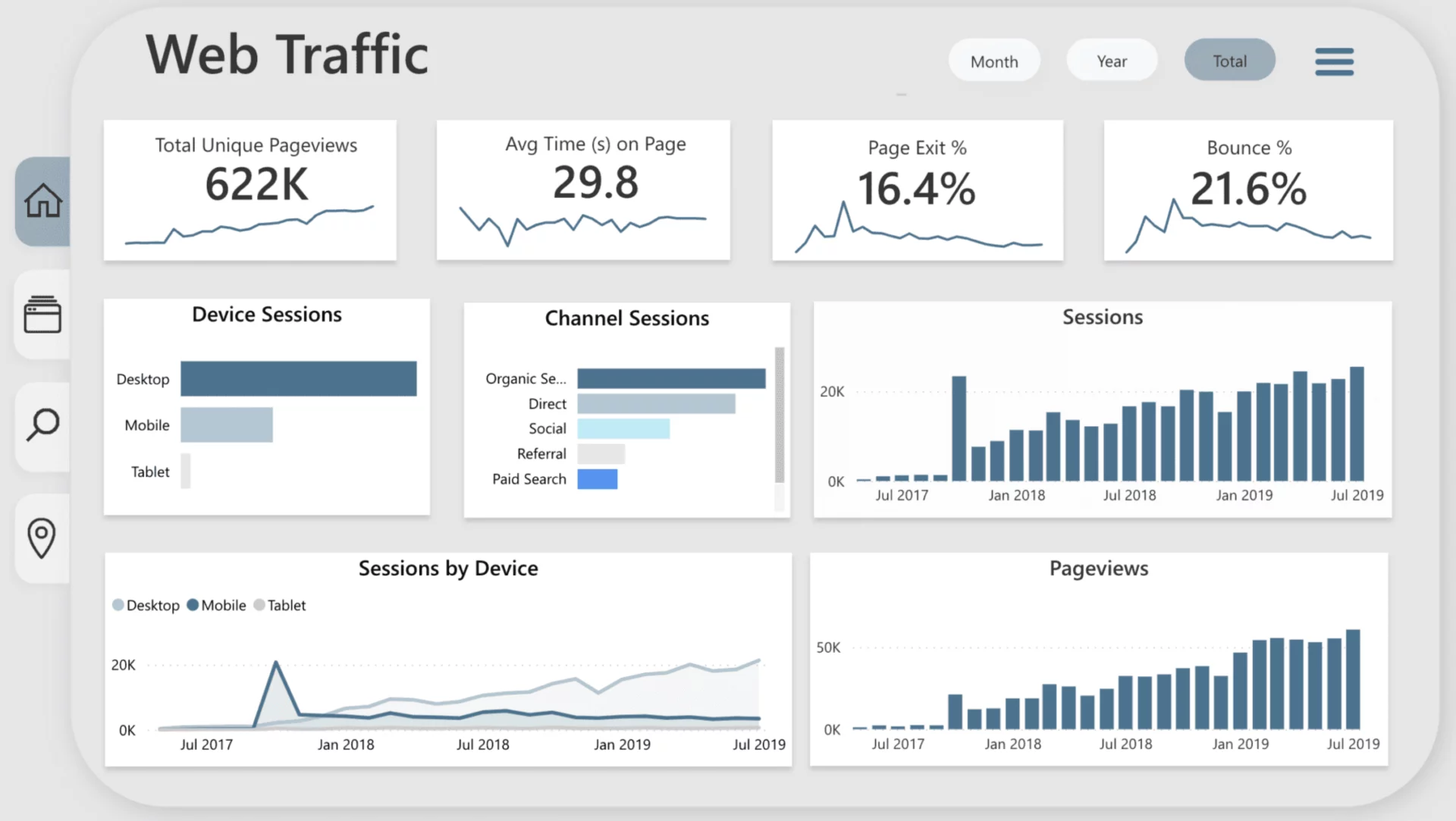
One dashboard Analysis The website was built with PowerBI
Power BI offers a visual user interface, particularly friendly to individuals who have experienced using Excel, thereby facilitated transition to building complex data models and professional reports. This platform is also appreciated for the ability of modeling strong data through Power Query to allow data conversion and DAX Data Data Data Analysis Expressions to build custom indexes and calculations. With flexible reporting features and extensive sharing capabilities, Power BI is considered suitable for both individual users wanting to analyze separate data and large-scale businesses requiring a comprehensive and capable BI solution.
2. Tableau
Tableau is one of the foundations Data visualisation The market's leading, widely known for its ability to create interactive charts and boards, quickly and easily possess aesthetics. This platform focuses heavily on the art of visualisation of data, allowing users to present not only simple statistics but also a fascinating and easy-to-know data story through motion charts and creative design. Tableau is appreciated for the ability to connect with a wide range of data sources, including from traditional databases to cloud platforms and Saas apps.
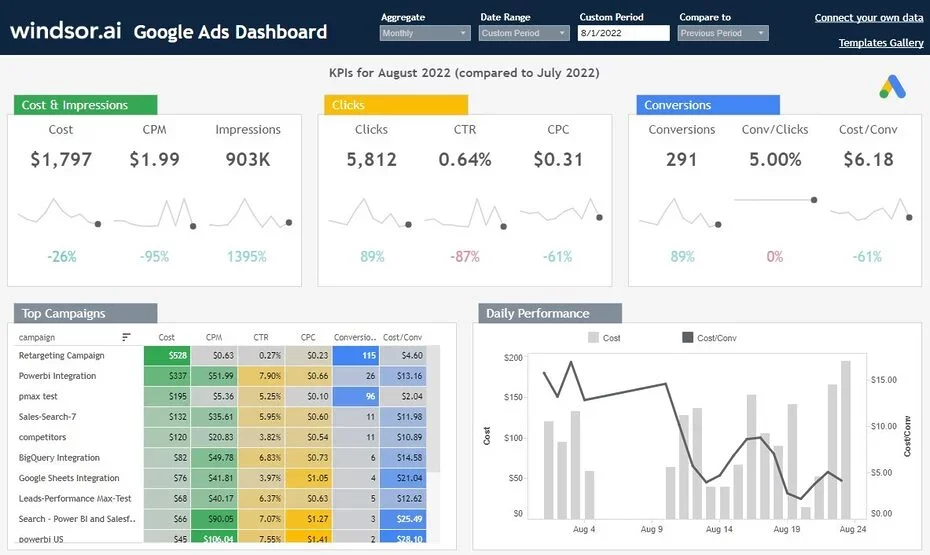
Dashboard Google Ads Built on Tableau using the Bristol data connoctor
The speed of superior data processing and deep analysis through the visual drag interfaces is Tableau's outstanding strengths, which make it easy for users to explore trends, patterns and insulations hidden in data without requiring complex programming knowledge. With a growing user community with rich training documents, Tallau became the choice of professional data analysts, professional BI and any individual or organization who wanted to explore, intuitiveise and share in effective, creative, and highly influential printings. Tableau also provides strong business versions, ensuring security and the ability to extend to large-scale organizations.
Three. Looker Studio previously Google Data Studio
Looker Studio is a free Business Intelligence tool from Google, providing a solution to democratic data access, allowing users to convert their data into interactive reports and consoles, easily understood and shared. This platform displays special strength in connection and visualisation of data from Google ecosystem sources, including Google Analytics, Google Ads, Google Sheets, Google Search Carts, and BigQuery. In addition, Looker Studio also supports connections to multiple external sources through a library of non-stop connactors that are expanded, from SQL databases to social and CRM platforms.

The dashboard project watches effectively. Sale marketing of an electronic commercial firm
Looker Studio's highlights are its easy to use. The interface pulls the visual support of the user quickly building the report without requiring deep technical knowledge. The ability to share flexible reports through the link or dip in the site is also a significant advantage, which facilitates collaboration and popularity within the business cabinet. With the full advantage of free, Looker Studio becomes an ideal choice for both moderate and small businesses, marketing professionals, and new individuals or organizations begin to travel with BI, seeking a quick, efficient, and costly solution to creating immediate reports.
Additional View:
Dashboard Dictol=Sale Performance Diccorium and Sale Report Dashboard
Four. Quick Comparison Power BI, Tableau and Looker Studio
To provide a more general view, below is the fast comparison between these three BI platforms, focusing on core criteria that have significant significance in the selection process:
| Fleet | PowerBI | Tableau | Looker Studio |
| Developer | Microsoft | Salesforce | |
| Costs | The free version Desktop, paid for Pro/Premium. Costs can be increased to the user scale and advanced features. | Pay free trial fees, multiple versions such as Desktop, Server, Online. Cost can be relatively high for large-scale businesses. | Freely for basic features. Some of the third-parties may require payment. |
| Compatibility | Exclusive with Microsoft Azure ecosystem, Excel, SQL Server, Dynamics 365. Supported multiple other sources of data but preferred Microsoft products. | Very diverse, supporting connections almost all types of data from simple files to complex databases, cloud platforms. | Exclusive with Google Ecosystem Google Analytics, Google Ads, Google Sheets, BigQuery, YouTube Analytics. Supported many other sources through connectors. |
| Complicated Level | Average to height. The friendly interface with the Excelsior user, however to harness the full DAX power, Power Query requires deep learning process. | Average to height. A significant study requirement for effective use of deep-industrial and complex graphic features. | Low to medium. Direct interface, easy to use for new starters. Matches for Quick Reports and Generals. |
| Intuition | Powerful, providing a variety of charts and customizations. It is possible to create interactive reports and dynamic consoles. | Outstanding, recognized as one of the leading platforms of graph design and the ability to tell stories using data. The dashboards are often high aesthetics. | Good, friendly interface, easy to manipulate drag to create charts. Fits for fast, readable reports. |
| Data Model | Powerful with Power Query for ETL Operations Election, Transform, Load and DAX to create complex calculations, data management. | Well, lets create basic relationships and calculations on data. | Basically, appropriate for simple and direct calculations from data sources. |
| Matches | The big business and has just used Microsoft ecosystems; Excel users desire to upgrade tool analysis; the BI projects serve themselves. | The deep data analyst; the business requires complex analysis and creative visualization; priority organizations explore data. | Small-time businesses; marketing experts desire to monitor campaign performance; new people start with BI; work environments primarily use Google Workspace. |
Each of these tools possessed distinct strengths and was designed to serve the needs Data Vision A variety of businesses. The choice of the BI platform is best suited not only to the current source of data and the expected budget, but also to give careful consideration to the skill level of the team and specific analysis objectives that the organization is heading for. A comprehensive data strategy will be the determining factor that helps the mining business maximize value from the chosen BI tool.

